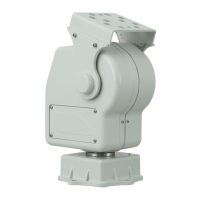
YP3040Pan-TiltMotor
HowtoInstalltheProduct
InstalltheHardware
ThisinstallationguideprovidesinstructionsforinstallingtheYP3040Pan-TiltMotor.
1.Installthewallbracket
2.Installthepan-tiltmotor
3.Installthecamerainthehousing
4.InstallthehousingonthePan-Tiltmotor
5.Connectthecables
InstalltheWallBracket
1.Preparethewallforinstallationofthewallbracket(recommendedaccessory),usethe
supplieddrilltemplatetopositiontheholes.Makesuretousedrillbits,screws,and
plugsthatareappropriateforthematerial.
Important
Toavoidcollision,makesurethereisenoughclearancearoundthepan-tiltmotorand
camera/camerahousing(minimumclearancetotheceilingis60cmor24in.fromthetop
edgeofthewallbracket).
2.Pullthecablesthroughthewallbracket,seeConnecttheCablesonpage7.
3.Attachthewallbrackettothewallwiththeroundplatformfacingupwards.
Important
Makesuretoleaveenoughslacktoallowforthecablestotwistandbendalongwith
theunit.
InstallthePan-TiltMotor
1.Placethepan-tiltmotoronthewallbracket,seeillustrationonpage3foralignment
anddirectionoftilt.
2.Securethepan-tiltmotorbytighteningthesuppliedbolts.
InstalltheCameraintheHousing
InstallthecamerainthehousingaccordingtotheinstructionsintheInstallationGuideprovided
withthehousing.MakesuretoallowforthePTZcontrolcabletopassthroughthehousingto
thecamera,seeConnecttheCablesonpage7.Formoreinformation,seetheInstallationGuides
providedwiththehousingandthecamera.
6


 To Next Page