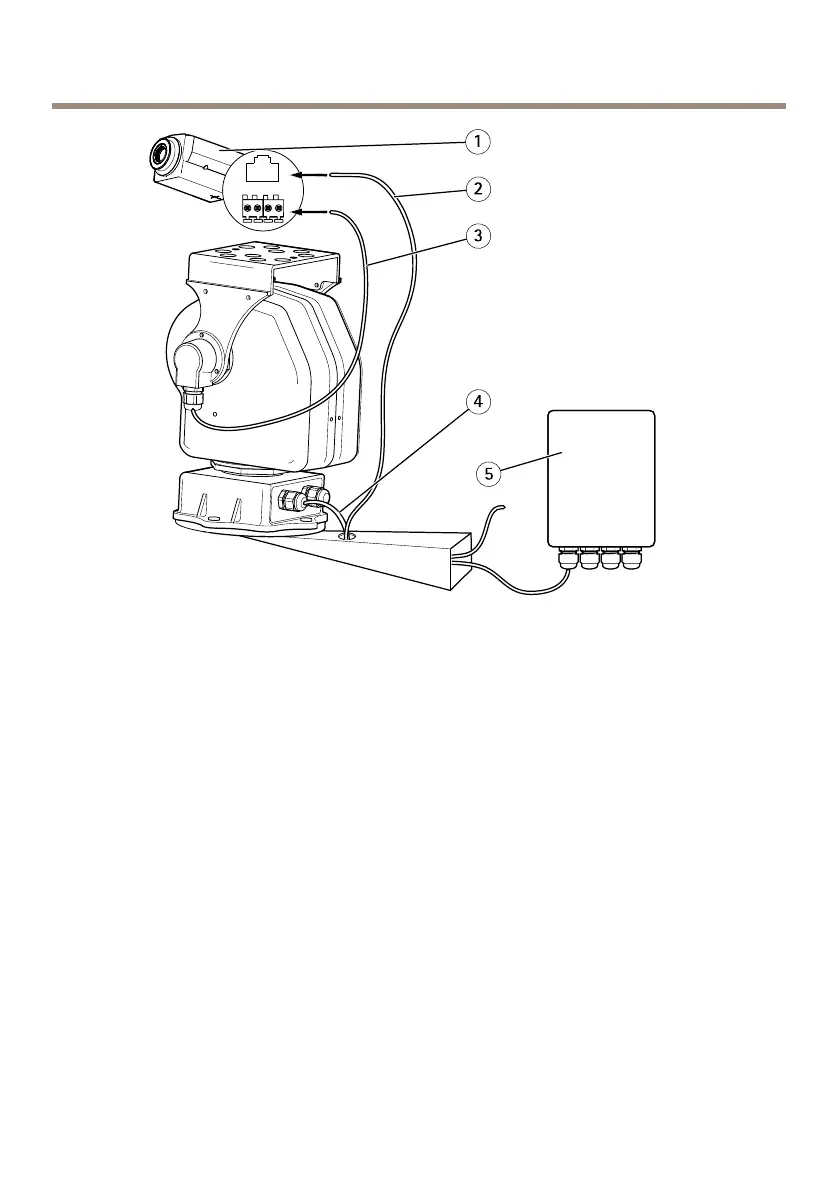
YP3040Pan-TiltMotor
1
Networkcamera
2
Networkcable(EthernetRJ-45tocamera)
3
PTZcontrolcable(RS485tocamera)
4
Powersupplycable(24VACfrommainsadaptor)
5
Mainsadaptor
AccesstheProduct
WhenyouinstallacompatibleAxisnetworkcameraontheYP3040Pan-TiltMotor,thecontrolswill
beavailablefromtheLiveViewpageinthecamera’swebpagesafterenablingthePTZfunctionality
inSetuptools.FollowtheseinstructionstoenablePTZfunctionalityinthecamera:
1.GotoSetup>SystemOptions>Ports&Devices>COMPortinthecamera’sweb
pages,andsetUsagetoPanTilt.
2.RefertotheUserManualsuppliedwithyourproductforinstructionsonhowtocongure
thePTZsettings.
8


 To Next Page