17
WHITE
AXMINSTER
W
Operating Instructions...
THICKNESSING
Adjustment:
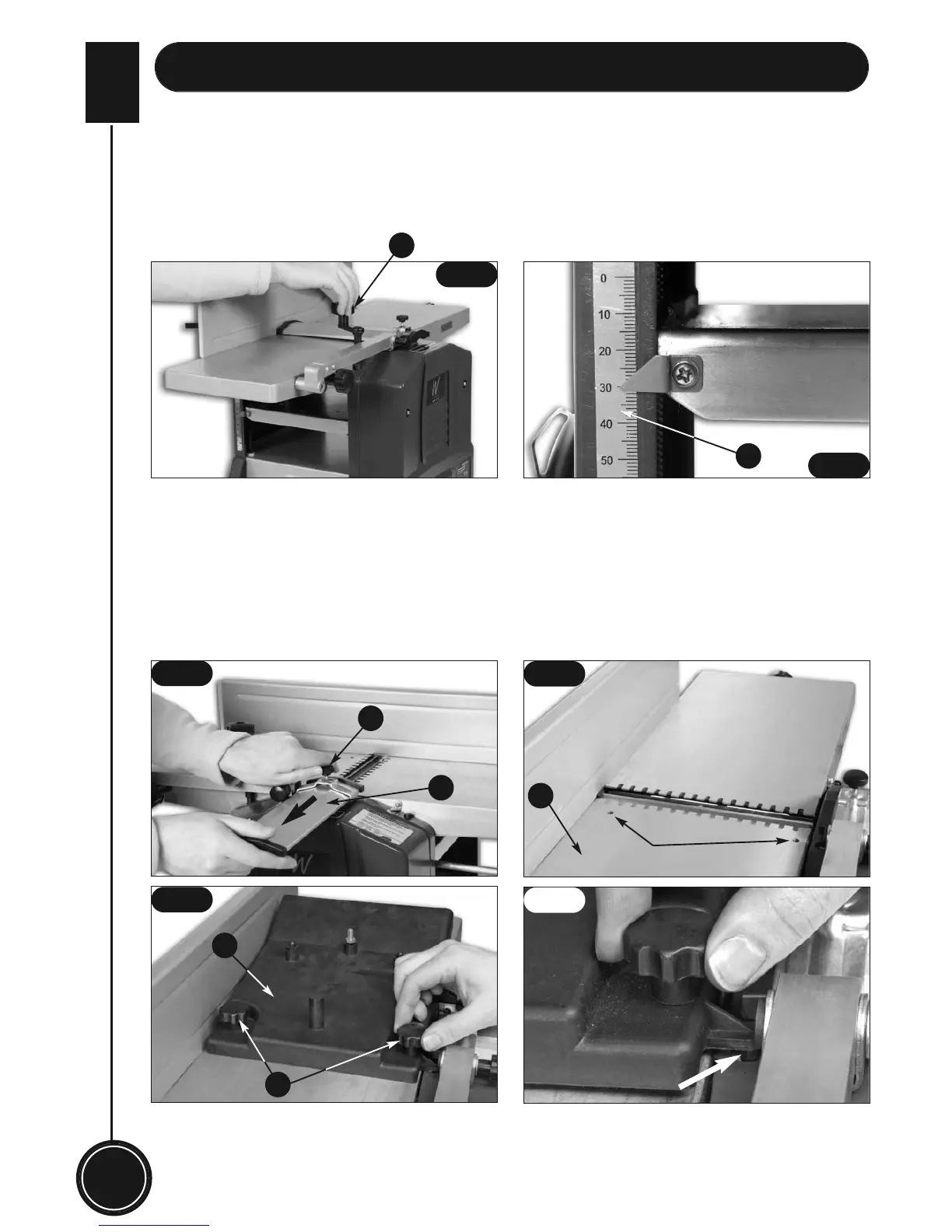
• Place the rise & full handle (6) onto the pillar near the left side of the fixed outfeed table, and
then rotate it to set the thickenssing table to a desired height with reference to the thicknessing
scale(19). (See fig 17 & 18)
Fit the dust extraction system:
1) Loosen the cutterblock guard clamping knob (1) pull out the cutterblock (9) to the side as far
as it will go. (See fig 19)
2) Place the dust extraction port moulding (15) on the fixed outfeed table (5). Ensure that its stop
pin and clamping knobs (16) are located respectively into the pre-drilled holes in the fixed
outfeed table (5), and its stop pin is located on the safety Interlock switch (4). (See figs 20,21,22)
3) Rotate the clamping knobs (16) until the dust extraction port (15) is firmly secured.
4) Fit the double-ended adaptor to the dust extraction port(15).
5) Fit the dust suction hose of a dust extractor unit to the double-ended adaptor.
6
19
1
9
5
15
16
Pre-drilled holes
Stop pin located on
the safety interlock
switch
Fig 17
Fig 18
Fig 19
Fig 20
Fig 21
Fig 22


 To Next Page