WHITE
AXMINSTER
W
14
Operating Instructions...
FREEPHONE 0800 371822
IMPORTANT: The planer-thicknesser MB9020 is intended specially for planing
operations on solid timber, using high-alloyed (HL) knives. When being thicknessed, the contact
surface of the work piece must be flat. In case bigger or heavier workpieces should be worked it
is necessary to clamp the machine firmly to its supporting bench or table (e.g. with screw
clamps). The machine is not suitable for operation outdoors. Any other use beyond this scope is
considered as failing to comply with the intended purpose. Axminster Power Tools is not liable
for any damage or injuries caused as a result of this; the risk is borne solely by the user.
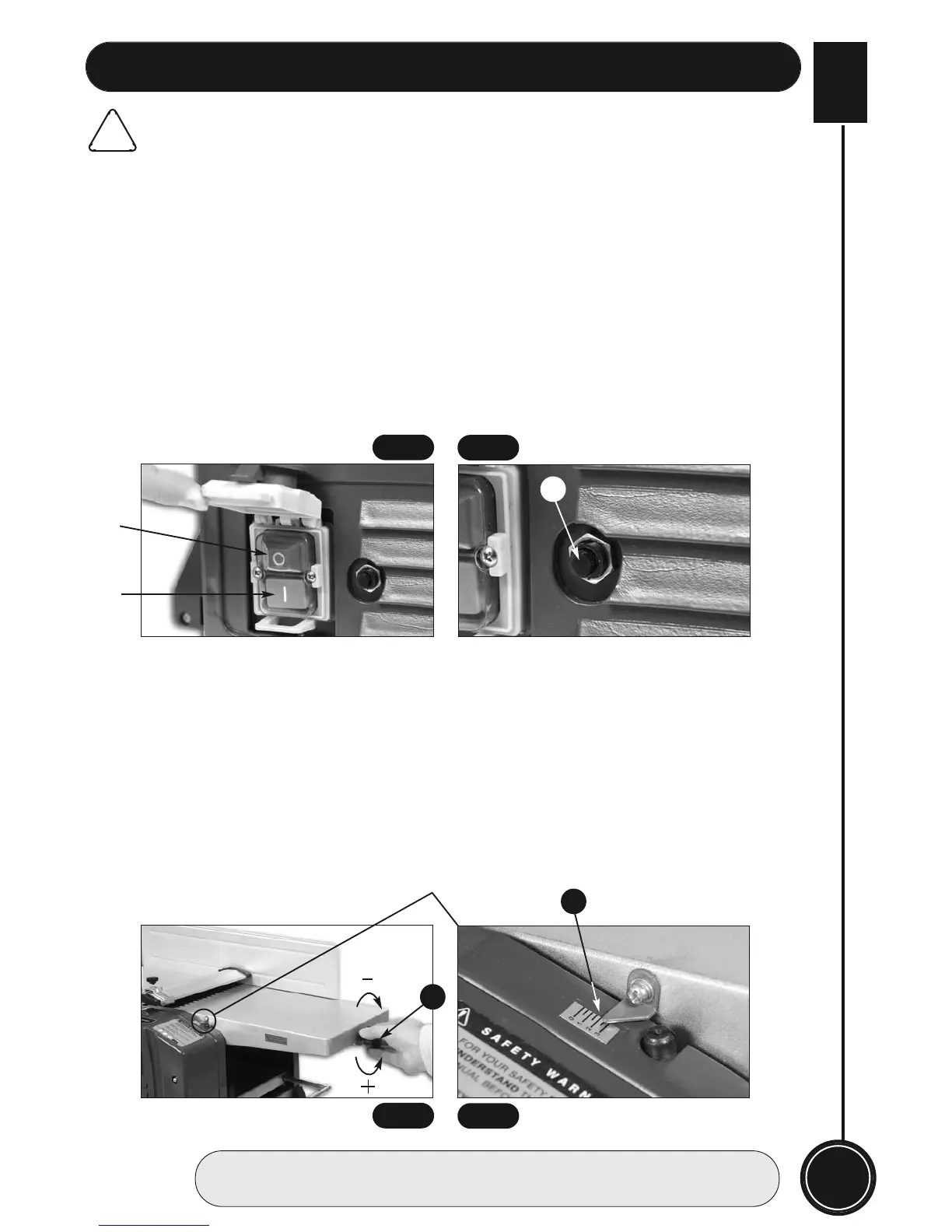
The NVR switch (7) of machine is located on the left side below the yellow folder cover. To
switch on the machine: Press green button “I”. To switch off the machine: Press red button “O”.
The switch can be locked to prevent the machine from being inadvertently switched on by
folding down the yellow cover. (See fig 5)
This machine is equipped with overload switch (6a) for motor running protection. Once the
overload occurs, the machine will stop automatically. After a while, the overload switch can be
reset. (See fig 6)
Adjustment:
Rotate the infeed adjusting knob (11) to adjust the table height to obtain the desired cutting
depth shown on the cutting depth scale(14). (See figs 7 & 8) Turn the lift and shift handle (13) to
set the guide fence (8) at a desired angle shown on the angle scale (8a & 8b).
!
CAUTION: When the planer thicknesser is not in use make sure cutterblock guard (9) is
covering the cutterblock to advoid injury, as the KNIVES ARE VERY SHARP!
PLANNING
6a
“I”
“O”
Fig 5
Fig 6
Fig 7
Fig 8
14
11


 To Next Page