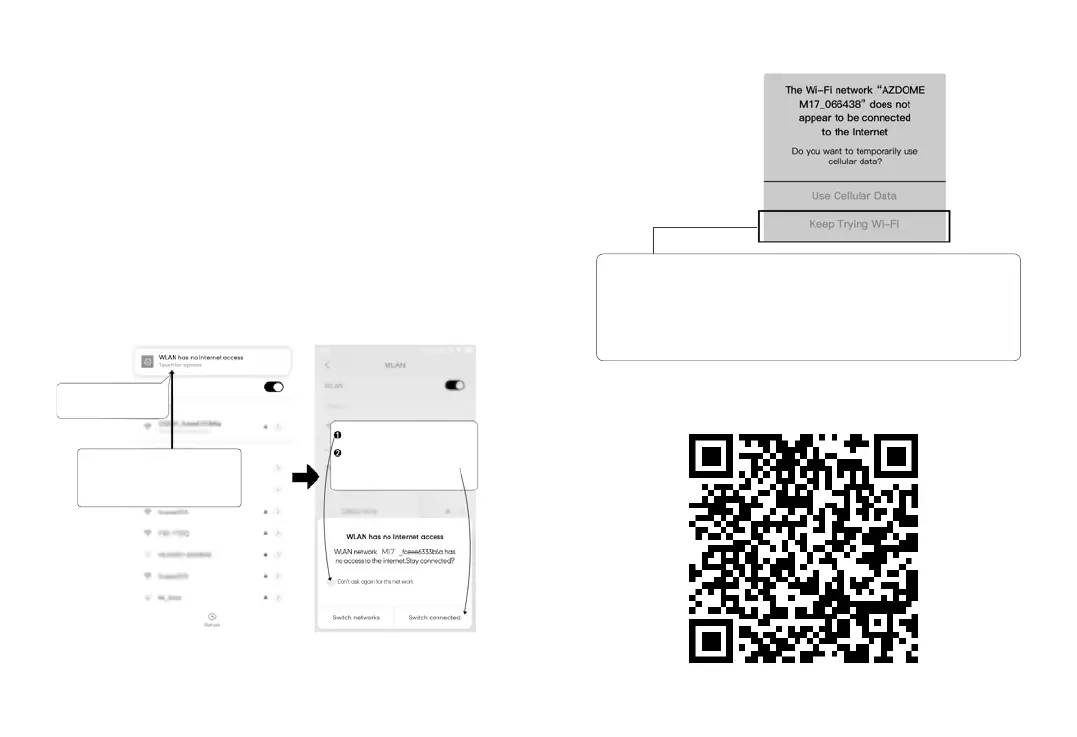
ScantheQRcodetogetthewholeprocessaboutWiFi
Touchhereassoonasyou
seethisnotification
Onceyouenterthedefault
passwordforAZDOMEWiFiandhit
connect,youwillseethispop-upin
fewseconds.
Touch here to check this box.
Then touch “YES” to stay
connected to this WiFi and
save this preference
ForAndroidphones:
WheninstallingtheAZDOMEAPP,itwillhavetwopop-up
prompts,select‘ WhileusingtheAPP’toallowAZDOMEto
accessthisdevice'slocation,andselect‘ Allow’toallow
AZDOMEtoaccessphotosandmediaonyourdevice.
Thereisoneextrastepyouwillhavetotakeforthefirsttime.
OnceyouconnecttotheWiFiofM17,itwillsay‘ NoInternet’.
Whichisfine.Waitabout10-15secondsuntilyouseethebelow
popupornotification.Youjusthavetotaponthepopup
notificationthatwillshowupinfewsecondstoselectthatyou
stillwanttostayconnectedeventhoughthereisNOInternet.
OnceyouselectthisOK,youaresettogo.
ForiPhone:
IfyougetthispopupforyouriPhonewhileusingWiFifeature,
makesuretotapon‘ KeepTryingWiFi’.Otherwisethecamera
willgetdisconnectedfromtheWiFiandthenyouwillhaveto
forgettheAZDOMEWiFiandthenstarttopairagaintomakeit
workagain.
19 20



 To Next Page