Support
Charging
5V1.5A
Built-inLi-ionBattery200mAh
-20°Cto70°C(-4°Fto158°F)
10~90%
RecordAudio
Mini-USBport
PowerInterface
Battery
OperatingTemperature
WorkingHumidity
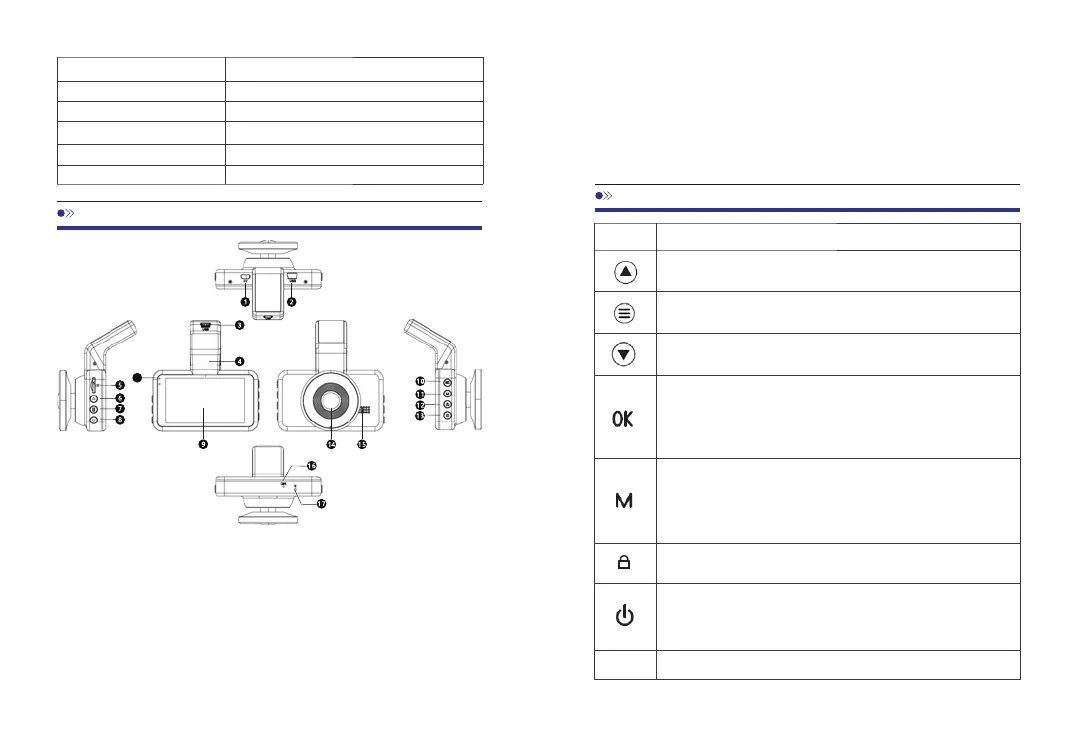
4.ProductDiagram
18
①MicroAVIN(For5PINVGARearCamera,NotRecommended)
②USBChargingPort1 ③USBChargingPort2
④Bracket ⑤TFCardSlot
⑥UpButton ⑦MenuButton
⑧DownButton ⑨Screen ⑩OK/RecordButton
⑪ModeButton ⑫LockButton ⑬PowerButton
⑭Lens ⑮Speaker ⑯Microphone
⑰ResetButton ⑱RedLight:ChargingStatusIndicator
GreenLight:WorkingStatusIndicator
OperationandFunction
1.Selectfunctionoptionsinsetupmode
2.Selectpreviousvideoinplaybackmode
Pressoncetoentermenusetting
(Disabledinrecordingmode)
1.Selectfunctionoptionsinsetupmode
2.Selectnextvideoinplaybackmode
1.Inrecordingmode,pressoncetostartrecording,
pressonemoretimetostoprecording.
2.Longpressoncetoshootphotoswhenrecording.
3.Pressoncetoconfirmyoursettinginsettingsmode.
1.PressoncetoshiftbetweenVideo/Photo/Lock
Videoplaybackmode.
2.Pressoncetoreturntopreviouspageinplayback
mode.
Inrecordingmode,pressoncetolockthevideoas
anemergencyone.
1.Pressoncetoturnonthedevice
2.Pressoncetolockthescreen
3.Pressandholdtoturnoffthedevice
Rebootthedeviceandrestoredefaultsettings
5.ButtonControls
Button
Reset
05 06



 To Next Page