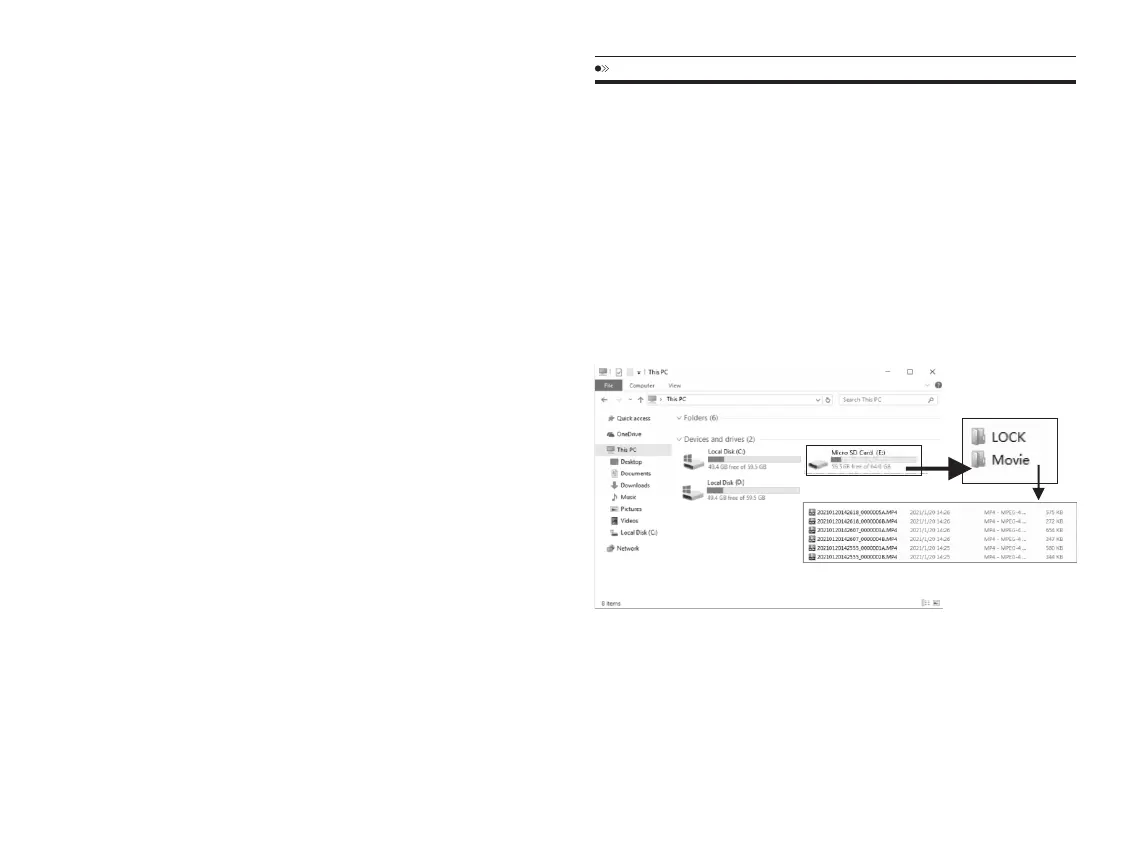
READINGDASHCAMFILES
1.PleaseremovetheMicroSDcardfromcameraandinsertitdirectlyinyour
laptopifyouhaveaMicroSDCardslot(otherwisepleaseusingaMicroSD
Cardreader).
2.YoushouldbeabletoseedriveDorEorothernamedependingonthe
pre-installedharddrives.Onceyoufindtheaddedflashdrive,doubleclickin
it,thenyouwillseetheNovatek-Movie/LOCK/Photo
Movie:Thelooprecordingvideofilesthatcanbeoverwritten.
LOCK:ThevideofilewillbelockedsoitwillNOTbedeletedbylooprecording
EN-28 EN-29
firmwareversionisthelatestversion.
5.MUSTformattheMicroSDCardindashcam,otherwisethedashcam
willupdateagainwhennextpoweron.
Anyproblemspleasecontactusservice@azdome.hk
thelatestfirmware.
1.PleasedownloadtheM63firmwarefilein
www.azdomes.com/pages/support
2.PleasecopythefirmwarefilenamedFW96670A.bintotheMicro-SD
cardandinsertMicroSDCardintodashcam.
-DONOTcreateanynewfolderontheMicro-SDcardtosavethefirmware
file.SimplycopyandpastethefiledirectlytotheMicro-SDcard.
-DONOTchangethefirwarefilename.Otherwise,thecamerawillNOT
recognizethefirmwareupdate.
3.Connecttopowersupplyandpresspowerbuttontopoweronthe
dashcam,thenthedashcamscreenwillstayblackandthefirstBluelight
willblinkrapidlyforabout30-40seconds.Thedashcamwillpoweron
againwhenthefirmwareupdatingcompletesuccessfully.
4.GotodashcamSystemSettingandselect“ Version”tocheckifthe
function.
3.Thensimplydoubleclickonthevideotoplaythem.
Filenamed*********A=videosorphotocapturedbyfrontcamera
Filenamed*********B=videosorphotocapturedbyrearcamera



 To Next Page