FAQ
Push
Q:Ifthestickermountisborken,whatshouldIdo
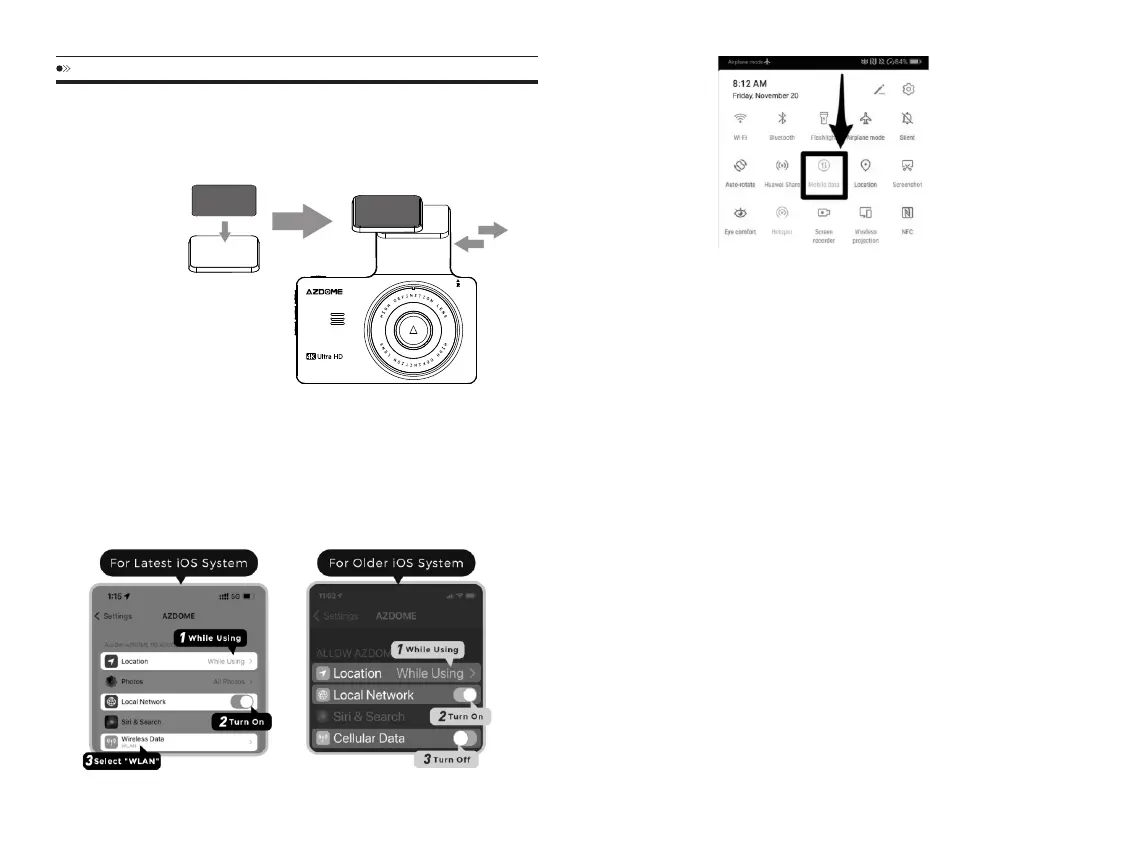
Wepreparealtrenatives:onemountcoverandonestickypadinthepackage,
pleaserefertodirectionsbelow
NOTE:ItisnormalthatWiFiwillsay"NoInternetConnection"because
dashcamWiFiisONLYforvideo/phototransferfunction,NOTmadeto
broadcastfootageoverthecloudorinternet,pleaseignorethepromot.
Q:CameradoesnotturnON
1.UsethedifferentUSBCable&yoursmartphone’sUSBcharger.Nowplugit
intoyourhome’s110Vwalloutlet.
2.Whenyouplugitin,thecamerashouldturnON.IfNOT,thenpressthe
PowerButtonOncetoseeifitturnsON?IfitstilldoesNOTturnON,then
removethememorycard.
3.Keepthecamerapluggedin.NowPresstheRESETbutton(Locatedatthe
top)ONCEwithapen’stiporapaperclip.NowthecamerashouldturnON.
Ifitstilldoesn’tturnON,thenpleaseCONTACTUS.
Q:CamerashowingMemoryErrororPleaseInsertMicroSDCardeven
thoughMicroSDcardisalreadyinstalledintothecamera.
PleasemakesureMicroSDcardisatleastClass10,U3andpurchasedfrom
trustedvendorsuchasWalmart,target,bestbuy,Ship&SoldbyAmazonetc.
GotocamerassystemsettingsandFORMATyourMicroSDcard.(makesure
tobackupyourvideosfirstbeforeformattingtheMicroSDcard.)After
formattingMiroSDcard,pleasepressandholdpowerbuttontoturnthe
cameraoff.Nowunplugpowercable,andre-plugthepowercable,camera
detachablecover
StickyPad
Q:Ican’tgetlivevideoonAZDOMEAPP,whatshouldIdo?
Ifcan’tgetlive-videoonAPP,pleaseturnoffcellulardataofAZDOMEAPP,
takeiPhoneandGooglephone(Android12)forexample.
TechnicalService:service@azdome.hk
EN-30 EN-31



 To Next Page