152
EMBROIDERY — — — — — — — — — — — — — — — — — — — — — — — — — — — — — — — — — — — — — — — — — — — — —
Retrieving embroidery
patterns from the computer
a
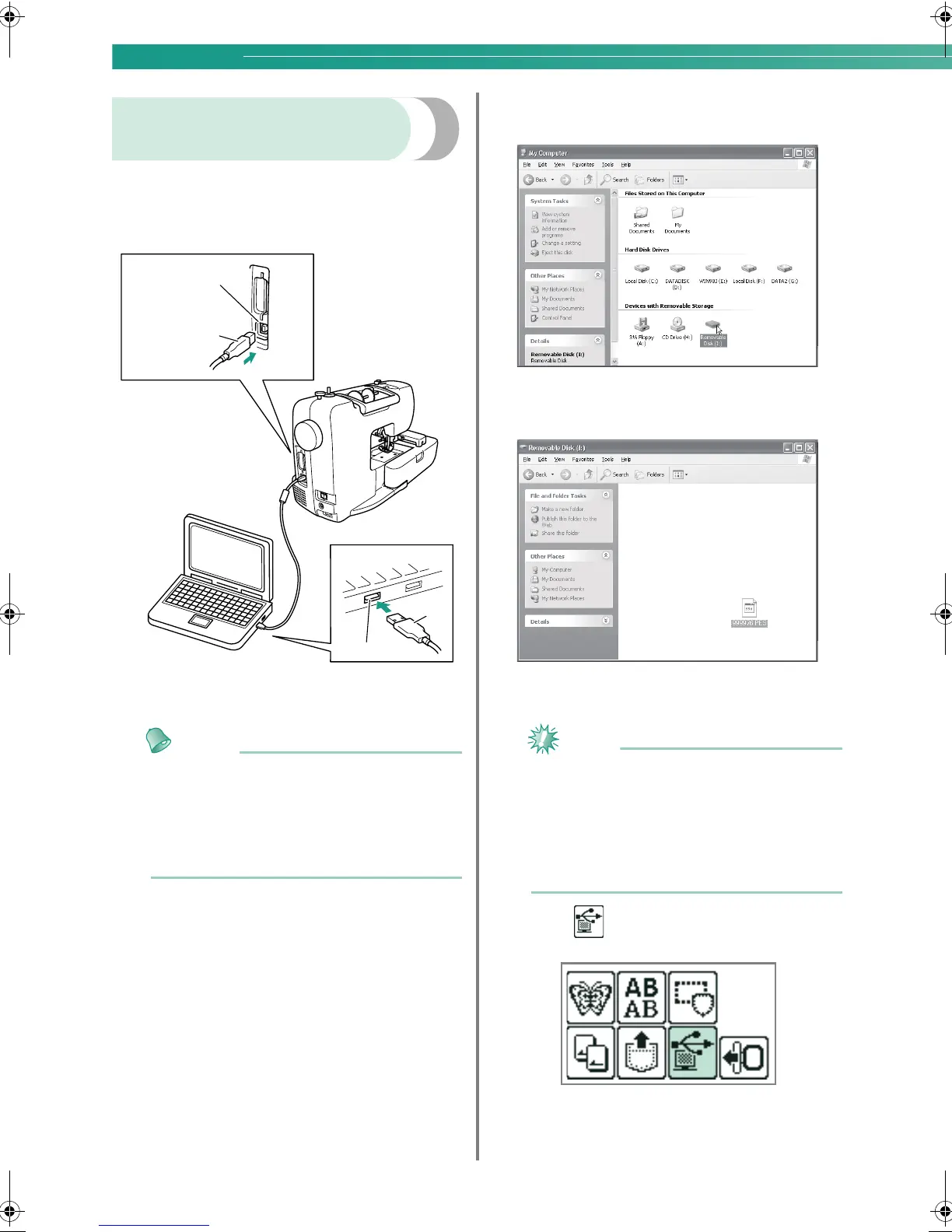
Plug the USB cable connectors into the
corresponding USB port connectors on the
computer and on the machine.
a USB port connector for computer
b USB cable connector
Memo
z The USB cable can be plugged into the USB
port connectors on the computer and
machine whether or not they are turned on.
z Embroidery patterns can be retrieved with or
without the embroidery unit attached to the
machine.
b
The "Removable Disk" icon appears in "My
Computer" on the computer.
c
Copy the pattern data to “Removable Disk”.
X Pattern data in “Removable Disk” is written
to the machine.
Note
z While data is being written, do not
disconnect the USB cable.
z
Do not create folders within “Removable
Disk”. Since folders are not displayed, pattern
data within folders cannot be retrieved.
z
While the machine is sewing, do not write
data to or delete data from “Removable Disk”.
d
Press .
X The saved patterns are displayed.
a
b
a
b
0711-0120-C-combo_E.book Page 152 Tuesday, August 26, 2008 2:43 PM





 To Next Page