ECA 450 Maintenance
Instruction 0024-9400
63
4.3 Printer Paper Replacement
Parts Required:
• Replacement Paper Roll (refer to Section 6.1)
Procedure:
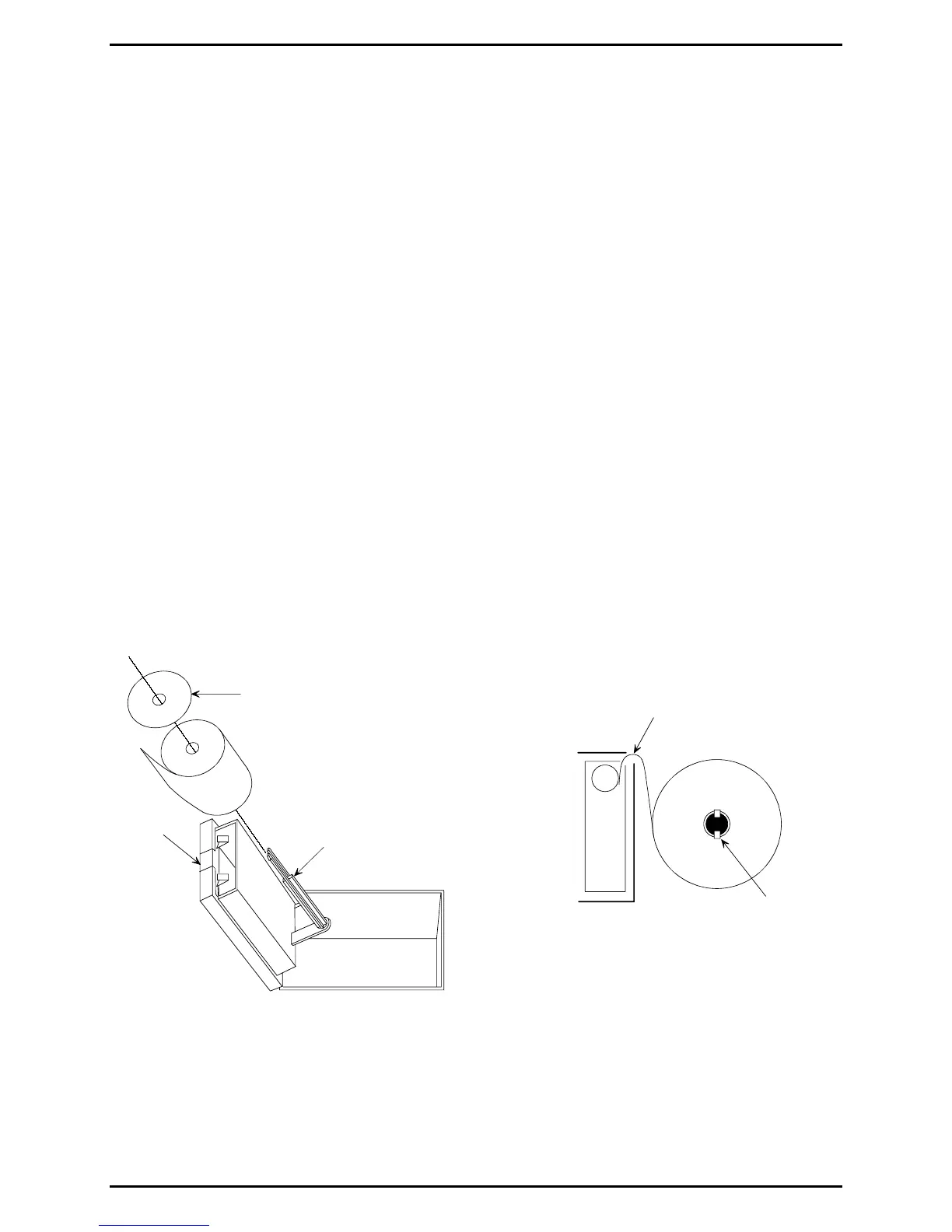
1. Open printer by pressing the printer’s front-panel latch. See Figure 4-2.
2. The paper-roll carrier is mounted on the rear of the printer’s front panel
and will swing out when the printer is opened.
3. Pinch in the two paper-roll clips at end of paper carrier; then remove
paper-retainer disk and empty roller from carrier.
4. Install a new paper roll and the paper-retainer disk onto the paper
carrier.
5. With analyzer turned on, position paper at entry point of printer’s feed
mechanism. The paper will be sensed by the mechanism and be
automatically fed through the printer and into the proper position for
printing.
Tip: To correct for minor paper misalignment, press the printer’s front panel
paper-feed button until the paper self aligns.
Figure 4-2. Installing Printer Paper
FRONT PANEL
LATCH
PAPER CARRIER
PAPER FEED
MECHANISM
PAPER ROLL
CLIPS
PAPER RETAINER



 To Next Page