6.0 Front Wheels
6.1 Unlocking, Locking and Removing the Front Wheels
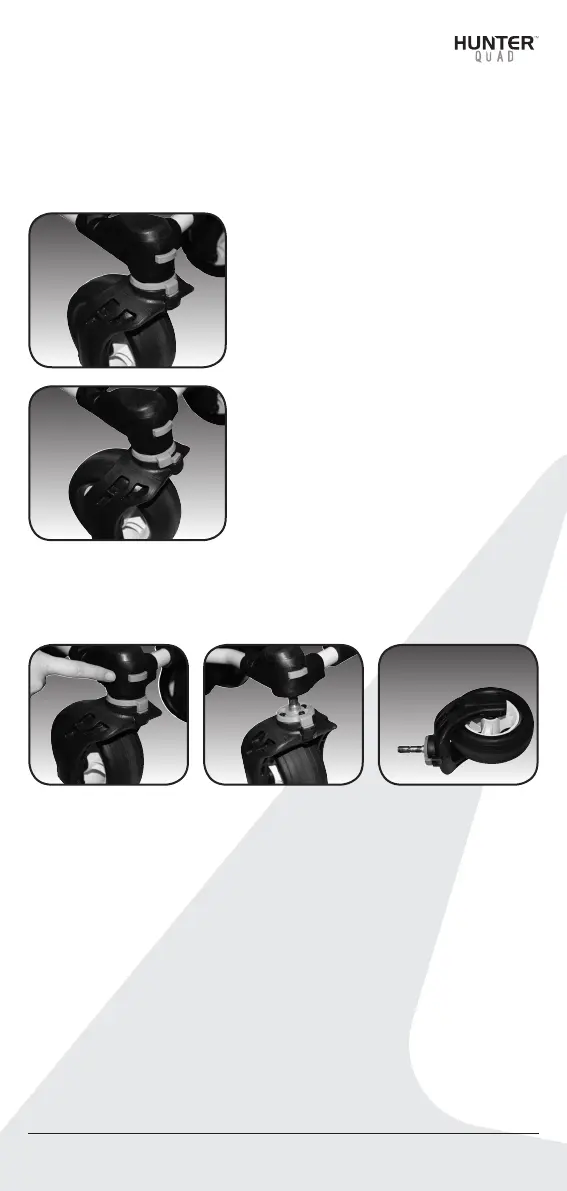
The front swivel wheel can be set in two positions.
Hunter™ Quad User Manual 13
1) Unlocked position to allow
for 360 degree swivel for
optimum turning ability.
In the picture shown the
two red components are
aligned. This is the position
for unlocked.
2) Locked position is best
when using the Controlled
Distance Function. In
the picture the two red
components are now
manually moved apart.
The front wheels can be removed by pressing the red button
shown in the picture and pulling the wheel down until it is
completely removed from the cart.
6.2 Adjusting and Aligning the Front Wheels
Each cart is checked for straight tracking prior to leaving the
factory. In the unlikely event the Quad cart is not tracking straight,
the front wheels can be adjusted to regain straight tracking as
follows:
1. Lock the two swiveling front wheels and start the cart to see
if the cart veers left or right. Please note that you can swap
the left and right front wheel and check again whether the
cart is tracking straight.


 To Next Page