3.0 Assembling Your Cart
3.1 Attaching the Front Wheels
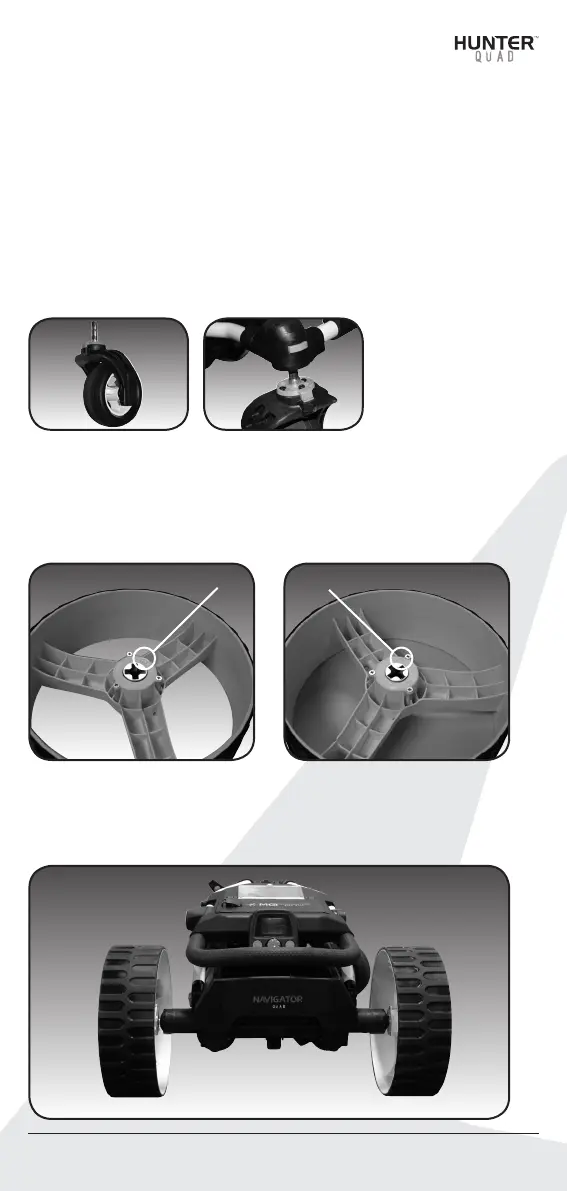
The two front wheels need to be attached to your Quad cart.
There is no difference between each front wheel so either can be
placed on the left or right side. Simply line up the silver pin on the
front wheel with the cart and push into the frame until you hear a
positive click. You can test the wheel is in position by pulling firmly
on the wheel. It should not move out of position.
3.2 Attaching the Rear Wheels
Step 1. The two rear wheels are labeled LEFT & RIGHT with an ‘L’
or an ‘R’ on the interior hub. Standing behind the cart, slide the
release button on the left wheel and align the notches on the
wheel hub with the left axle.
Step 2. When placed in position simply release the button. You will
hear a “click” when the wheel is properly secured. To check that
the wheel is properly in position pull on the wheel. If it is properly in
position it will not slide off. Repeat for the right wheel.
Hunter™ Quad User Manual 05
L R


 To Next Page