42339 rev A1 03/06/20
10
Manufactured under one or more of these patents. U.S. Patents: 5332944, 5361215, 5550753, 5559720, 5,883,459, 6253227, 6282370, 6590188, 6976052,
6965815, 7030343, 7,417,834 b2, Canadian Patent: 2342614, Australian patent: 2373248 other patents both foreign and domestic applied for and pending. All
material copyright of Balboa Water Group.
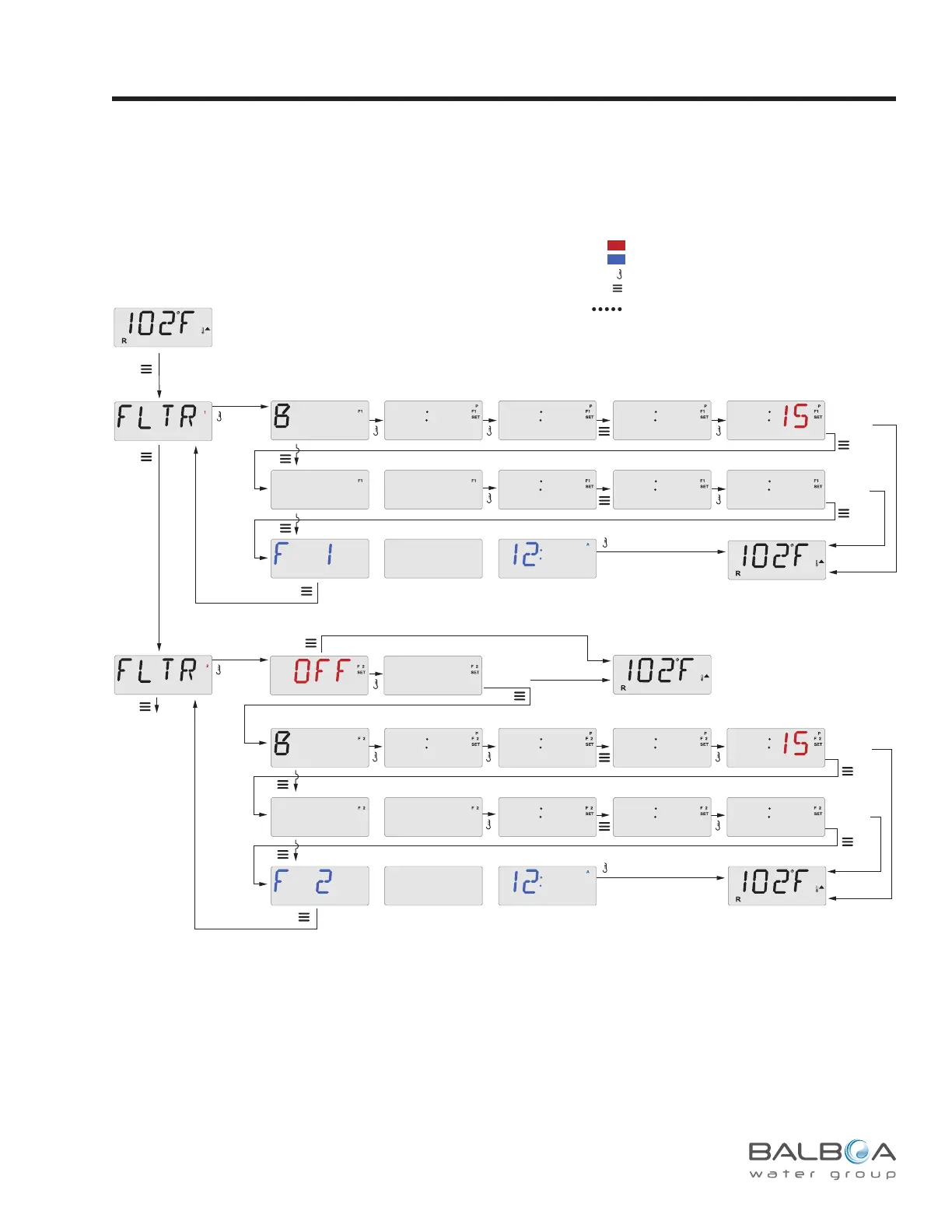
Adjusting Filtration
Sets Filter 1 length in hours
Sets start hour Shows/flashes minutes
Shows/flashes minutes
Sets 15-minute incrementsShows/flashes start time
Sub-Menu Detail – Set Filter Cycle 1
to show RUN HRS
to show F1 ENDS xx:xx
Sets 15-minute increments
Press Menu/Select
repeatedly until FLTR 1
appears in the LCD.
Main Screen
Main Screen
Sets Filter 1 length in hours
Sets start hour Shows/flashes minutes
Shows/flashes minutes
Sets 15-minute incrementsShows/flashes start time
to show RUN HRS
to show F2 ENDS xx:xx
Sets 15-minute increments
Main Screen
To next item in
Main Menu
Main Screen
To Set
To Set
To Set
To Set
To Set
Waiting
a few seconds
reverts to original setting
Waiting
a few seconds
reverts to original setting
Wait to
Revert
*****
Waiting
a few seconds
reverts to original setting
*****
Waiting a few seconds
will lose any new Filter 1
Start Time and Run Hours and
revert to the previous Filter 1 settings.
*****
To Set
Waiting a few seconds
will lose any new Filter 2 On/OFF,
Start Time and Run Hours and
revert to any previous Filter 2 settings.
*****
*****
Wait to
Revert
*****
*****
2X
2X
BEGN
OO 8
OO 9
OO 9
9
RUN
HR5
OO 3
OO 3
3O 3
END5
OO 9
OO 9
9
RUN
HR5
OO 3
00
OO 3
3O 3
END5
ON
BEGN
OO 8
45
45
Main Filtration
Filter cycles are set using a start time and a duration. Start time is indicated by an “A” or “P” in the bottom right corner of the display. Dura-
tion has no “A” or “P” indication. Each setting can be adjusted in 15-minute increments. The panel calculates the end time and displays it
automatically.
Indicates Flashing or Changing Segment
Key
A temperature button, used for “Action”
Menu/Select button
Indicates Alternating or Progressive Message - every 1/2 second
Waiting time that keeps the last change to a menu item.
Waiting time (depends on menu item) that reverts to original setting and
ignores any change to that menu item.
*****
Filter Cycle 2 - Optional Filtration
Filter Cycle 2 is OFF by default.
It is possible to overlap Filter Cycle 1 and Filter Cycle 2,
which will shorten overall ltration by the overlap amount.
Purge Cycles
In order to maintain sanitary conditions, secondary Pumps and/or a
Blower will purge water from their respective plumbing by running briey
at the beginning of each lter cycle.
If Filter Cycle 1 is set for 24 hours, enabling Filter Cycle 2 will initiate a
purge when Filter Cycle 2 is programmed to begin.



 To Next Page