42339 rev A1 03/06/20
5
Manufactured under one or more of these patents. U.S. Patents: 5332944, 5361215, 5550753, 5559720, 5,883,459, 6253227, 6282370, 6590188, 6976052,
6965815, 7030343, 7,417,834 b2, Canadian Patent: 2342614, Australian patent: 2373248 other patents both foreign and domestic applied for and pending. All
material copyright of Balboa Water Group.
Adjusting the Set Temperature
When using a panel with Up and Down buttons (Temperature buttons), pressing Up or Down will cause the temperature to ash. Pressing
a temperature button again will adjust the set temperature in the direction indicated on the button. When the LCD stops ashing, the spa
will heat to the new set temperature when required.
If the panel has a single temperature button, pressing the button will cause the temperature to ash. Pressing the button again will cause
the temperature to change in one direction (e.g. UP). After allowing the display to stop ashing, pressing the Temperature Button will cause
the temperature to ash and the next press will change the temperature in the opposite direction (e.g. DOWN).
Press-and-Hold
If a Temperature button is pressed and held when the temperature is ashing, the temperature will continue to change until the button is
released. If only one temperature button is available and the limit of the Temperature Range is reached when the button is being held, the
progression will reverse direction.
Dual Temperature Ranges
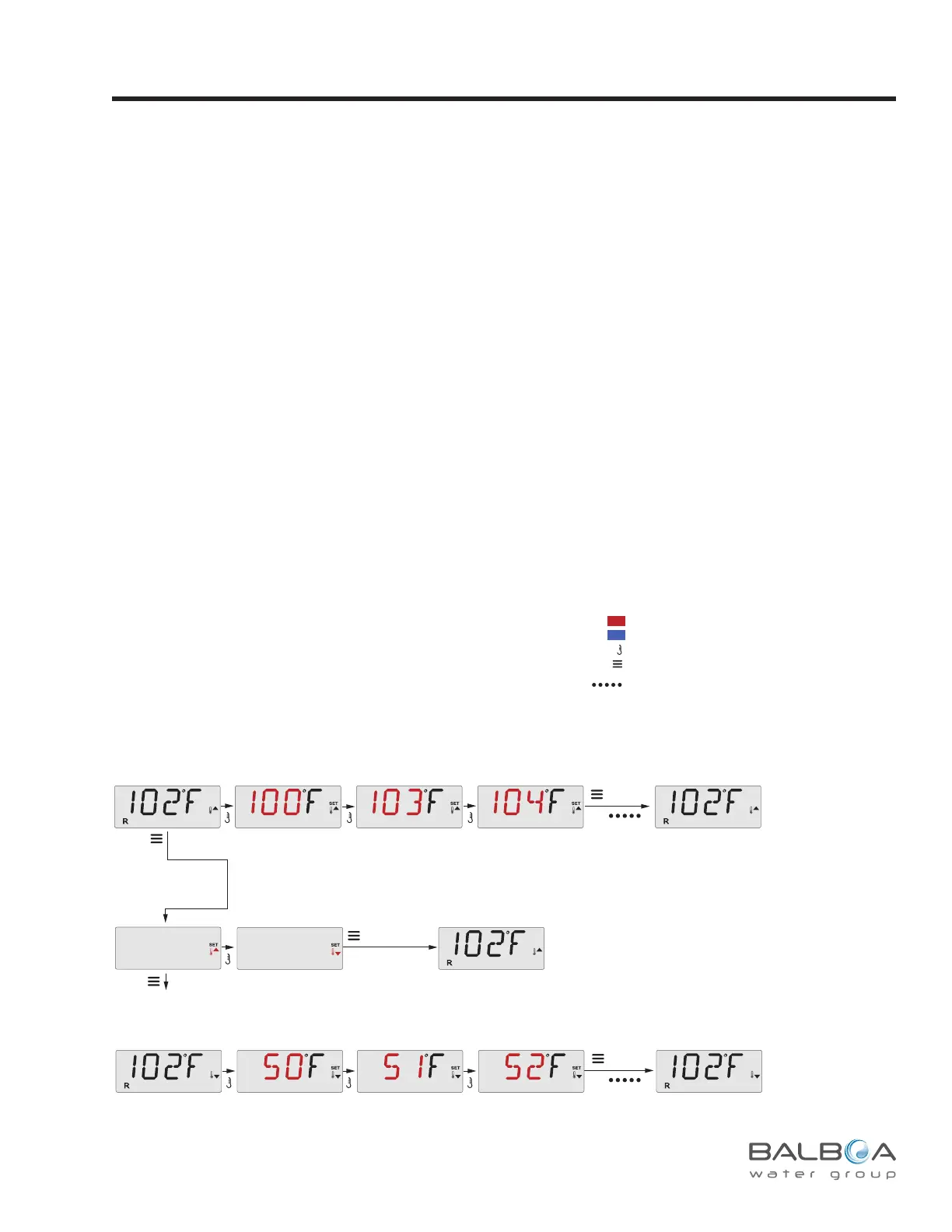
This system incorporates two temperature range settings with independent set temperatures. The High Range designated in the display by
a thermometer and an “up” arrow, and the Low Range designated in the display by a thermometer and “down” arrow.
These ranges can be used for various reasons, with a common use being a “ready to use” setting vs. a “vacation” setting. The Ranges
are chosen using the menu structure below. Each range maintains its own set temperature as programmed by the user. This way, when a
range is chosen, the spa will heat to the set temperature associated with that range.
For example:
High Range might be set between 80°F and 104°F.
Low Range might be set between 50°F and 99°F.
More specic Temp Ranges may be determined by the Manufacturer.
Freeze Protection is active in either range.
See Ready and Rest on Page 6
for additional heating control information.
Temperature and Temp Range
Sub-Menu Detail – Set Temperature and Water Temperature Ranges
High-Range vs.
Low-Range Temp Choice
Press a Temp Button repeatedly to change the temperature.
Pressing and holding a Temp Button will also change the temperature.
Pressing and holding a Temp Button will also change the temperature.
Toggle the Range arrows in the LCD.
Set Temp will Show & Flash
Set Temp will Show & Flash
*****
Waiting a few
seconds reverts to
original settings
To next item in Main Menu
Main Screen Main Screen
Main ScreenMain Screen
Main Screen
To Set
a few seconds
OR
Press a Temp Button repeatedly to change the temperature.
a few seconds
OR
TEMP
TEMP
Indicates Flashing or Changing Segment
Key
A temperature button, used for “Action”
Menu/Select button
Indicates Alternating or Progressive Message - every 1/2 second
Waiting time that keeps the last change to a menu item.
Waiting time (depends on menu item) that reverts to original setting and
ignores any change to that menu item.
*****



 To Next Page