42339 rev A1 03/06/20
9
Manufactured under one or more of these patents. U.S. Patents: 5332944, 5361215, 5550753, 5559720, 5,883,459, 6253227, 6282370, 6590188, 6976052,
6965815, 7030343, 7,417,834 b2, Canadian Patent: 2342614, Australian patent: 2373248 other patents both foreign and domestic applied for and pending. All
material copyright of Balboa Water Group.
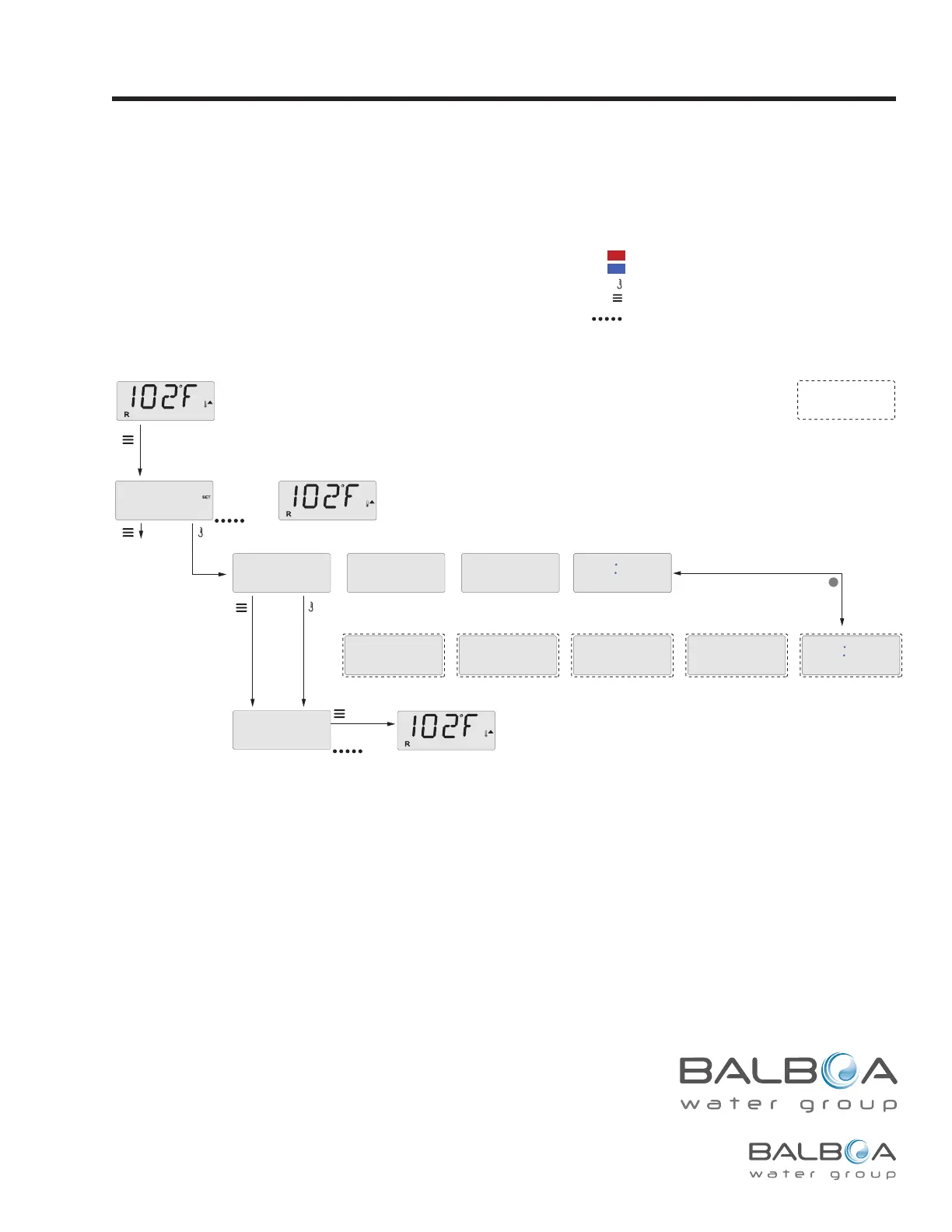
Hold (Standby)
Press “Jets” Button for Pump Out/Drain, only if Drain Mode is enabled.
OR
Some spas will allow
PUMP ING OUT (Drain Mode)
with “Jets” button
“Jets” will toggle pump on and off.
J
Press Menu/Select
repeatedly until HOLD
appears in the LCD.
Main Screen
Main Screen
A few seconds
Main Screen
a few seconds
or
To next item in
Main Menu
Sub-Menu Detail – STANDBY FOR 1 HR
04-11-09
PUMP
ING
OUT
FOR
O57
HOLD
DONE
ING
FOR
O57
HOLD
Hold Mode –MO37*
Hold Mode is used to disable the pumps during service functions like cleaning or replacing the lter. Hold Mode will last for 1 hour unless
the mode is exited manually.
Drain Mode
Some spas have a special feature that allows a pump to be
employed when draining the water.
When available, this feature is a component of Hold Mode.
Drain Mode will time out with Hold Mode.
Indicates Flashing or Changing Segment
Key
A temperature button, used for “Action”
Menu/Select button
Indicates Alternating or Progressive Message - every 1/2 second
Waiting time that keeps the last change to a menu item.
Waiting time (depends on menu item) that reverts to original setting and
ignores any change to that menu item.
*****
Indicates a Menu Item that
Depends on a Manufacturer
Configuration and
may or may not appear.
M037 is a Message Code. See Page 18.



 To Next Page