42339 rev A1 03/06/20
18
Manufactured under one or more of these patents. U.S. Patents: 5332944, 5361215, 5550753, 5559720, 5,883,459, 6253227, 6282370, 6590188, 6976052,
6965815, 7030343, 7,417,834 b2, Canadian Patent: 2342614, Australian patent: 2373248 other patents both foreign and domestic applied for and pending. All
material copyright of Balboa Water Group.
A Little History can tell a lot
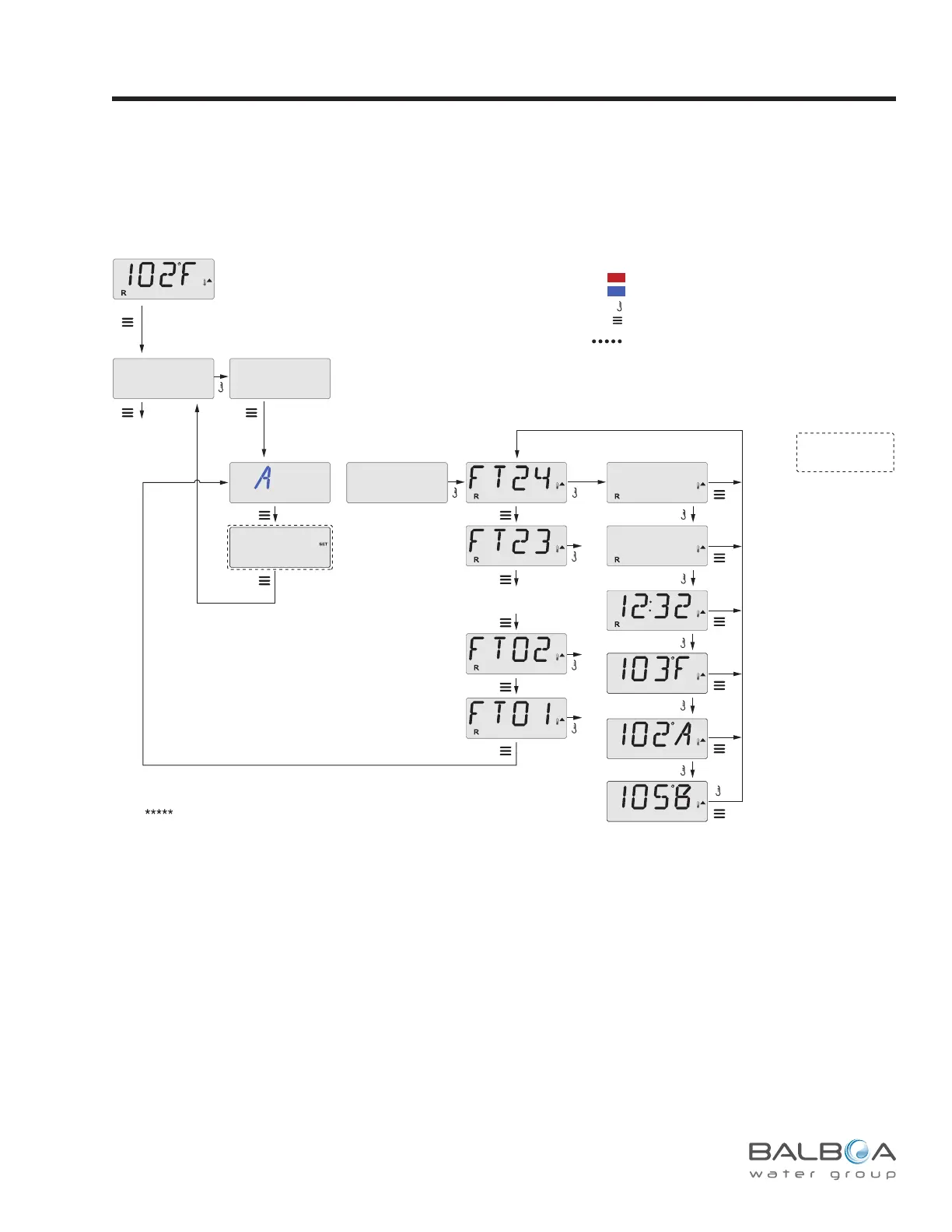
The Fault Log stores up to 24 events in memory and they can be reviewed under the Fault Log Menu.
Each event captures a Fault Message Code, how many days have passed since the fault, Time of the fault, Set Temperature during the
fault, and Sensor A and B temperatures during the fault.
Utilities – Fault Log
Sub-Menu Detail – Utilities - Fault Log
Only if DEMO Mode
is enabled
The Fault Log is also available from the
Test Menu (in Test Mode).
M: Message Code
M:
M:
M:
D: Days Ago
Time
Set Temperature
Sensor A Temp
Sensor B Temp
24 Fault messages is the maximum.
Fewer messages may be displayed.
To FIRST item in
Main Menu
(TEMP Range)
Press Press Menu/Select
repeatedly until UTIL (Utilities)
appears in the LCD.
Press Press Menu/Select
repeatedly until FALT LOG
appears in the LCD.
Waiting a few seconds inside the Fault Log Menu will allow the screen to return to normal operation.
MXXX
DZZZ
UTIL
INFO
FALT
DEMO
LOG
Indicates Flashing or Changing Segment
Key
A temperature button, used for “Action”
Menu/Select button
Indicates Alternating or Progressive Message - every 1/2 second
Waiting time that keeps the last change to a menu item.
Waiting time (depends on menu item) that reverts to original setting and
ignores any change to that menu item.
*****
Indicates a Menu Item that
Depends on a Manufacturer
Configuration and
may or may not appear.
See following pages for various Message Codes and denitions.



 To Next Page