2016-12-19 QF-S10 - BML - Remote Control Setup - 2016-11-29 1
Remote Control Setup
1.
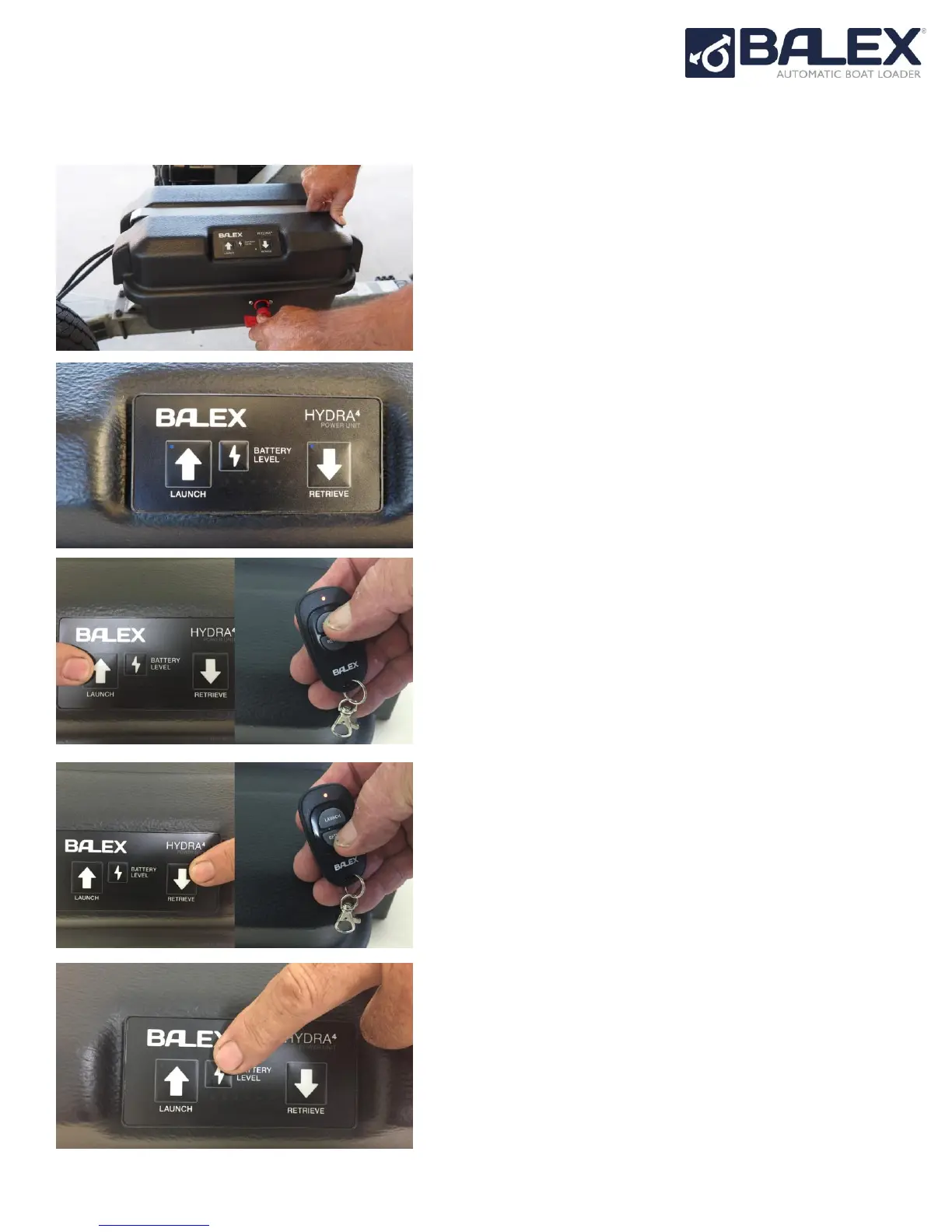
Apply power through the ABL Power Key. The battery
LEDs will cycle through then settle on the
measured
battery voltage.
2.
Press and hold the BATTERY LEVEL switch on for
5
seconds, both blue LEDs will flash slowly.
3.
Press the LAUNCH button once on the control panel,
the left, blue LED will remain on. Press the
LAUNCH
button on the remote control - the left LED will go out,
then both LEDs will be flashing
slowly again.
4.
Press the RETRIEVE button once, the right, blue
LED will
remain on. Press the RETRIEVE button on
the remote
control - the right LED will go out, then
both LEDs will be
flashing slowly again.
5.
Repeat steps 3 and 4 again for the next remote
control,
or else hold the BATTERY LEVEL button
on until both
LEDs stop flashing to exit Remote Set Up mode.



 To Next Page