Introduction
Manual Documentation Number: ESP901-902_5012m Chapter 1 5
B&B Electronics Mfg Co Inc – 707 Dayton Rd - PO Box 1040 - Ottawa IL 61350 - Ph 815-433-5100 - Fax 815-433-5104 – www.bb-elec.com
B&B Electronics Ltd – Westlink Commercial Pk – Oranmore, Galway, Ireland – Ph +353 91-792444 – Fax +353 91-792445 – www.bb-europe.com
Serial Server Quick Start Guide
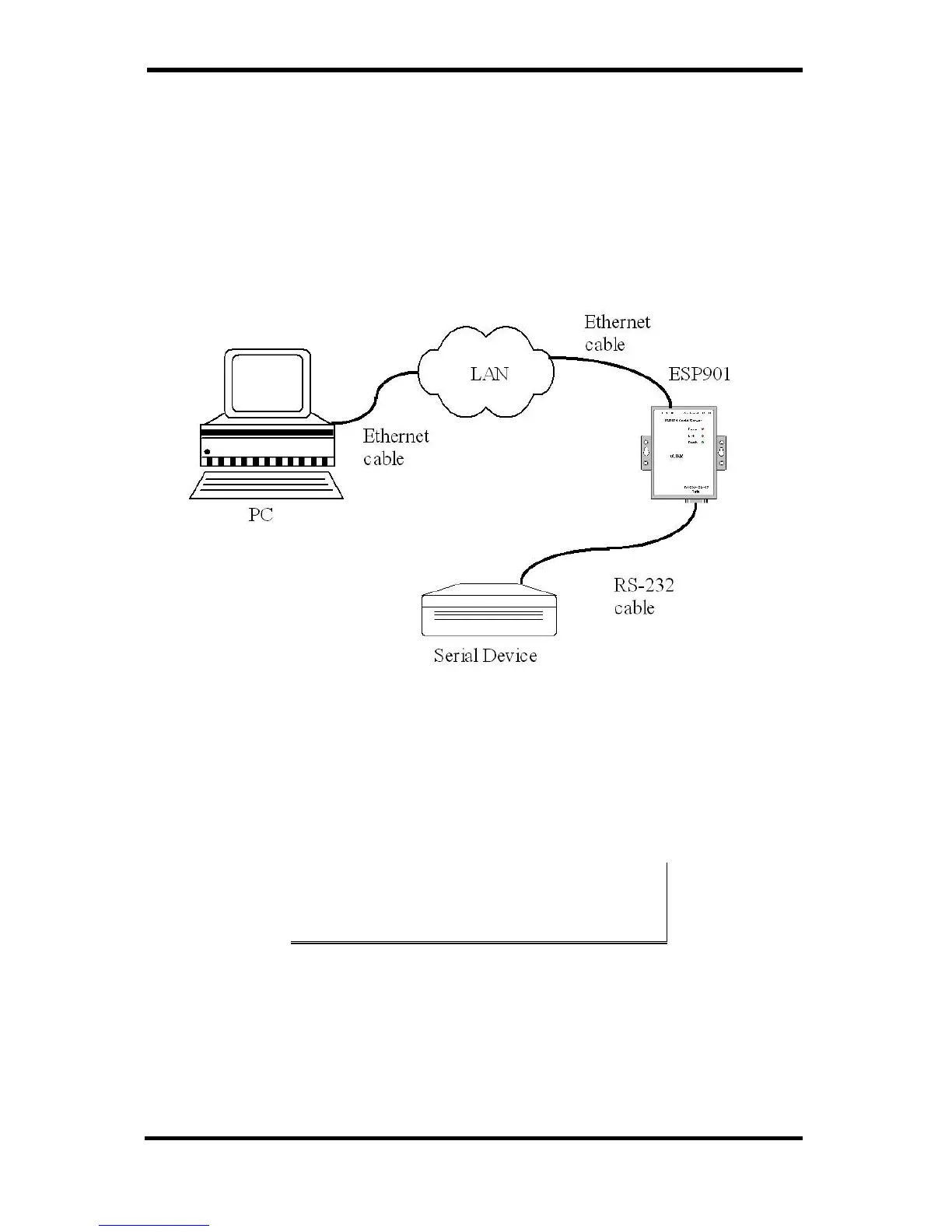
For descriptive purposes this Quick Start Guide considers a typical
configuration consisting of a PC connected via an Ethernet LAN to an
ESP901 or ESP902 Serial Server connected to the RS-232 port of a
serial device.
Hardware Setup
Figure 2. Typical Hardware Setup
Step 1: Connect the Serial Server to the network using a standard
network cable.
Step 2: Connect the Serial Server to the RS-232 port on the serial
device.
If the serial device is configured as a DCE use a straight-through serial
cable. If the serial device is configured as a DTE use a crossover (null
modem) cable.
Step 3: Set all the DIP switches to the OFF position.
Step 4: Apply power to the Serial Server.


 To Next Page