Installing the VLINX ESP Software
18 Chapter 3 Manual Documentation Number: ESP901-902_5012m
B&B Electronics Mfg Co Inc – 707 Dayton Rd - PO Box 1040 - Ottawa IL 61350 - Ph 815-433-5100 - Fax 815-433-5104 – www.bb-elec.com
B&B Electronics Ltd – Westlink Commercial Pk – Oranmore, Galway, Ireland – Ph +353 91-792444 – Fax +353 91-792445 – www.bb-europe.com
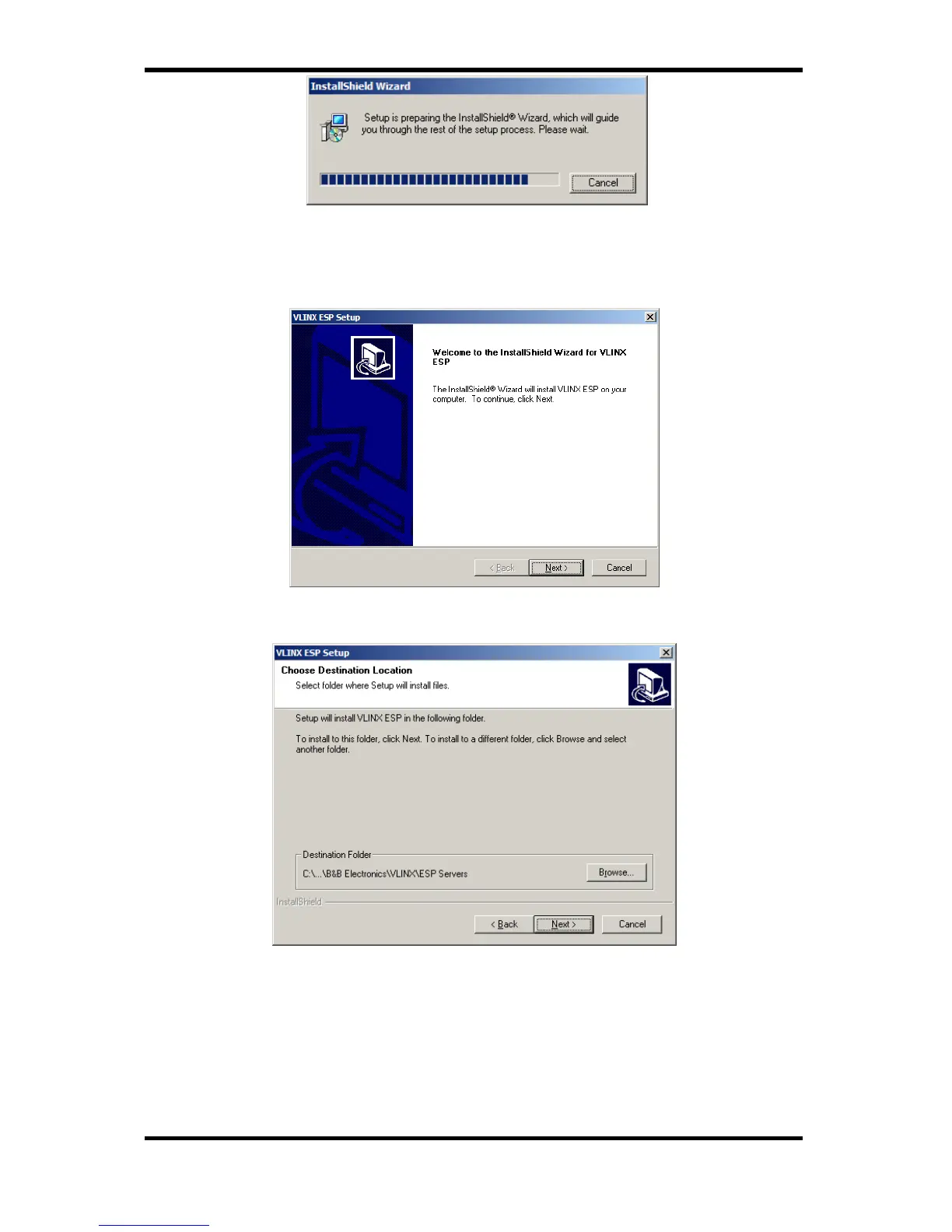
Figure 13. The Install Shield Wizard Window
Step 2: When the VLINX ESP Setup window appears, click Next.
Figure 14. VLINX ESP Setup Window
Figure 15. The Choose Destination Window
Step 3: When Choose Destination Location appears, click Next.
The installation progress will be shown until complete.


 To Next Page