Using ESP Manager
28 Chapter 4 Manual Documentation Number: ESP901-902_5012m
B&B Electronics Mfg Co Inc – 707 Dayton Rd - PO Box 1040 - Ottawa IL 61350 - Ph 815-433-5100 - Fax 815-433-5104 – www.bb-elec.com
B&B Electronics Ltd – Westlink Commercial Pk – Oranmore, Galway, Ireland – Ph +353 91-792444 – Fax +353 91-792445 – www.bb-europe.com
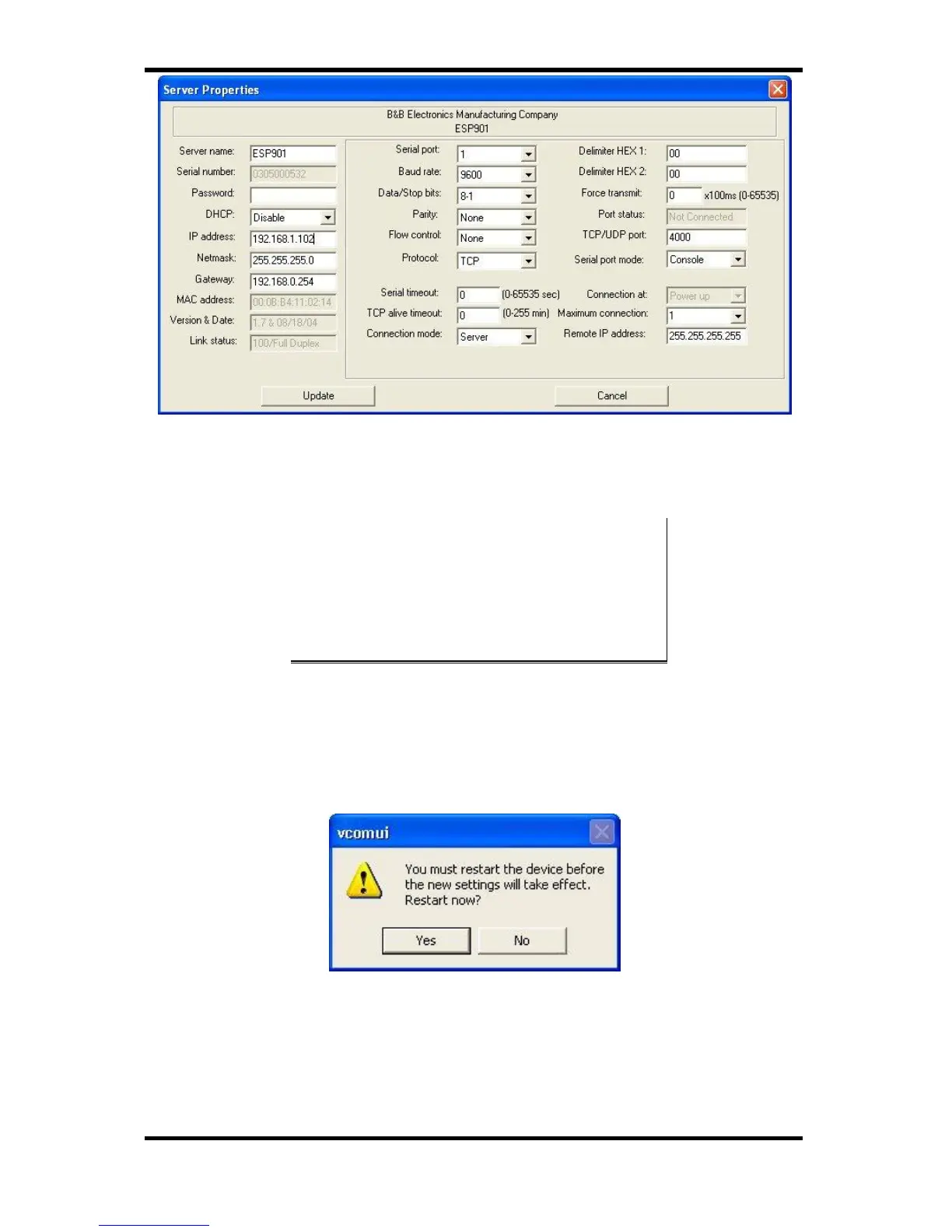
Figure 24. The Server Properties Window
ESP Manager Navigation:
- Use the mouse to select the property and parameters or
- Tab to move to the next property
- Tab+Shift to move back to previous property
- Arrows to move between properties or change values or
contents of the current property
- Enter to select update or cancel
Step 7: After configuring as needed, click Update to store the
configuration in the server. The following window will
appear:
Figure 25. The Restart Dialogue Box
Step 8: Click Yes to restart. The following dialogue box will appear:


 To Next Page