Using Telnet
66 Chapter 11 Manual Documentation Number: ESP901-902-5012m
B&B Electronics Mfg Co Inc – 707 Dayton Rd - PO Box 1040 - Ottawa IL 61350 - Ph 815-433-5100 - Fax 815-433-5104 – www.bb-elec.com
B&B Electronics Ltd – Westlink Commercial Pk – Oranmore, Galway, Ireland – Ph +353 91-792444 – Fax +353 91-792445 – www.bb-europe.com
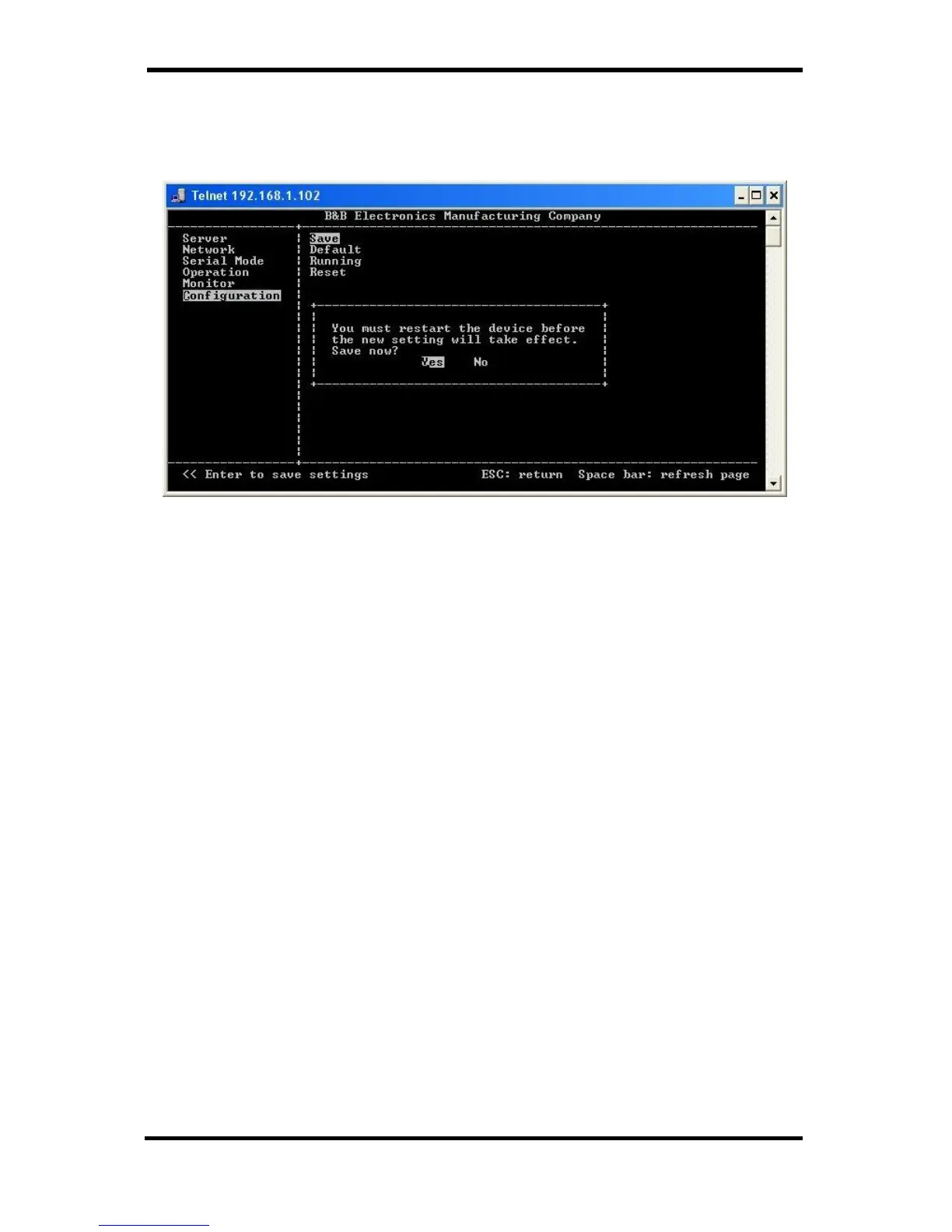
Step 7: Once all the changes have been made move to the Save field
and select Enter. The restart message will appear.
Figure 57. Saving and Restarting the Configuration
Step 8: Select Yes to save changes. This is necessary to write the
settings to the server. The Telnet window will disappear.
Step 9: To view the changes re-enter Telnet and re-establish
communications. The configuration menu will appear and
display the current settings.


 To Next Page