Section 4 - Configuring the Serial Server Vlinx VESR4x4 Serial Server
Page 32 of 67 www.bb-elec.com/
www.bb-europe.com/
You can also configure the serial server to receive from nodes on the network
using the same list of configuration options.
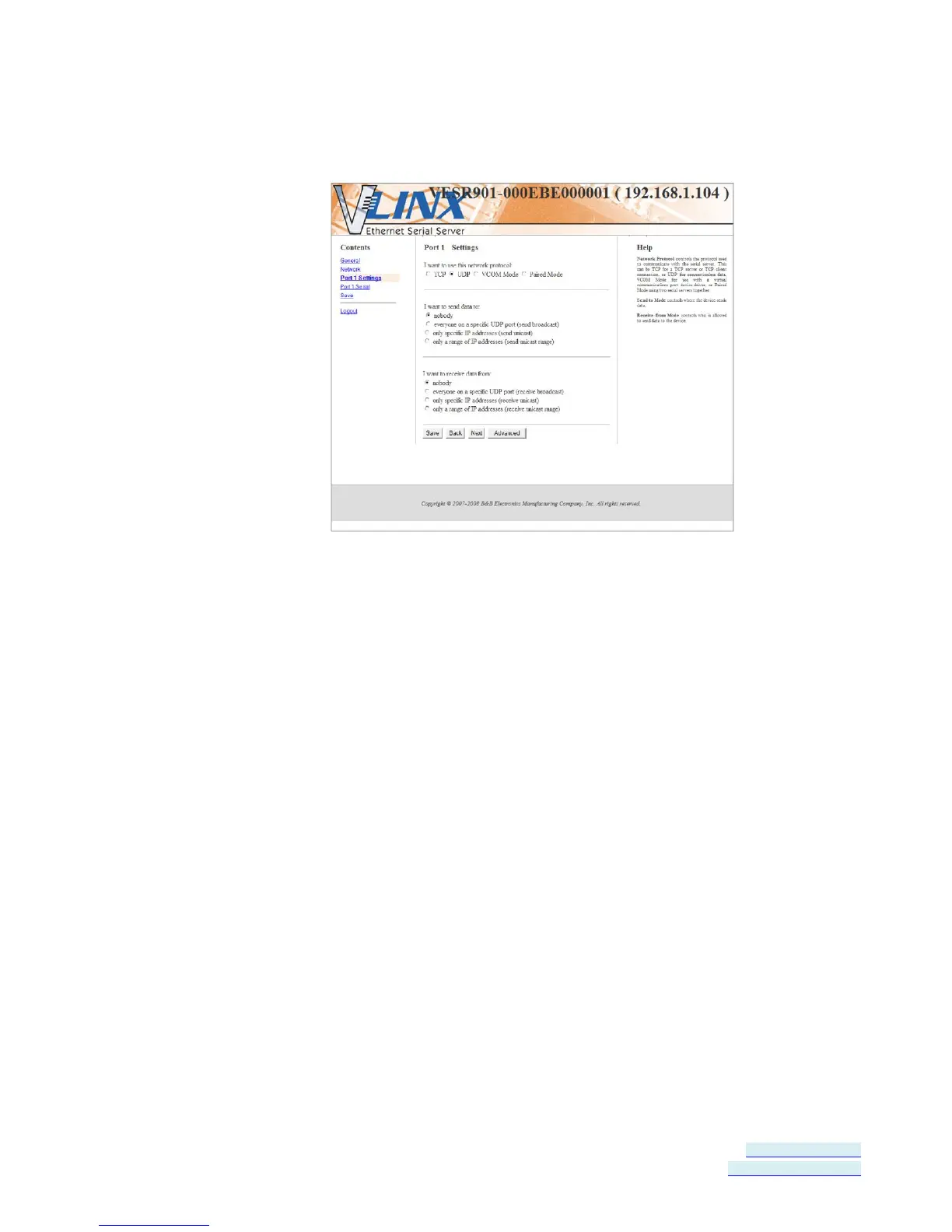
Figure 28. UDP Configuration
Setting the serial server to use UDP
1. Select UDP protocol.
Options are provided for sending and receiving data to and from:
Nobody
Everyone on a specific UDP Port
Only specific IP addresses
Only a range of IP addresses
Additional configuration fields appear depending on the options chosen.
2. Select the required Send options:
a. nobody - sends to nobody
b. everyone on a specific UDP port (send broadcast) - sends to all UDP
ports on the network (specified later)
c. only specific IP addresses (send unicast) - sends to specific network
IP addresses (specified later)
d. only a range of IP addresses (send unicast range) - sends to all IP
addresses within a specified range (specified later)
3. Configure the Send IP addresses and port numbers:


 To Next Page