Note: Four relay audio call signaling: press [PTT] + [CALL] to
send 1000HZ signaling; press [PTT] + [VFO/MR] to send
1450HZ signaling; press [PTT] + [A/B] to send 1750HZ signaling;
press [PTT] + [BAND] to send 2100HZ signaling.
In order to ease the operation, the two programmable
buttons [SK1] and [SK2] can be programmed by your dealer as
function shortcuts, as shown in the following table. For more
information about each function, see the “Function and
Operation” section.
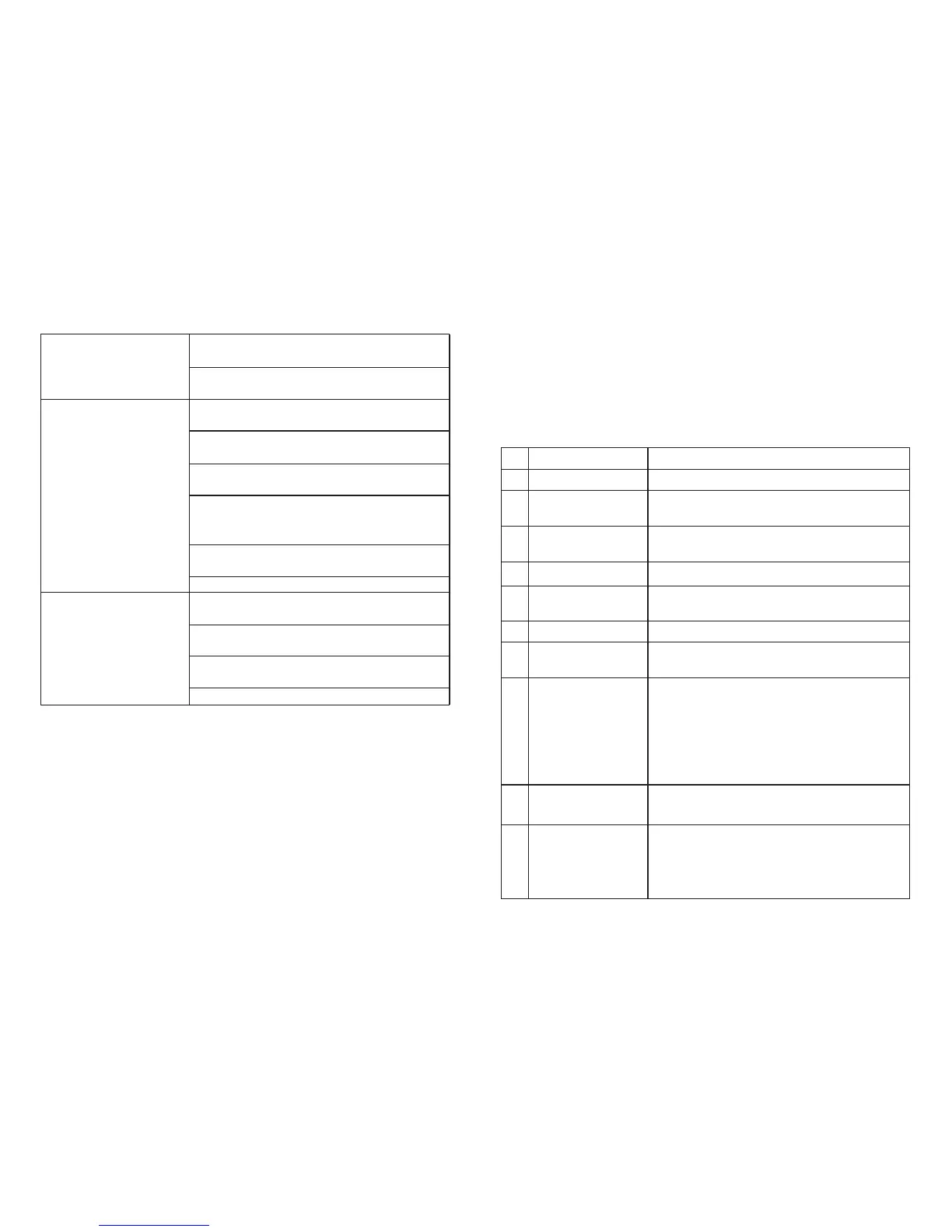
Programmable Buttons
[Exit] / [Clear] button
[
* ]button
[ # ] button
Clear the entered information in input state.
Code word D in DTMF function
In analog mode in main interface, press this
button to turn on/off scrambling.
In digital mode in main interface, press this
button to enter manual dial interface.
In VFO frequency mode, press and hold this
button to start scanning.
Analog channel enters the menu mute setting;
press this button to start mute scanning.
In radio mode, enter the search function, and
store the searched signal to current radio
channel automatically.
Press this button to clear the data in message
editing box.
Code word * in DTMF function
In the main interface, press this button to switch
high/low power
Press and hold this button to turn on/off keypad
lock
Switch the input method in input method
interface.
Code word # in DTMF function
No.
1
2
3
4
5
6
7
8
9
10
Shortcut name
None
Prompt tone on/off
Emergency mode on
Emergency mode off
Select high/low
power
Monitor
Delete useless
channels
Push to talk 1
Relay / offline
Scan on / off
Purpose
No function is assigned to the preset button.
Quickly enable or disable all prompt tones at
the same time.
Quickly establish an emergency call. This is the
recommended option for the orange button.
Quickly end an emergency call initiated outward.
Quickly switch between high power and low
power.
Quickly turn on or off the monitor function.
Quickly delete useless channels from the scan
list (except the selected channels).
Quickly make digital group calls, digital single
call, call prompts, or send text messages (only
for digital mode) via push to talk. (This option is
only available if the digital function is enabled
on the device.) Push-to-talk 1 to push-to-talk 6
can be set.
Quickly switch between relay mode and offline
mode.
Quickly turn the scan function on or off. Note:
double-segment double-waiting scan does not
work



 To Next Page