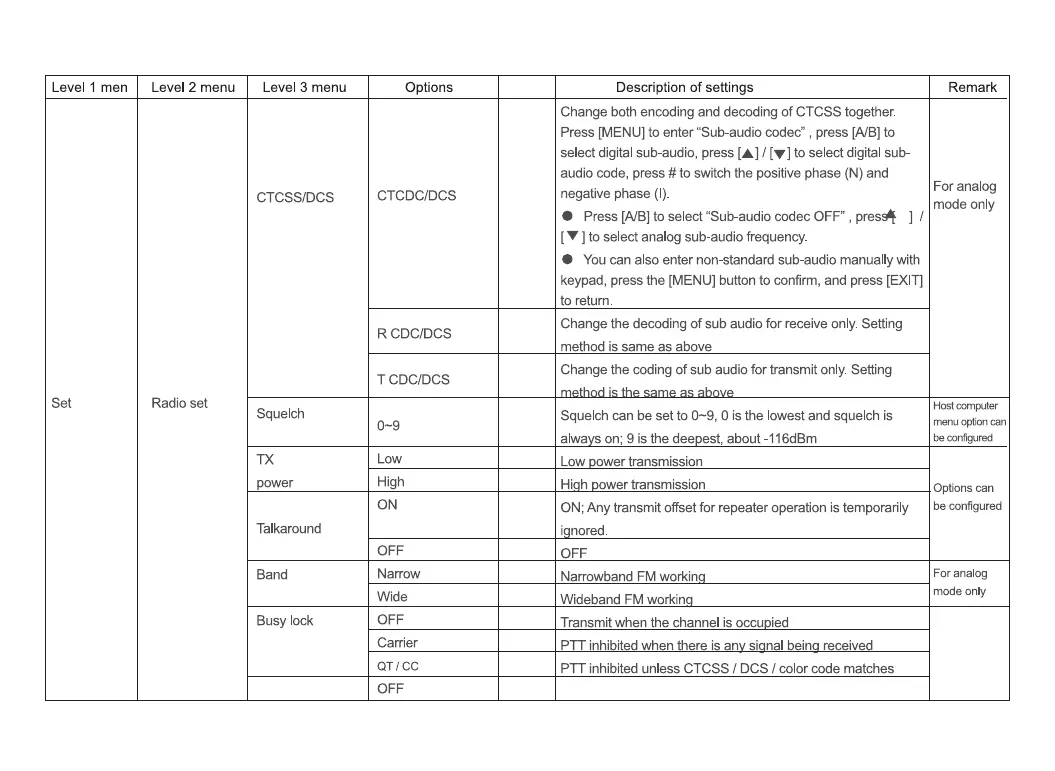
Level 1 men
Set
Level 2 menu
Radio set
Level 3 menu
CTCSS/DCS
Squelch
TX
power
Talkaround
Band
Busy lock
Options
CTCDC/DCS
R CDC/DCS
T CDC/DCS
0-9
Low
High
ON
OFF
Narrow
Wide
OFF
Carrier
QT / CC
Description of settings
Change both encoding and decoding of CTCSS together.
Press [MENU] to enter "Sub-audio codec" , press [A/B] to
select digital sub-audio, press [A] I [V] to select digital sub-
audio code, press # to switch the positive phase (N) and
Remark
For analog
negative phase (l).
mode only
Press [AIBI to select "Sub-audio codec OFF" , pres* ] I
[ V ] to select analog sub-audio frequency.
You can also enter non-standard sub-audio manually with
keypad, press the [MENU] button to confirm, and press [EXIT]
to return.
Change the decoding of sub audio for receive only. Setting
method is same as above
Change the coding of sub audio for transmit only. Setting
Squelch can be set to 0—9,O is the lowest and squelch is
alwa on; 9 is the dee est about -116dBm
Low wer transmission
Hi h ower transmission
ON; Any transmit offset for repeater operation is temporarily
i nored.
OFF
Narrowband FM workin
Wideband FM workin
Transmit when the channel is occu ied
Host computer
menu option can
be configured
Options can
be configured
For analog
mode only
PTT inhibit wh n th in
PTT inhibited unless CTCSS / DCS / color code matches


 To Next Page