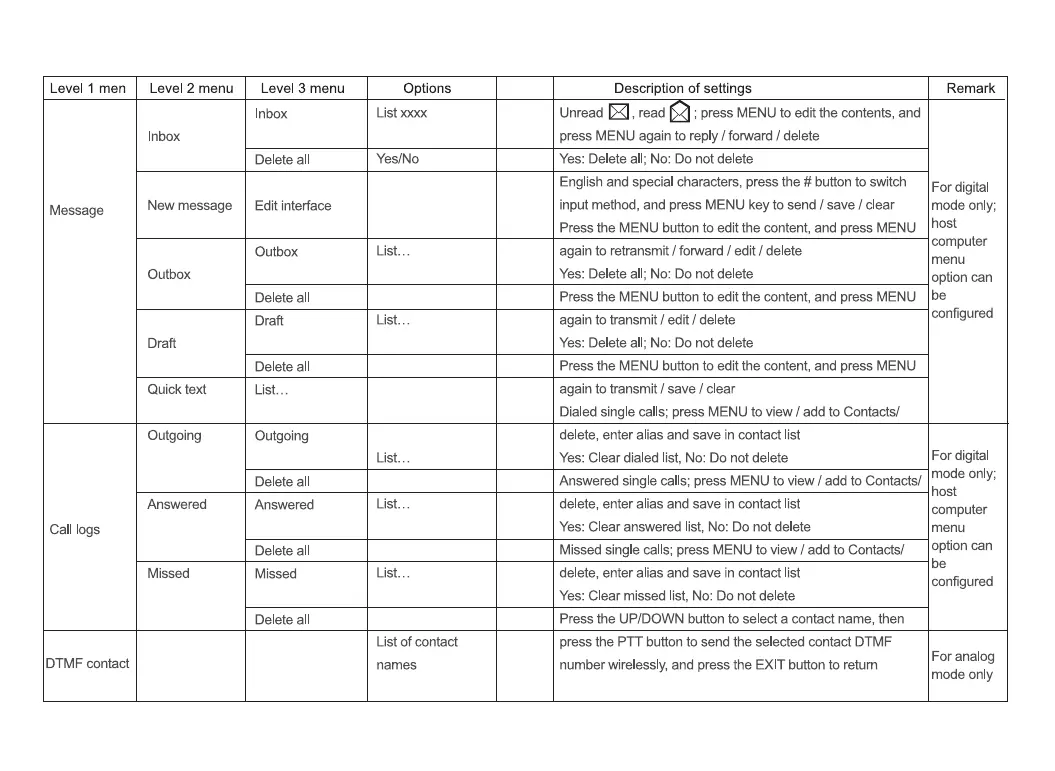
Level 1 men
Message
Call logs
DTMF contact
Level 2 menu
Inbox
New message
Outbox
Draft
Quick text
Outgoing
Answered
Missed
Level 3 menu
Inbox
Delete all
Edit interface
Outbox
Delete all
Draft
Delete all
List..
Outgoing
Answered
Missed
Options
List xxxx
Yes/No
List..
List..
List..
List..
List.
List of contact
names
Description of settings
Unread , read
; press MENU to edit the contents, and
press MENU again to reply / forward / delete
Yes: Delete all; No: Do not delete
English and special characters, press the # button to switch
input method, and press MENU key to send / save / clear
Press the MENU button to edit the content, and press MENU
again to retransmit I fomard I edit / delete
Yes: Delete all; No: Do not delete
Press the MENU button to edit the content, and press MENU
again to transmit / edit / delete
Yes: Delete all; No: Do not delete
Press the MENU button to edit the content, and press MENU
again to transmit / save I clear
Dialed single calls; press MENU to view / add to Contacts/
delete, enter alias and save in contact list
Yes: Clear dialed list, No: Do not delete
Remark
For digital
mode only;
host
computer
menu
option can
be
configured
For digital
mode only;
Answered single calls; press MENU to view / add to Contacts/
delete, enter alias and save in contact list
Yes: Clear answered list, No: Do not delete
Missed single calls; press MENU to view / add to Contacts/
delete, enter alias and save in contact list
Yes: Clear missed list, No: Do not delete
Press the UP/DOWN button to select a contact name, then
press the PTT button to send the selected contact DTMF
number wirelessly, and press the EXIT button to return
host
computer
menu
option can
be
configured
For analog
mode only


 To Next Page