Menu list
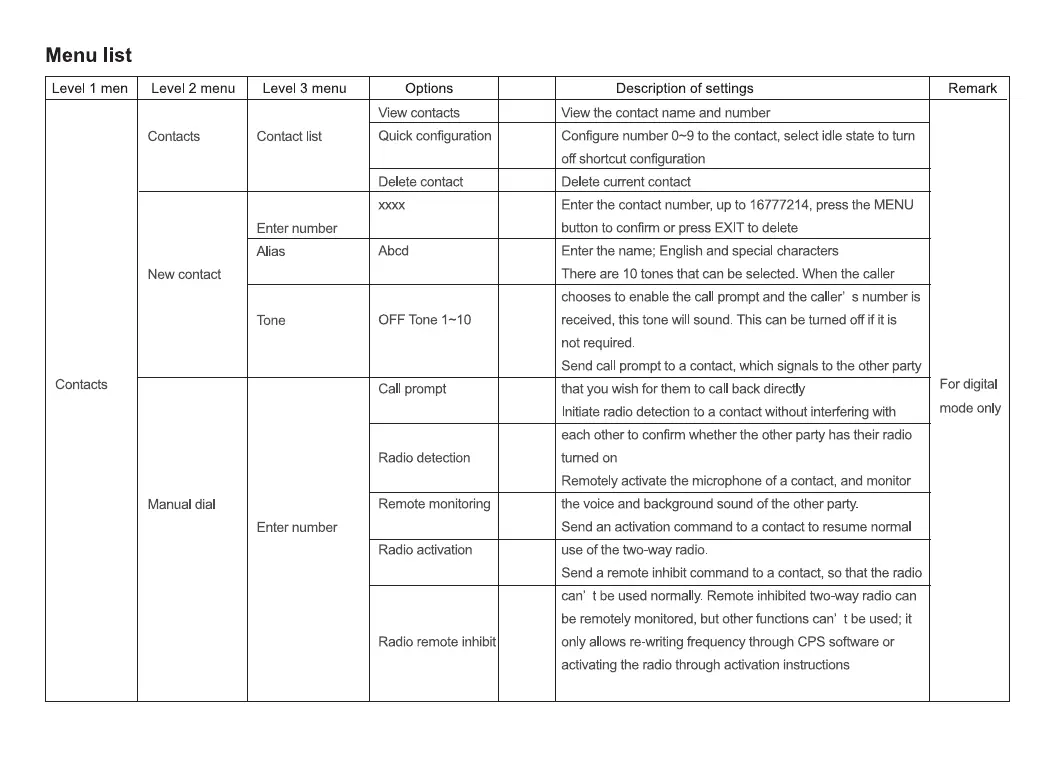
Level 1 men
Contacts
Level 2 menu
Contacts
New contact
Manual dial
Level 3 menu
Contact list
Enter number
Alias
Tone
Enter number
Options
Mew contacts
Quick configuration
Delete contact
Abcd
OFF Tone 1-10
Call prompt
Radio detection
Remote monitoring
Radio activation
Radio remote inhibit
Description of settings
Mew the contact name and number
Configure number to the contact, select idle state to turn
off shortcut configuration
Delete current contact
Enter the contact number, up to 16777214, press the MENU
button to confirm or press EXIT to delete
Enter the name; English and special characters
There are 10 tones that can be selected. When the caller
chooses to enable the call prompt and the caller' s number is
received, this tone will sound. This can be tumed off if it is
not required.
Send call prompt to a contact, which signals to the other party
that you wish for them to call back directly
Initiate radio detection to a contact without interfering with
each other to confirm whether the other party has their radio
turned on
Remotely activate the microphone of a contact, and monitor
the voice and background sound of the other party.
Send an activation command to a contact to resume normal
use of the two-way radio.
Send a remote inhibit command to a contact, so that the radio
can' t be used normally. Remote inhibited two-way radio can
be remotely monitored, but other functions can' t be used; it
only allows re-writing frequency through CPS software or
activating the radio through activation instructions
Remark
For digital
mode only


 To Next Page