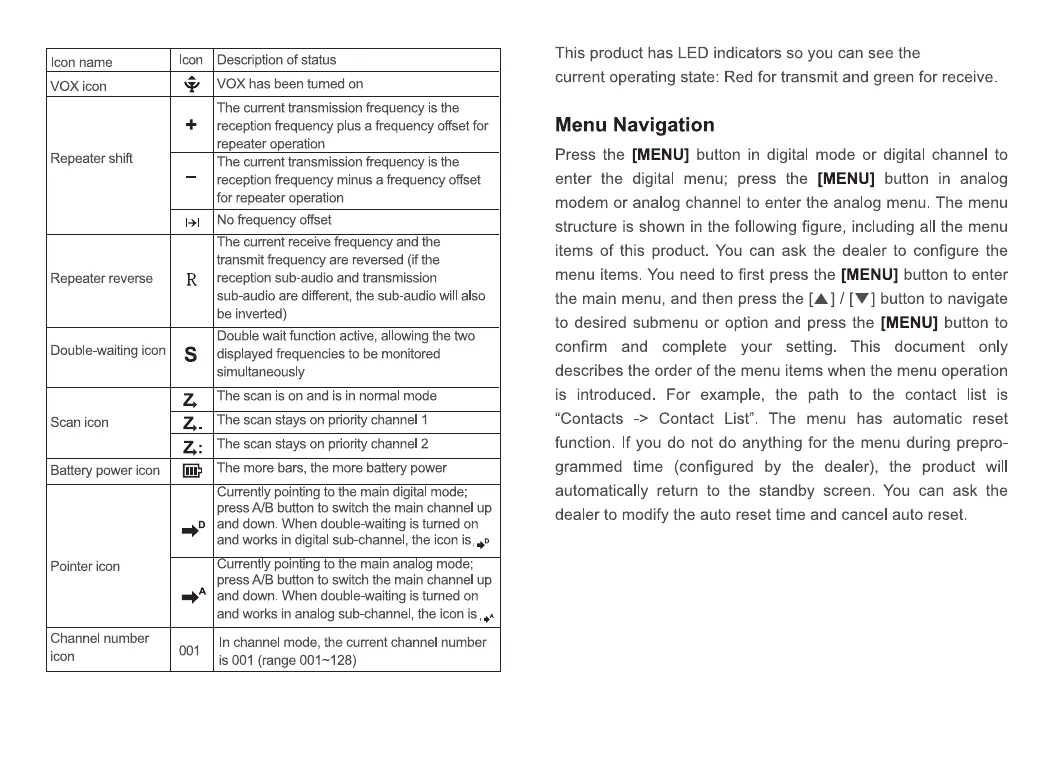
con name
VOX icon
Repeater shift
Repeater reverse
Double-waiting icon
Scan icon
Battery power icon
Pointer icon
Channel number
Icon
Icon
R
s
D
001
Description of status
VOX has been turned on
The current transmission frequency is the
reception frequency plus a frequency offset for
repeater operation
The current transmission frequency is the
reception frequency minus a frequency offset
for repeater operation
No frequency offset
The current receive frequency and the
transmit frequency are reversed (if the
reception sub-audio and transmission
sub-audio are different, the sub-audio will also
Double wait function active, allowing the two
displayed frequencies to be monitored
simultaneously
The scan is on and is in normal mode
The scan stays on priority channel 1
The scan stays on priority channel 2
The more bars, the more battery power
Currently pointing to the main digital mode;
press AIB button to switch the main channel up
and down. When double-waiting is turned on
and works in digital sub-channel, the icon is .0
urrently panting tot e man analog m e;
press AIB button to switch the main channel up
and down. When double-waiting is turned on
and works in analog sub-channel, the icon is
In channel mode, the current channel number
is 001 (range 001-128)
This product has LED indicators so you can see the
current operating state: Red for transmit and green for receive.
Menu Navigation
Press the [MENU] button in digital mode or digital channel to
enter the digital menu; press the [MENU] button in analog
modem or analog channel to enter the analog menu. The menu
structure is shown in the following figure, including all the menu
items of this product. You can ask the dealer to configure the
menu items. You need to first press the [MENU] button to enter
the main menu, and then press the [A] / [V] button to navigate
to desired submenu or option and press the [MENU] button to
confirm and complete your setting. This document only
describes the order of the menu items when the menu operation
is introduced. For example, the path to the contact list is
"Contacts -> Contact List". The menu has automatic reset
function. If you do not do anything for the menu during prepro-
grammed time (configured by the dealer), the product will
automatically return to the standby screen. You can ask the
dealer to modify the auto reset time and cancel auto reset.


 To Next Page