Function
Purpose
11
12
13
14
15
16
Strict/normalsquelch Quickly switch between strict squelchand
Enctyptionon/ off
VOX control on / off
Zone switching
Battery power
indication
Individual operation
End call
normal squelch (only for analog mode).
Quickly tum on / off encryption for channel (
only for digital mode ).
Quickly tum on or off Voice Operated Transmit.
Quickly select the zone, allowing the user to
switch between two areas ( zones ).
Quickly display the battery charge state in volts
Quickly turn on or off individual operation
function.
Quickly end the phone call ( only for digital
mode ).
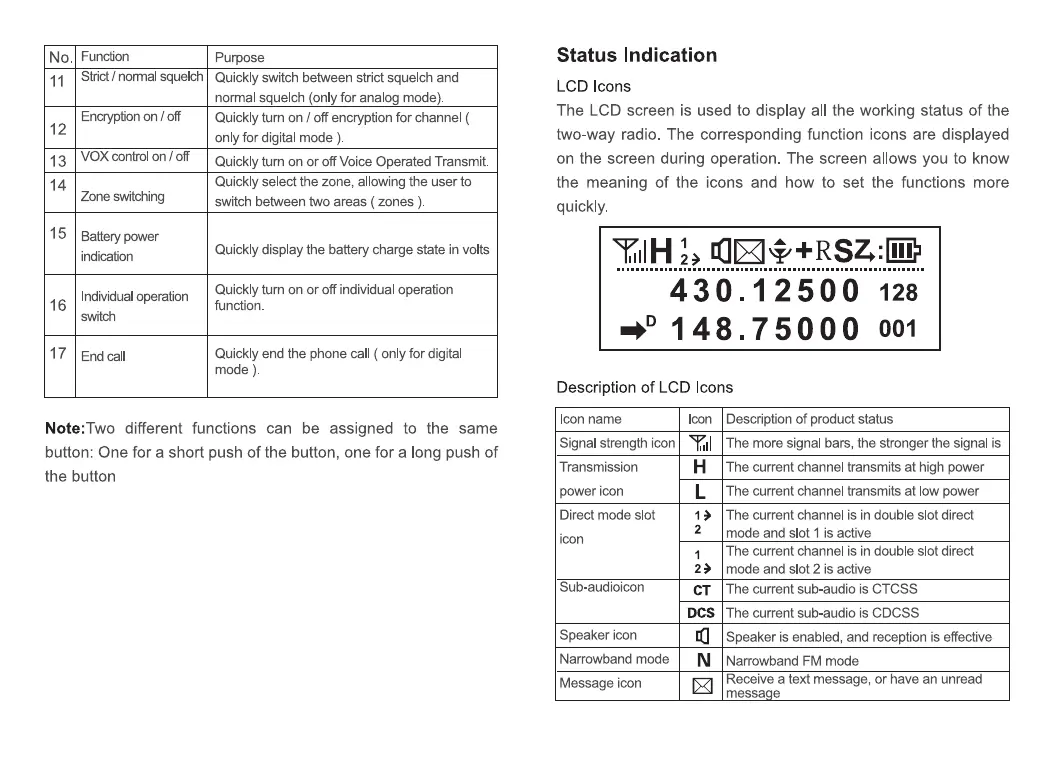
Status Indication
LCD Icons
The LCD screen is used to display all the working status of the
two-way radio. The corresponding function icons are displayed
on the screen during operation. The screen allows you to know
the meaning of the icons and how to set the functions more
quickly.
YIIIH
430.12500 128
•D 1 7 5 001
Description of LCD Icons
Icon name Icon
Note: Two different functions can be assigned to the same
button: One for a short push of the button, one for a long push of
the button
Signalstrengthicon Ylll
Transmission
power icon
Direct mode slot
icon
Sub-audioicon
Speaker icon
Narrowband mode
Message icon
H
L
2
CT
DCS
N
Description of product status
The more signal bars, the stronger the signal is
The current channel transmits at high power
The current channel transmits at low power
The current channel is in double slot direct
mode and slot 1 is active
The current channel is in double slot direct
mode and slot 2 is active
The current sub-audio is CTCSS
The current sub-audio is CDCSS
Speaker is enabled, and reception is effective
Narrowband FM mode
Receive a text message, or have an unread
messa e


 To Next Page