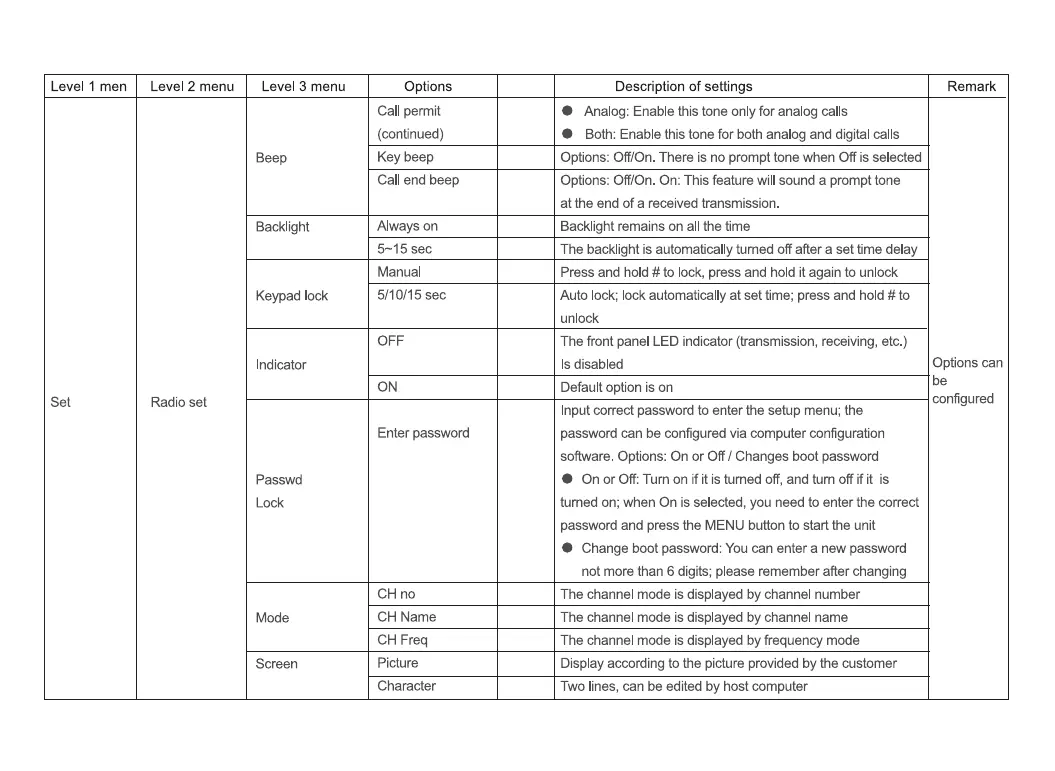
Level 1 men
Set
Level 2 menu
Radio set
Level 3 menu
Beep
Backlight
Keypad lock
Indicator
Passwd
Mode
Screen
Options
Call permit
(continued)
Key beep
Call end beep
Always on
5-15 sec
Manual
5/10/15 sec
OFF
ON
Enter password
CH no
CH Name
CH Freq
Picture
Character
Description of settings
Analog: Enable this tone only for analog calls
Both: Enable this tone for both analog and digital calls
Options: Off/On. There is no prompt tone when Off is selected
Options: Off/On On: This feature will sound a prompt tone
at the end of a received transmission.
Backlight remains on all the time
The backlight is automatically turned off after a set time delay
Press and hold # to lock, press and hold it again to unlock
Auto lock; lock automatically at set time; press and hold # to
unlock
The front panel LED indicator (transmission, receiving, etc.)
Is disabled
Default option is on
Input correct password to enter the setup menu; the
password can be configured via computer configuration
software. Options: On or Off / Changes boot password
On or Off: Turn on if it is turned off, and tum off if it is
tumed on; when On is selected, you need to enter the correct
password and press the MENU button to start the unit
Change boot password: You can enter a new password
not more than 6 digits; please remember after changing
The channel mode is displayed by channel number
The channel mode is displayed by channel name
The channel mode is displayed by frequency mode
Display according to the picture provided by the customer
Two lines, can be edited by host computer
Remark
Options can
be
configured


 To Next Page