14
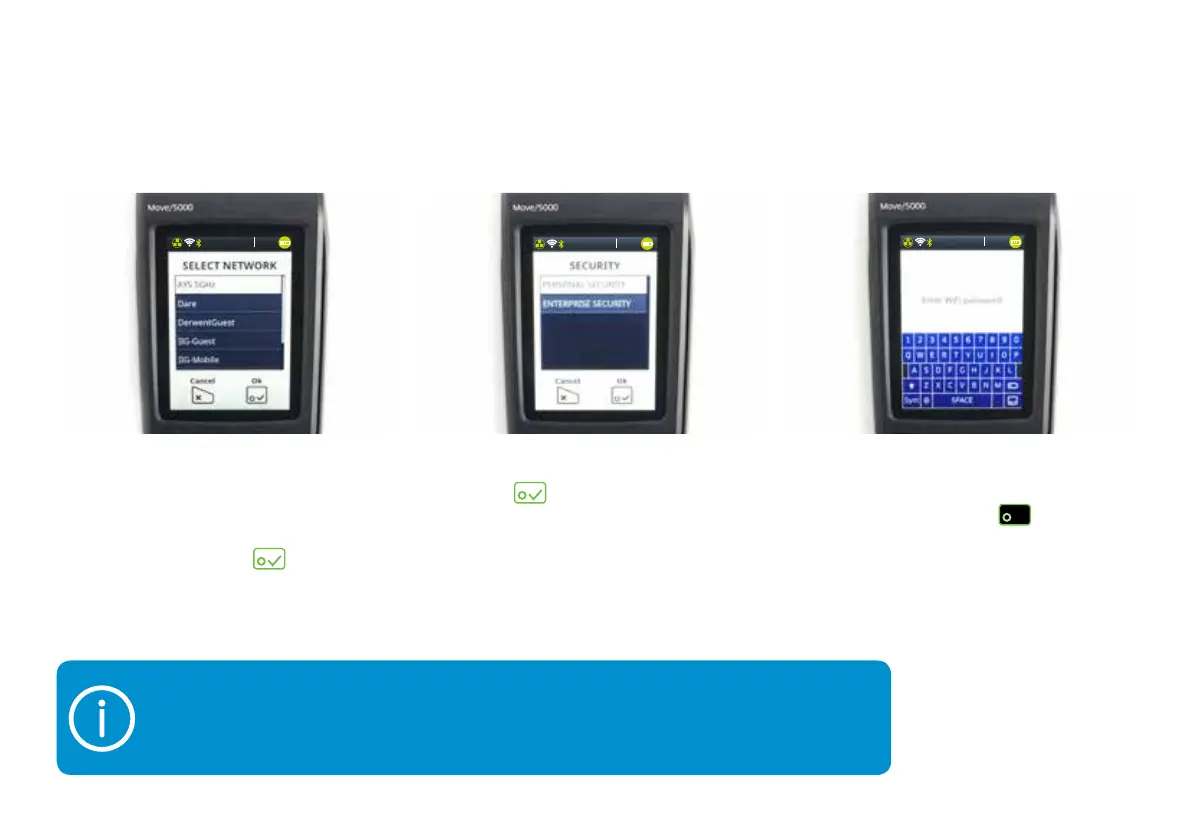
9) A qwerty keyboard will appear
on your screen. Enter your Wi-Fi
password, then press
button.
If you ever need to type letters or numbers into your terminal, a virtual keyboard will
appear on the screen. If you need to switch from upper case to lower case, use the
‘Shift’ button (like you would on your phone). And if you need any special characters,
tap the ‘Sym’ button.
8) Select ‘Personal Security’
and tap
.
7) For a couple of moments, your
terminal will tell you it’s scanning.
It’ll then show you all the networks
it’s detected. Choose the one you
want to use and tap
.
13:3 7
03/10/2018
13:3 7
03/10/2018
13:3 7
03/10/2018


 To Next Page