SETTING THROUGH WEB INTERFACE
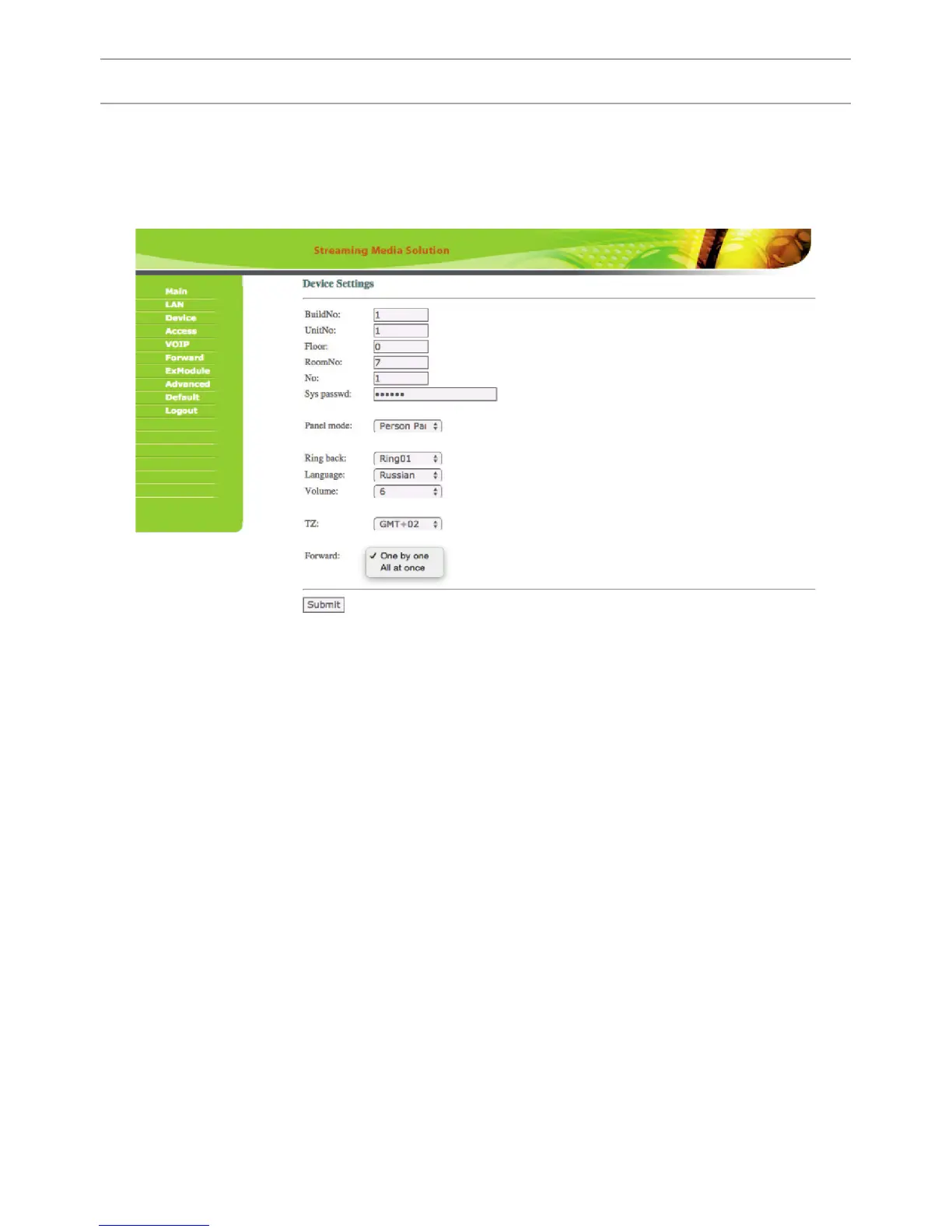
2. Device Settings.
Select «Device» to access the conguration of the logical address, the operating
mode and ringtones:
BuildNo: Specify the house number.
UnitNo: Specify the entrance number.
Floor: Specify the number of the oor.
RoomNo: Specify the number of the apartment.
No: Specify the outdoor panel serial number.
Panel mode: Set the operating mode «Unit Panel».
The number of the building, entrance, oor, and apartment must match the
address of the internal monitor, which will receive a call from this outdoor panel.
If you have several outdoor panels that have one logical address, then, enter a
value of 2, 3, 4, 5 and so on, until 9 in the “No” eld. If the logical addressing
of the outdoor panel corresponds to the addressing of the monitor, and the IP
addresses of the devices are in the same local network segment, the devices will
nd each other, and the call will occur correctly.
To make a call via the internal protocol to the internal monitor you must put “0”
in the “Floor” eld. Then when you call from the outdoor panel, the call comes to
the internal monitor.
19



 To Next Page