SETTING THROUGH WEB INTERFACE
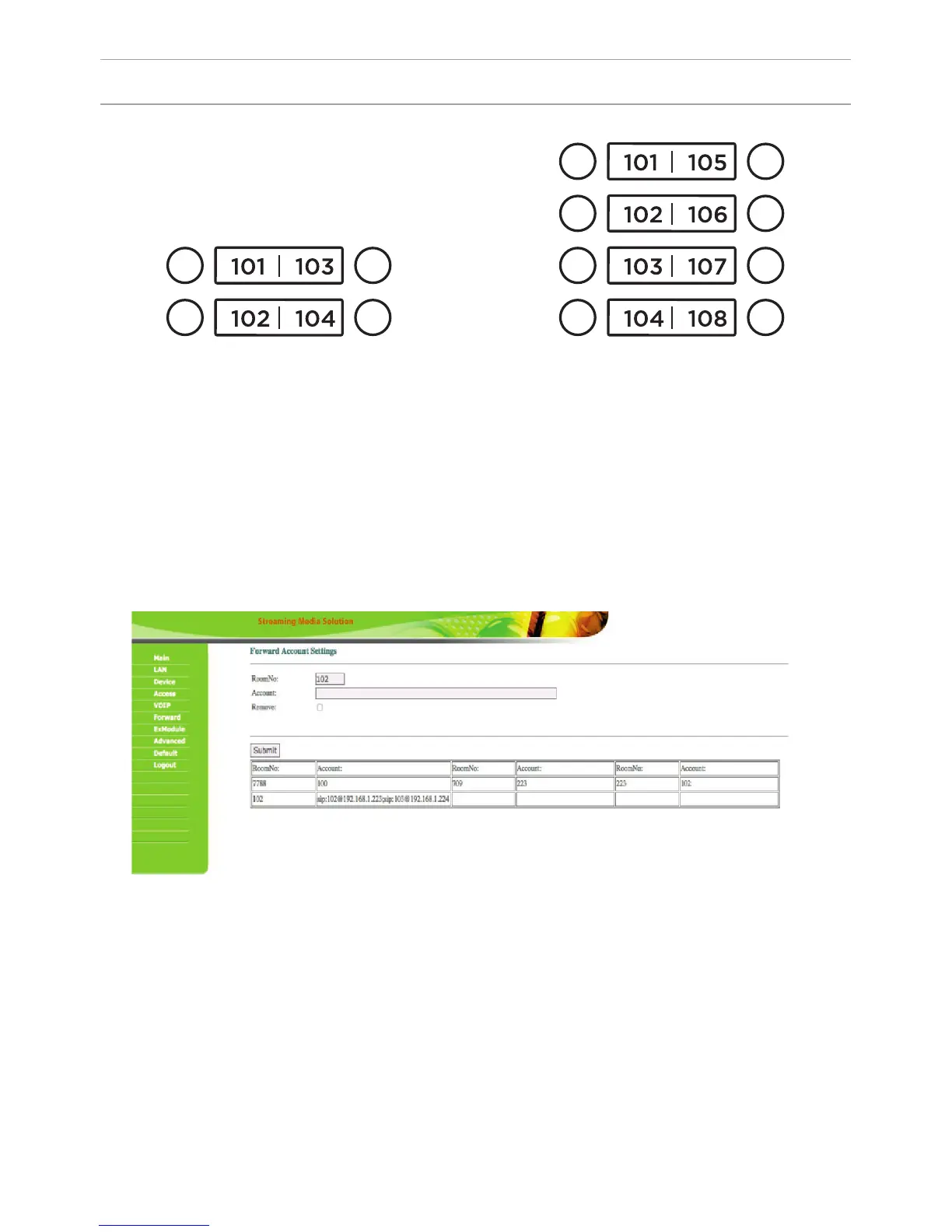
The numbers of call buttons look as follows:
0001
0002
0001
0002
0003
0004
0003
0004
0005
0006
0007
0008
Also, this section may be used for forwarding calls made by the SIP protocol
when there is no internal monitor, on any given SIP-account (SIP-number).
1. In the “Apartment” eld, enter the number of the call button after clicking
on which call forwarding will occur. The order of numbers of the call buttons is
shown in the gure above.
2. In the “SIP-account”, enter the required SIP-number to which the call will come
from the outdoor panel after pressing the corresponding button on it.
3. Click the “Apply” button to add values to the table.
So that the outdoor panel canould make a call to multiple devices
After pressing the call button on the panel, the panel can call up to 8 devices
simultaneously or in turn (switching to the call of the next number if the previous
number does not respond within 25 seconds), depending on the selected divert
mode in the tab “Device Settings”.
So that the outdoor panel canould make a call to multiple devices, you need
to enter the number of the apartment (oor + room) in the ”Room” eld, after
calling on which the call forwarding will occur, and in the “Account” eld the
numbers should be separated by a semicolon, like «sip:101@192.168.1.99 », where
101 – is the number you are calling, 192.168.1.99 – is the IP address of the SIP PBX
or the IP address of the called SIP client (when the call is made on P2P).
22



 To Next Page