Network / FTP
Network / HTTPS
Network / IP Filter
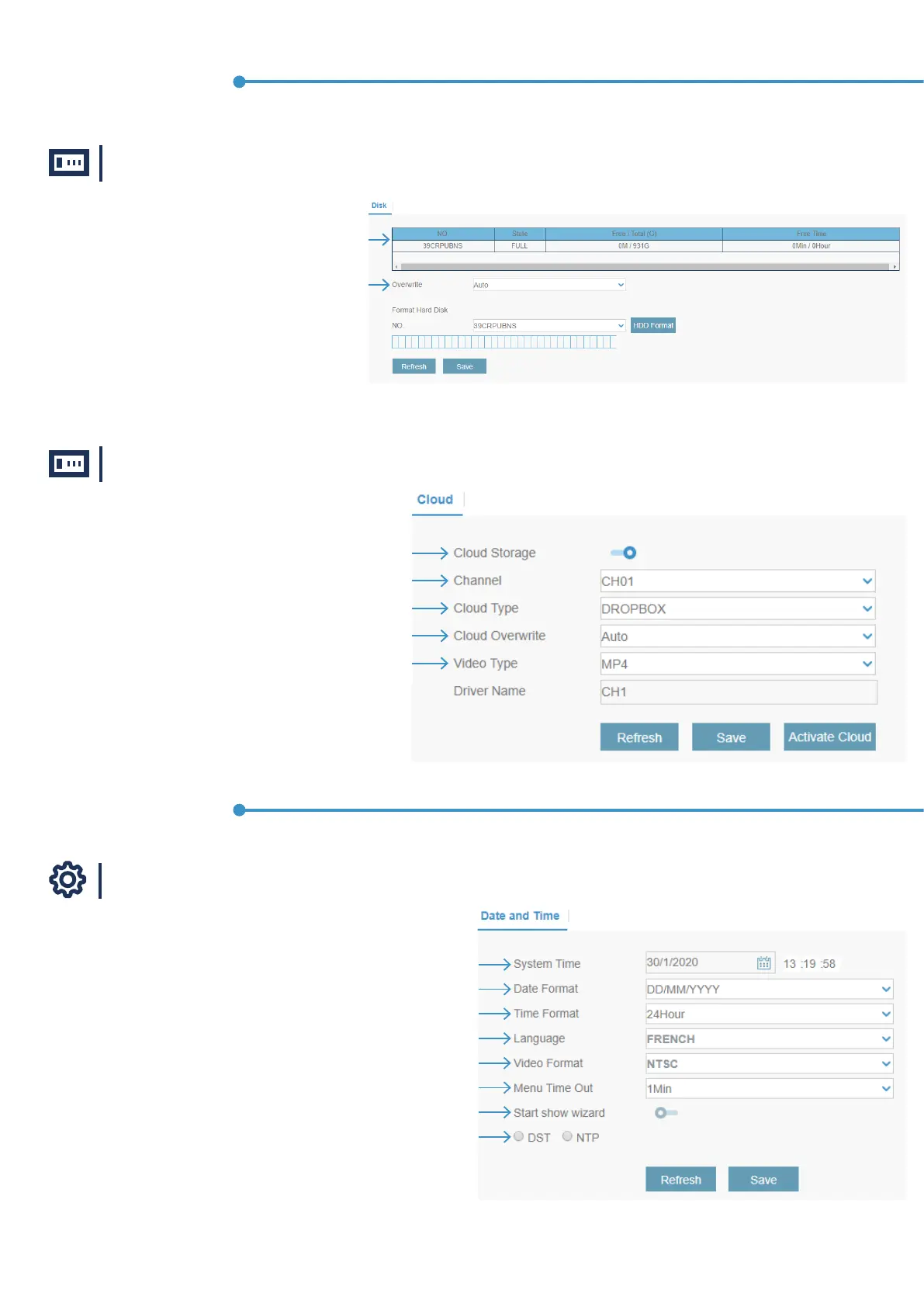
Device / Disk
Device / Cloud
System / General
Information about the Hard Drive Disk
Enable or disable the Cloud Storage
Choose the cannel to congure
Choose the Cloud type
Use this option to overwrite
Select the video type
Click the calendar icon to change the date
Select the preferred date format
Select the preferred time format
Select the correct video standard for your region
Choose the video format
Select the time your system will exit the Main Menu when idle. You can also disable this by
selecting “OFF” (password protection will be temporarily disabled)
Click the checkbox if you would like to display the Startup Wizard each time you turn
onor reboot your system
Choose DST or NTP
Device menu
System menu
To congure general settings
Use this option to overwrite the old recordings on the HDD when
the HDD is full. For example, if you choose the option 7 days then
only the last 7 days recordings are kept on the HDD. To prevent
overwriting any old recordings, select OFF. If you have disabled
this function, please check the HDD status regularly, to make sure
the HDD is not full. Recording will be stopped if HDD is full.



 To Next Page