4. Remote Setting
Channel / Channel
Channel / Live
Channel / Image Control
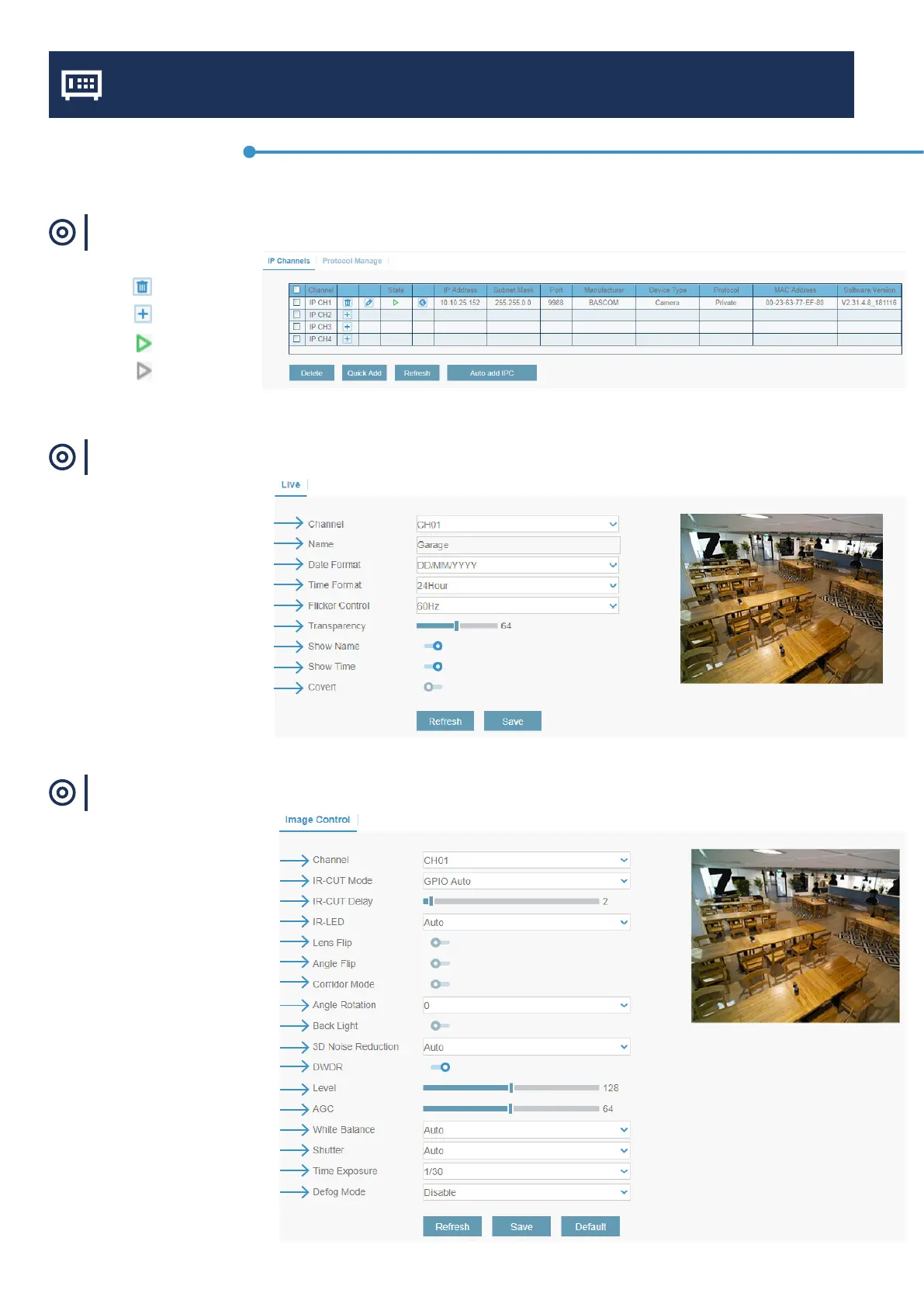
Choose the channel to congure
Give a name to the camera
Date format which needs to be displayed
Time format which needs to be displayed
Refresh Rate of the camera
Transparency of the block behide the date/time
Show the camera name in live view
Show the camera time in live view
Check the box if you want to hide the live view
Choose the channel to congure
Select the desired built-in IR cut lter mode
Set the delay time of IR-CUT switching
Select the desired LED mode
Mirrior Camera image vertical
Mirrior Camera image horizontal
Rotate the camera image by 90 °
Set the ip angle
To enable or disable Backlight compensation
To enable or disable 3D noise reduction function
Automatically adjust the brightness and contrast
Set the 3D noise reduction level
Automatic Gain Control
Congure white balance
Set the shutter mode
Exposure time of the camera
Heats the camera in case of fog and snow
Delete channel
Add channel manually
Camera online
Camera ofine
Channel menu



 To Next Page