EasyManua.ls Logo

BASF 6106 - Page 24

Default Icon
72 pages
Print Icon
To Next Page IconTo Next Page
To Previous Page IconTo Previous Page
Loading...
HEAD
LOAD
OPTIONS
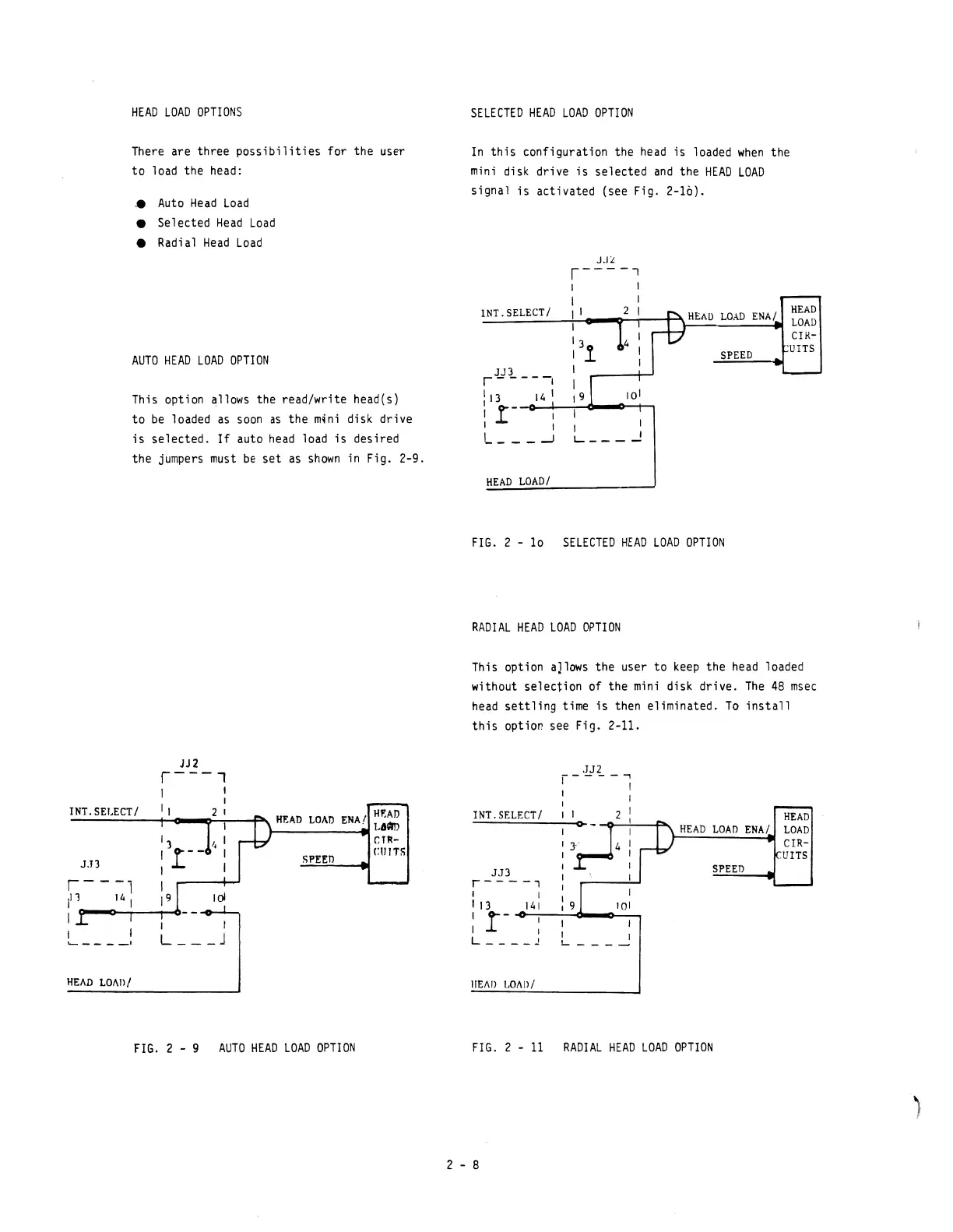
There are three
possibilities
for the user
to
load the head:
.•
Auto
Head
Load
Selected
Head
Load
Radial
Head
Load
AUTO
HEAD
LOAD
OPTION
This option allows the read/write head(s)
to
be
loaded
as
soon
as
the
m~ni
disk drive
is
selected.
If
auto
head
load
is
desired
the jumpers
must
be
set
as
shown
in Fig. 2-9.
INT.SELECT/
11
J.TJ
SPEEO
1 I
1
'--
- -
__
I
L
___
J
HEAD
LOAn!
FIG.
2 - 9
AUTO
HEAD
LOAD
OPTION
SELECTED
HEAD
LOAD
OPTION
In
this
configuration the
head
is
loaded
when
the
mini
disk drive
is
selected
and
the
HEAD
LOAD
signal
is
activated (see Fig. 2-10).
INT.SELECT!
HEAD
LOAD
ENA!
SPEED
r
J
..
n
--
--,
1 13 14 1
, -
-o-~";",,,.o.---tI
: .t I
L
___
-'
HEAD
LOAD!
FIG.
2 -
10
SELECTED
HEAD
LOAD
OPTION
RADIAL
HEAD
LOAD
OPTION
This option aJlows the user
to
keep
the
head
loaded
without
selection
of the
mini
disk drive.
The
48
msec
head
settling
time
is
then eliminated.
To
install
this
option see Fig.
2-11
.
.JJ2
I----~
: I
INT.SELECTI
I 1 2 I
JJ3
r----'
,
1
13
:
r-
,
141
I
I
L
____
~
IIEAIl
LOI\D/
C>-
-
~---:--F'"
101
L
___
~
HEAD
HEAD
LOAD
ENA!
LOAD
CIR-
.VITS
SPEED
FIG.
2 -
11
RADIAL
HEAD
LOAD
OPTION
2 - 8

Other manuals for BASF 6106