9.2 Faults without error messages
Faults and malfunctions that cannot be displayed as well as possible causes and
their error source can be identied using the following table. If you cannot remedy
the fault using the description below, contact the supplier or installer.
Problem Possible causes Measures
Display does not
function
12V mains voltage not ◼
available
Switch on or connect
controller
Check the connection's
main fuse
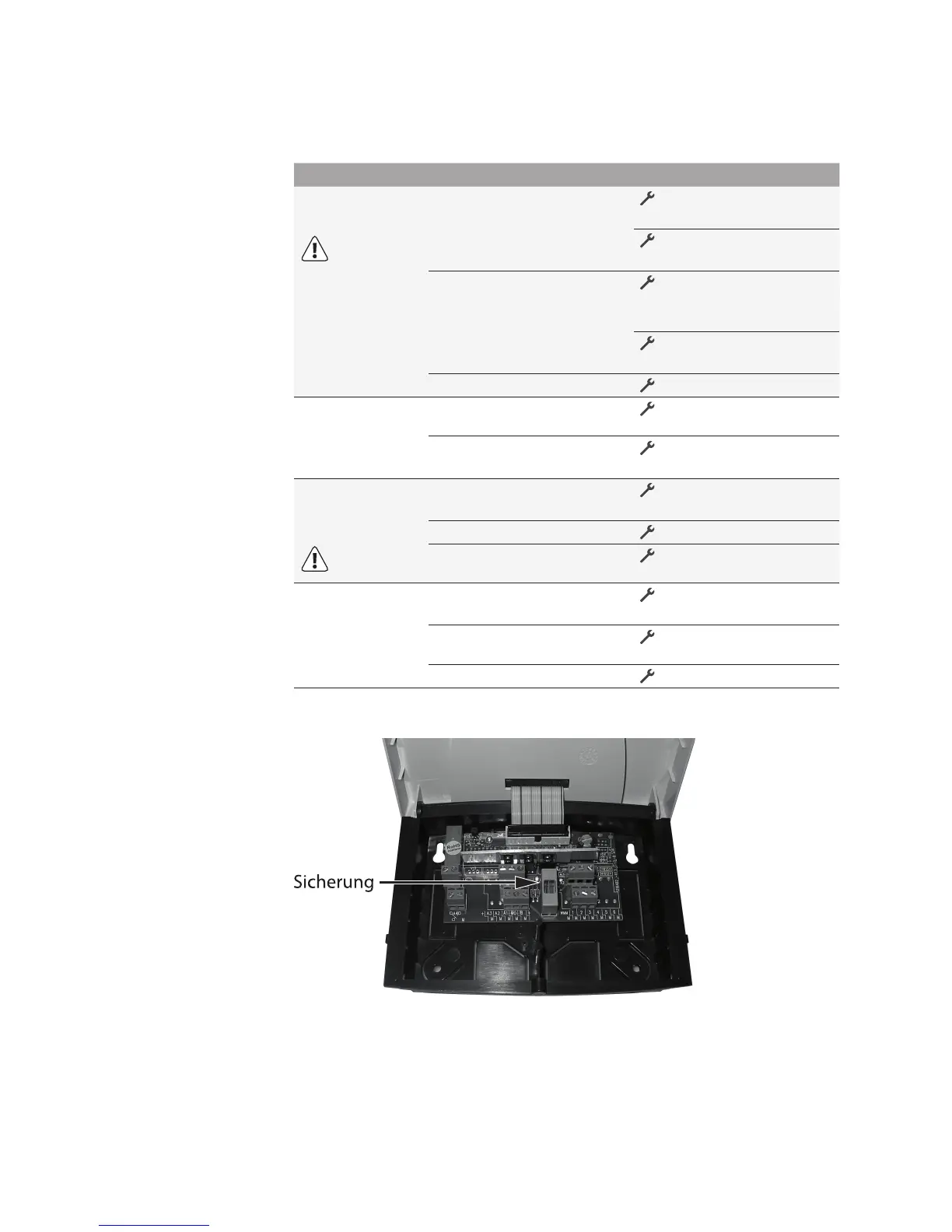
Defective fuse inside the ◼
device
Check the fuse*,
replace with a new type
2A/T, if necessary.
Check the 12V compo- Check the 12V compo-Check the 12V compo-
nents for short-circuits
Defect device ◼
Contact the supplier
Outputs are not
switched on
Controller is in manual ◼
operation
Exit "Manual" operation.
Switch-on condition is not ◼
satised.
Wait until switch-on
condition is satised.
"Pump" symbol
rotates, but the
pump is not on
Connection to the pump ◼
interrupted.
Check the cable leading
to the pump
Pump is blocked. ◼
Free the pump
No voltage present at the ◼
switching output.
Contact the supplier.
Temperature
display strongly
uctuates at short
intervals
Sensor cables are installed ◼
near the 230V cables
Relocate sensor cables,
shield sensor cables
Long sensor cables ex- ◼
tended without shielding
Shield sensor cables
Defect device ◼
Contact the supplier


 To Next Page