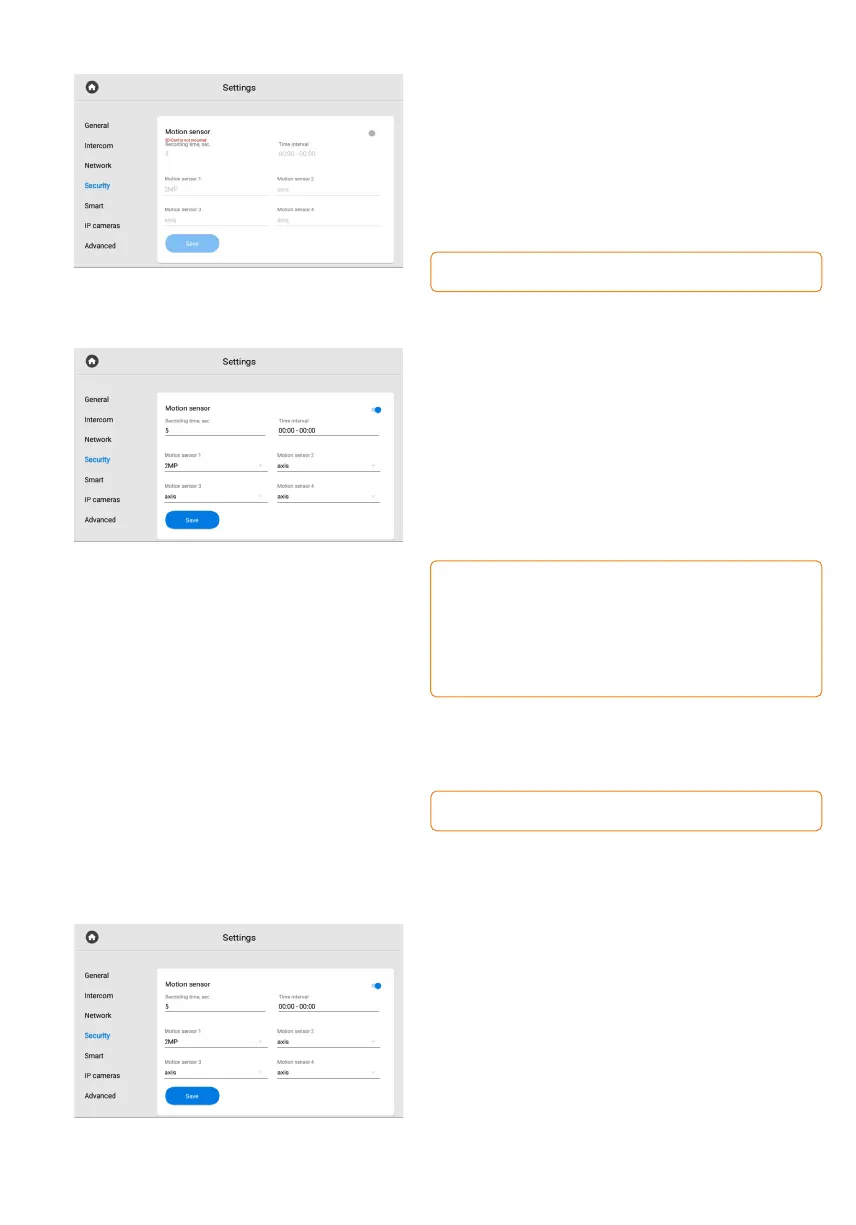
Motion detection
Motion detection is the feature of recording
video from the specified camera when the motion
sensor is triggered.
You can enable / disable and configure the feature
in this section and in the web interface.
The feature requires connected motion sensors (up to 4)
and an SD card.
How to configure motion detection
via the monitor
• Open the Security menu of the Monitor settings.
Go to the Motion detection section.•
Enable the feature.•
Set the duration of the video recording•
in the Recording time field.
Set time interval when the sensor will work.•
If the start time of the sensor coincides with its end, the sensor
will work around the clock (00:00-00:00).
If the normal sensor type is selected, then for this feature
the sensor will work only when the alarm is turned on.
The sensor will work 24 hours a day if 24-hour sensor mode
is selected.
• Select one or more cameras (from the list
of added IP cameras) for video recording
in the Motion sensor 1 - Motion sensor 4 fields.
For correct functioning, the number of selected cameras must
match the number of connected sensors.
• Save settings.
Notification will be displayed near
the call icon on the main screen,
and you can watch the recorded video
in the corresponding section of the
Call menu.
User password
In this tab, you can change the user password.
To do it:
Enter the current (previous) password.•
Create a new password and enter it in the•
appropriate field.
Confirm the new password by re-entering.•
Save changes.•



 To Next Page