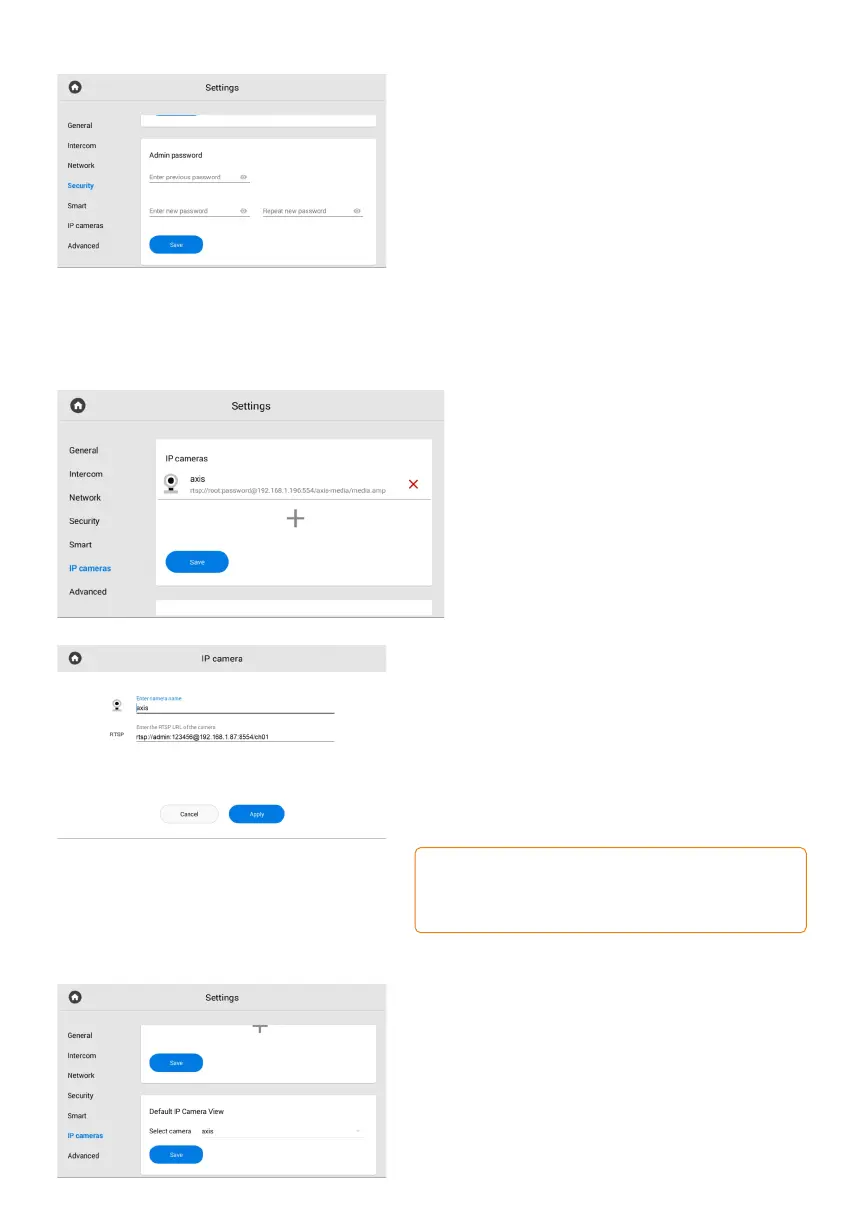
Admin password
In this section, you can change the administrator
password that is used to enter the web interface
and monitor settings.
To do it:
Enter the current (previous) password.•
Create a new password and enter it in the•
appropriate field.
Confirm the new password by re-entering.•
Save changes.•
In this menu, you can add IP cameras
for their stream monitoring.
It’s possible to add from 1 to 32 cameras.
IP camera settings menu
How to add an IP camera using a monitor
• Open the Settings menu.
Go to the IP cameras tab.•
Press plus icon at the end of the list. •
Enter the name of the camera.•
Enter the RTSP URL of the camera stream.•
It is usually indicated in the installation
instructions with the camera.
Example of the URL for RTSP stream:
rtsp://admin:123456@192.168.1.87:8554/ch01. It includes
the username (admin), user password (123456), panel IP
(192.168.1.87); a number of a camera access port (8554);
channel number (ch01).
• After entering the required data, press Apply.
Default IP camera view
Here you can select the camera that will be
displayed first when opening the IP cameras
viewing menu.



 To Next Page