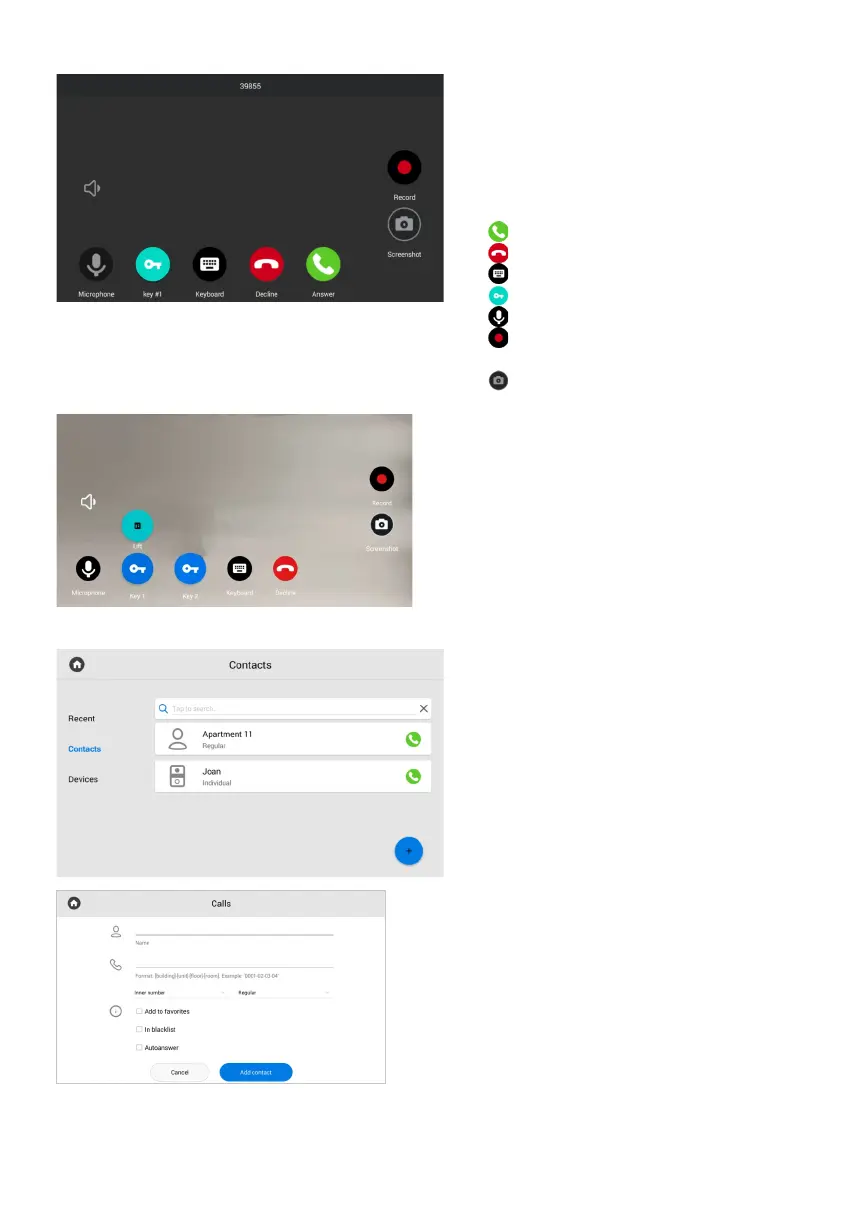
If the EVRC-IP is installed in your house,
you can call the elevator from the monitor
during the conversation between the monitor
and the panel.
If you hold lock Key 1/Key 2, the elevator call
button will appear. The elevator will be called
to the floor where the panel is installed
to move up / down;
During the incoming call, the following
screen will be displayed this screen.
Icons meaning:
- to answer a call;•
- to decline a call/end a conversation;•
- to open the keyboard;•
- to open the lock/s; •
- to turn on / off the microphone;•
- to record the video of the•
conversation;
- to take a photo of the screen.•
Call display
For quick access, you can save up to
10,000 contacts. They can be inner
numbers of panels, concierges, another
monitors or SIP number of any device.
You can add contacts in this monitor
menu or in the web interface.
Contacts
• Open the Call menu and go to the Contacts tab.
Press plus icon in the left low corner.•
Enter contact name.•
Specify number type: inner or SIP (required•
for entering a number in the correct format).
Select device type: multi-apartment panel,•
individual panel, or regular device (monitor
or any other device). This data is also necessary
for the correctcontact display in various
sections of the monitor.
Enter a number in the corresponding format.•
Press Add contact after entering all data. •
How to add contact via a monitor:



 To Next Page