16-4 9469200995
BESTCOMSPlus Settings Loader Tool DGC-2020ES
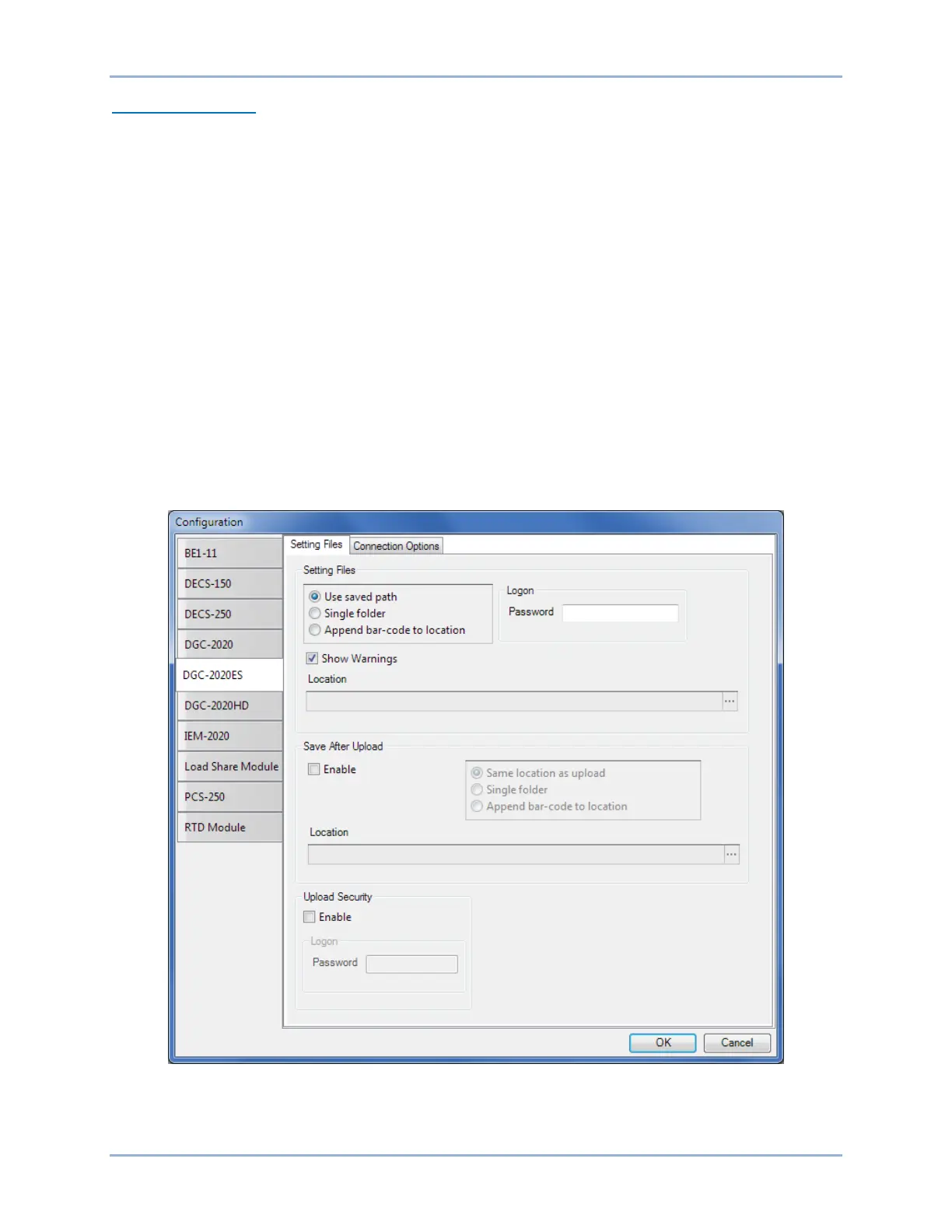
Setting Files Options
Use Saved Path: When enabled, the path specified in the Loader Grid entry is used when uploading the
settings file.
Single Folder: When enabled, this specifies a single folder which contains all settings files for the
product. The Windows filename specified in the Location field of the Loader Grid entry is searched for in
the Single Folder location. For example, all settings files for a product are located in “C:\files”. The
Location field in the Loader Grid entry for a device contains “C:\documents\settings\DGC-2020ES
Settings.bstx”. The BESTCOMSPlus Settings Loader Tool searches in “C:\files” for the file named “DGC-
2020ES Settings.bstx”.
Append Bar-Code to Location: When enabled, the bar code is appended to the specified location when
uploading the settings file. For example, an entry with the bar code “0002” is located in C:\files\0002 and
an entry with the bar code “0003” is located in C:\files\0003.
Logon: If User Name and Password are specified, you will not be prompted for credentials when
required.
Save After Upload: After uploading a settings file, the settings are downloaded from the connected
device and saved to the specified location, when enabled.
Upload Security: When enabled, the security settings stored in the settings file are uploaded to the
device. Credentials will be requested if not already specified.
Figure 16-3 illustrates the Setting Files tab.
Figure 16-3. Configuration, Settings Files Tab



 To Next Page