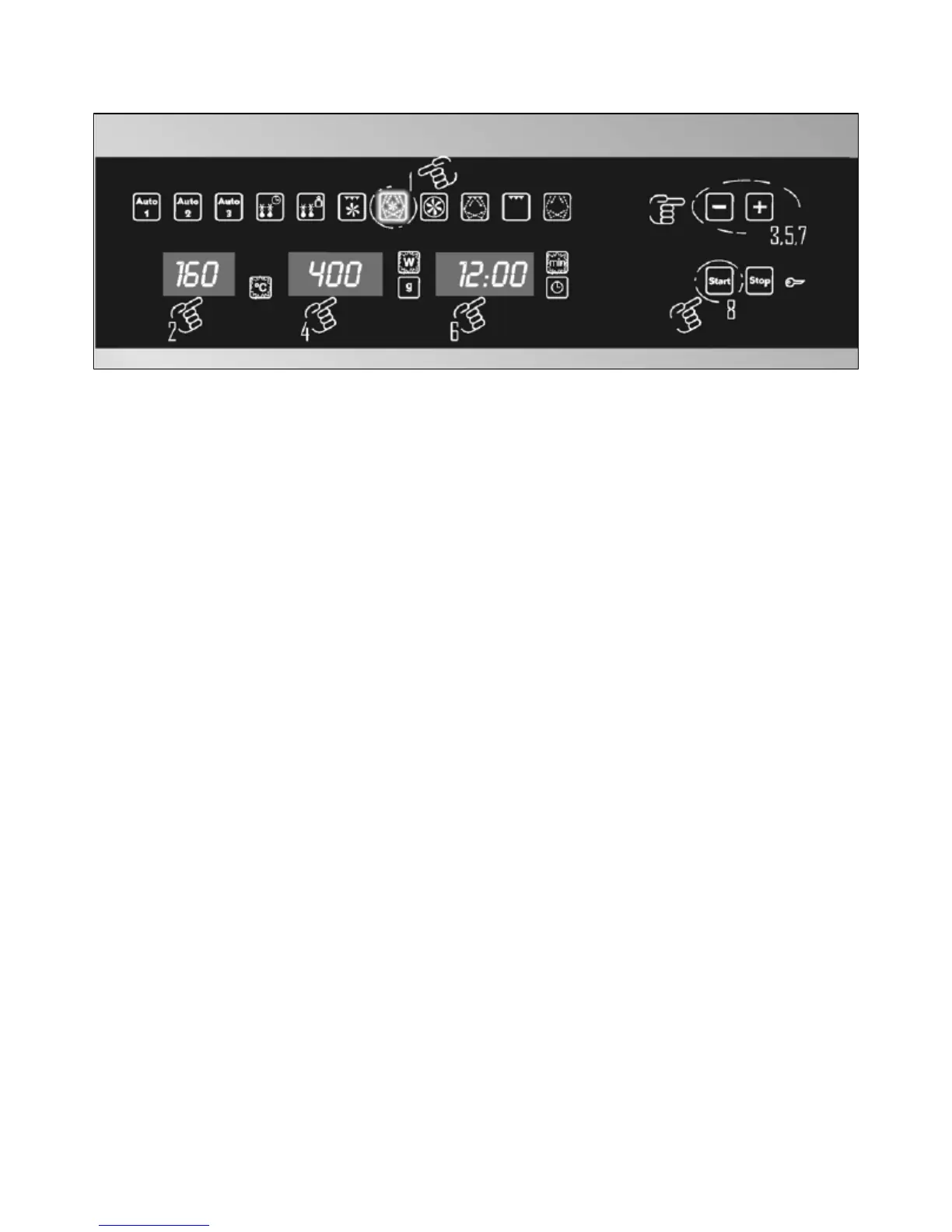
Hot air + microwave function
Use this function to bake and roast.
o Open the door of the appliance.
o Press the hot air + microwave function button.
o The appliance will automatically select a temperature of 160°,
the centigrade indicator will light.
o To adjust the temperature, press the temperature button/display
(C). Use the plus and minus buttons to adjust the temperature.
o The appliance will automatically select a power level of 600 W.
IMPORTANT: 600 W is the maximum power level that can be
set on the hot air + microwave function.
o To adjust the power level, press the power button/display (E),
the watts indicator will light. Use the plus and minus buttons to
adjust the power level.
o Press the cook time button button/display (G), the cook time
indicator will flash. Use the plus and minus buttons to adjust the
cooking time.
o Press the start button (I) and the oven will start cooking.
During operation
o If you press the stop button (I) then the production of
microwaves will cease automatically.
o The timer will stop and the cook time button/display (G) will
continue to show the remaining cooking time.
21






 To Next Page