Parameter menu point L - AttitudeControl mode
AttitudeControl can be used to level the helicopter automatically by the ip of a switch. This provides dierent applications
i.e. to use as bail out rescue in case the pilot looses orientation, to have a training aid for learning new ight maneuvers or to
use as stabilization for camera ights. At Parameter menu point L you can choose between dierent operation modes and
applications that determine how the helicopter will be stabilized exactly when activating AttitudeControl in ight. Please see
the instruction manual for further reference. For the beginning we recommend using the „Rescue mode with pitch control“.
If using the tail gyro control channel also for AttitudeControl the amount of throw determines as usual the height of gyro gain
when switched into direction „AttitudeControl o“. Moving the channel by using a switch into the other direction the amount
of tail gyro gain will be stored temporarily and AttitudeControl is activated. The amount of throw into this direction determines
the height of AttitudeControl gain.
When using AttitudeControl with combined switch channel make sure AttitudeControl is at least deactivated once
before take o. Otherwise the tail gyro gain would be minimal as the system would not yet have been able to determine
your tail gain setting after initialization.
With this type of operation it is absolutely necessary to use a switch that changes the control directions directly and
without intermediate steps. In particular, do not use a slider or delay function for switching the gain channel on the
transmitter! Otherwise, when you activate AttitudeControl the tail gyro sensitivity would be decreased to 0% at rst before
the system turns on the AttitudeControl. You would have 0% of tail gyro gain when AttitudeControl is active as the system
stores the last valid tail gyro value!
N
M
L
K
J
I
H
G
F
E
D
C
B
HeadingLock-Mode
(Status LED: blue)
AttitudeControl o
(Status LED: red)
B
C
D
E
F
G
H
I
J
K
L
M
N
-100% +100%0%
Channel for tail gyro
and AttitudeControl
AttitudeControl on
(Status LED: red)
A
Menu LED
(= gain)
Functional test of AttitudeControl
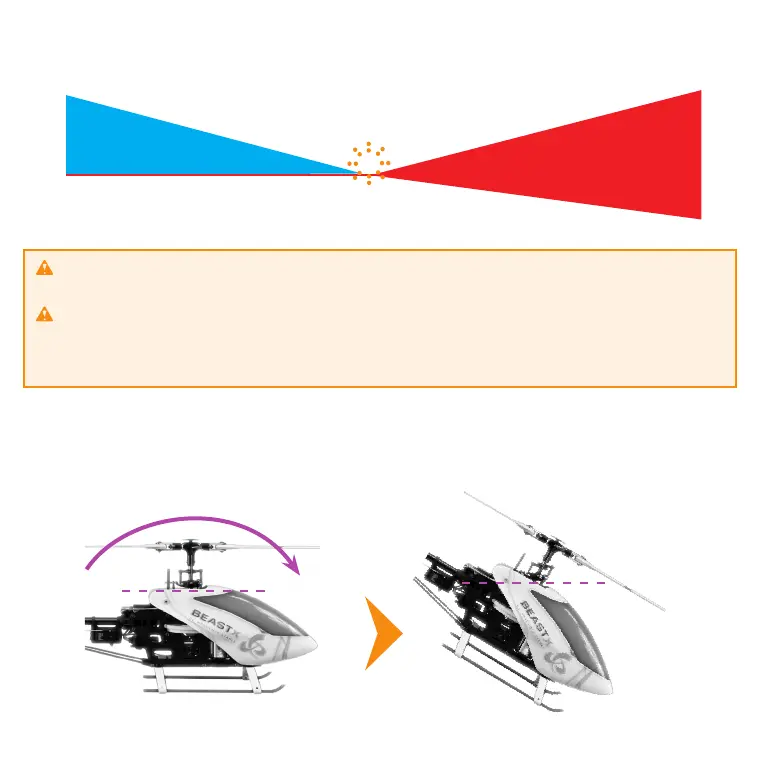
When activating AttitudeControl you should be able to see an immediate impact on the swashplate control: If the heli is tilted to one
side, MICROBEAST PLUS permanently steers the swashplate opposed to the inclination. In the region around horizontal position the
swashplate will always stay nearly horizontal to the ground. The system constantly tries to bring the helicopter back to the horizontal
position as long as the helicopter is oblique.
Tilt the helicopter forwards, backwards or to the side
The system will try to level the helicopter
by keeping the swashplate horizontal
or moving it against rotation
as long as the helicopter
is tilted.
If on the other hand AttitudeControl is deactivated the system will only counteract sudden movements but will not control
the swashplate as long the heli is not moved even in tilted position.


 To Next Page
 Loading...

