fr
en
de
nl
47
FUNCTION
(Only if the operating device has been removed. To be carried out by qualied
staff only!)
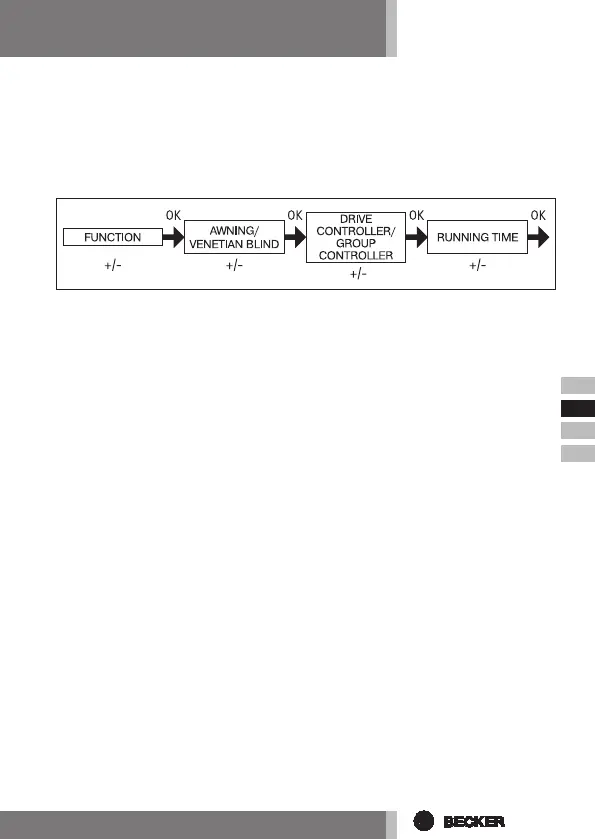
AWNING/VENETIAN BLIND, DRIVE CONTROLLER/ GROUP CONTROLLER,
RUNNING TIME
(Awning/venetian blind selection, drive controller/group controller selection,
awning/venetian blind running time)
1. Press the MENU button.
2. To select the FUNCTION menu press the + button
until FUNCTION appears.
3. Press OK to conrm. AWNING/VENETIAN BLIND appears.
4. Use the +/- button to choose between awning/venetian blind.
5. Press OK to conrm.
DRIVE CONTROLLER/GROUP CONTROLLER appears.
6. Use the +/- button to select the desired control device (DRIVE CONTROL-
LER/GROUP CONTROLLER).
7. Press OK to conrm. RUNNING TIME appears.
8. Use the +/- button to set the required running time. (Pre-setting: 120 sec-
onds for awnings and 180 seconds for venetian blinds).
9. Press OK to conrm.
10. The RUNNING TIME function is now set.
11. For further programming options in the FUNCTION refer to the next section.


 To Next Page