48
Assembly and Operating Instructions
FUNCTION
(Only if the operating device has been removed. To be carried out by qualied
staff only!)
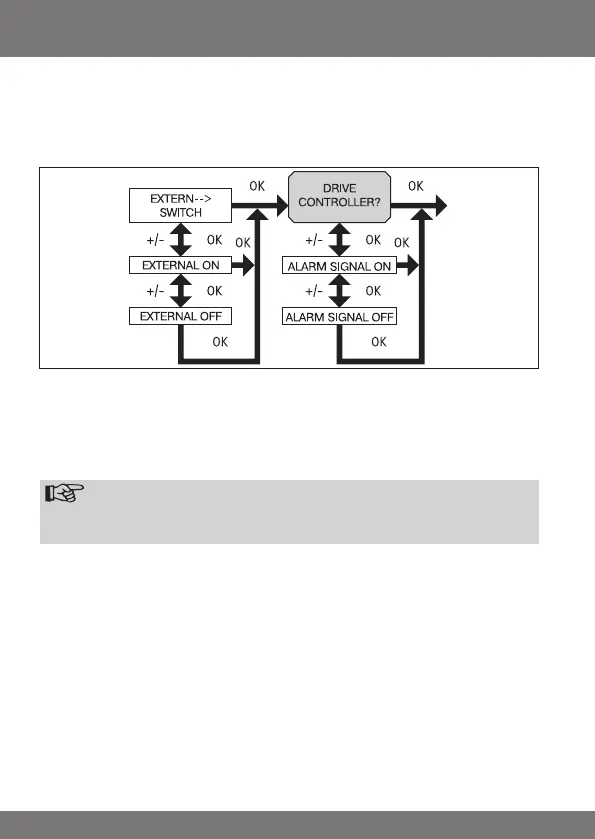
EXTERNAL ON/OFF/SWITCH, ALARM SIGNAL ON/OFF
(Processing external signals, processing alarm signals)
1. You have conrmed the RUNNING TIME function. EXTERNAL SWITCH ap-
pears. (EXTERNAL SWITCH/ON/OFF refers to external control signals. The
factory setting is EXTERNAL SWITCH)
2. Use the +/- button to select the desired setting for the control
inputs.
3. Press OK to conrm your selection.
Note
Thefollowingdialogue eld willonly be displayedwhenDRIVE CON-
TROLLERhasbeenselected.
4. ALARM SIGNAL ON appears. (ALARM SIGNAL ON is the factory setting)
5. Use the +/- button to set ALARM SIGNAL to ON or OFF as desired. Press OK
to conrm.
6. The ALARM SIGNAL ON/OFF function is now set.
7. For further programming options in the FUNCTION menu refer to the next
section.



 To Next Page