Need help?
Do you have a question about the Beckhoff CP6201 and is the answer not in the manual?
Essential safety precautions for operating and handling the Industrial PC.
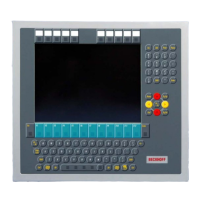
Specifies the intended industrial applications for the Panel PC.
Details on Fieldbus, Serial, DVI, USB, Network, and other interfaces.
Steps and considerations for mounting the Panel PC inside a control cabinet.
Step-by-step guide on how to physically mount the Panel PC using clamping levers.
Instructions for connecting the 24 VDC power supply and optional UPS.
Details the pin configuration for the 8-pole power and control connector.
Guidance on fitting cables and assembling connectors for power and control signals.
Specifies minimum cable cross-sections (1.5 mm²) for power supply connections.
Schematic illustrating the external switch and power supply connections.
Detailed instructions for safely switching the Industrial PC on and off.
Table of common faults, their causes, and recommended correction procedures.
 General
| Brand | Beckhoff |
|---|---|
| Model | CP6201 |
| Category | Industrial PC |
| Language | English |


 To Next Page