6
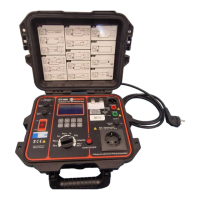
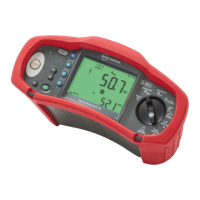
Number Measurement Function
1
Starts the selected test. The TEST key is surrounded by a “touch pad”. The touch
pad measures the potential between the operator and the tester’s PE terminal.
If you exceed a 100 V threshold, the
W symbol above the touch pad is illuminated.
2 Set RCD variable trip current.
3 Illuminates when > 100 V is detected on the touch pad.
4 Zero the test lead resistance offset.
5 Turns the backlight on and off.
6
Turns the tester on and off. The tester will also shut off automatically if there is
no activity for 10 minutes.
7
• Loop input select (L-N, L-PE).
• Voltage input select (L-N, L-PE, N-PE).
• Insulation test: (L-N, L-PE, N-PE)
• RCD current rating (10, 30, 100, 300, 500, 1000 mA or VAR).
8 RCD Current multiplier (x1/2, x1, x5, AUTO).
9
• Select RCD: Type AC (sinusoidal), Type AC Selective, Type A (half-wave), Type A
Selective.
• Battery test.
• Loop No Trip R
E
/ I
K
10
• RCD test polarity (0, 180 degrees).
• Insulation test voltage (250, 500, or 1000 V).
11 Volts.
12 Insulation resistance.
13 Continuity.
14 Loop impedance — No trip mode.
15 Loop impedance — Hi current trip mode.
16 RCD tripping time.
17 RCD tripping level.
18 Phase rotation.
19 Rotary switch.


 To Next Page