EasyManua.ls Logo

Behringer DIGITAL MULTI-FX - User Manual

Behringer DIGITAL MULTI-FX
2 pages
Print Icon
To Next Page IconTo Next Page
Loading...
FX Function PAR 1 control
Chorus Eects speed
Flanger Eects speed
Phaser Eects speed
Delay Delay time
Tremolo Eects speed
Pitch Shifter
Detune
(slight shifting for fatter sound)
FX Function PAR 2 control
Chorus Eects depth
Flanger Eects depth
Phaser Eects depth
Delay Delay feedback
Tremolo Shape (LFO waveform)
Pitch Shifter Semi tone (pitch interval)
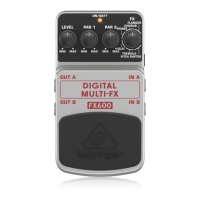
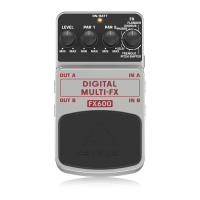
DIGITAL MULTI-FX FX600
Digital Stereo Multi-Eects Pedal
Thank you for showing your condence in us by purchasing the BEHRINGER DIGITAL MULTI-FX FX600.
This ultimate digital multi-eects pedal delivers 24-bit high-resolution stereo eects including Flanger,
Chorus, Phaser, Delay, Tremolo and Pitch Shifter. Thanks to its extensive tone control plus additional multi-
functional parameter adjustment you’ll have plenty of cool sounds at your disposal to handle every situation.
1. Controls
(1) The LEVEL control adjusts the output level.
(2) and (3) The PAR 1 and 2 controls have dierent functions depending on the chosen eect.
(1)
(4)
(6)
(8) (7)
(5)
(2) (3)
(4) The FX control lets you chose between six dierent modulation eects:
CHORUS: This eect slightly detunes the original signal. A very pleasant detune eect is created in
connection with the pitch variation.
FLANGER: Originally, the anger eect was generated with two tape recorders running
synchronously. The same audio signal was recorded on both machines. If you put a nger on
the left spool of one of the machines, the spool and the playback speed are slowed down.
The generated delay results in phase shifting of the signals.
PHASER: With the phaser, a second, phase-shifted signal is added to the original audio signal.
The resulting sound is thicker and above all livelier.
PITCH SHIFTER: The pitch shifter slightly detunes the audio signal.
TREMOLO: The tremolo eect is achieved by periodic modulation of the input signal level. This results
in a continuous change from low to high level that lends a quivering, tremulous sound character.
DELAY: A delay of the input signal with various repetitions.
(5) The ON/BATT LED illuminates when the eect is activated. It also serves as a battery level indicator.
(6) Use the footswitch to activate/deactivate the eect.
(7) Use the two ¼" TS connectors IN A and IN B to plug in a stereo input signal. For mono use just
plug in IN A.

Question and Answer IconNeed help?

Do you have a question about the Behringer DIGITAL MULTI-FX and is the answer not in the manual?

Summary

Controls Overview

LEVEL Control

Adjusts the output level of the audio signal.

PAR 1 and PAR 2 Controls

Dual parameter controls with functions dependent on the selected effect.

FX Effect Selection

Chooses between six different modulation effects like Chorus, Flanger, and Delay.

Operational Indicators and Connectors

Features ON/BATT LED, footswitch, and stereo input connectors.

Safety Instructions

Warranty Information

Technical Specifications

Input and Output Specifications

Details connector types (1/4" TS) and impedance for inputs/outputs.

Power Supply and Consumption

Specifies requirements for AC adapter and battery, plus power draw.

Physical Dimensions and Weight

Provides physical measurements and weight of the FX600 pedal.

Overview

The BEHRINGER DIGITAL MULTI-FX FX600 is a digital stereo multi-effects pedal designed to provide a wide range of high-resolution audio effects for musicians. This pedal delivers 24-bit processing for its effects, ensuring high-quality sound.

Function Description:

The FX600 offers six distinct modulation effects: Chorus, Flanger, Phaser, Delay, Tremolo, and Pitch Shifter. Each effect can be extensively customized using the pedal's controls.

  • Chorus: This effect slightly detunes the original signal, creating a pleasant detune effect in conjunction with pitch variation.
  • Flanger: Originally achieved with two synchronized tape recorders, the flanger effect creates phase shifting of signals by subtly slowing down one of the audio streams.
  • Phaser: A second, phase-shifted signal is added to the original audio, resulting in a thicker and more lively sound.
  • Delay: This effect introduces a delay of the input signal with various repetitions, allowing for echo and rhythmic effects.
  • Tremolo: The tremolo effect is produced by periodically modulating the input signal level, leading to a continuous change from low to high level that creates a quivering, tremulous sound character.
  • Pitch Shifter: This effect slightly detunes the audio signal, which can be used to create a fatter sound or subtle pitch intervals.

Important Technical Specifications:

  • Effects: 24-bit high-resolution stereo effects (Flanger, Chorus, Phaser, Delay, Tremolo, Pitch Shifter).
  • Input Connectors: Two 1/4" TS connectors (IN A and IN B) for stereo input. For mono use, only IN A is required.
    • IN A Impedance: 500 kΩ (stereo), 250 kΩ (mono)
    • IN B Impedance: 500 kΩ
  • Output Connectors: Two 1/4" TS connectors (OUT A and OUT B) for stereo output. For mono use, only OUT A is required.
    • OUT A Impedance: 1 kΩ
    • OUT B Impedance: 1 kΩ
  • Power Supply:
    • External: 9 V DC (not included), 2 mm DC jack, negative center.
    • Internal: 9 V type 6LR61 battery.
  • Power Consumption: 130 mA.
  • Dimensions (H x W x D): Approximately 2 1/8" x 2 3/4" x 4 4/5" (54 x 70 x 123 mm).
  • Weight: Approximately 0.73 lbs (0.33 kg).

Usage Features:

  • Controls:
    • LEVEL: Adjusts the overall output level of the effect.
    • PAR 1 & PAR 2: These controls have different functions depending on the selected effect, allowing for detailed parameter adjustment.
      • Chorus: PAR 1 controls effects speed, PAR 2 controls effects depth.
      • Flanger: PAR 1 controls effects speed, PAR 2 controls effects depth.
      • Phaser: PAR 1 controls effects speed, PAR 2 controls effects depth.
      • Delay: PAR 1 controls delay time, PAR 2 controls delay feedback.
      • Tremolo: PAR 1 controls effects speed, PAR 2 controls shape (LFO waveform).
      • Pitch Shifter: PAR 1 controls detune (slight shifting for fatter sound), PAR 2 controls semi tone (pitch interval).
    • FX Control: A rotary switch that allows the user to select one of the six available effects (Chorus, Flanger, Phaser, Delay, Tremolo, Pitch Shifter).
  • Footswitch: Used to activate or deactivate the effect.
  • ON/BATT LED: This indicator illuminates when the effect is active and also serves as a battery level indicator.
  • Stereo/Mono Operation: The pedal supports both stereo and mono input/output signals. For mono, only IN A and OUT A are needed. For stereo, both IN A/B and OUT A/B should be used.
  • Power Activation: The FX600 does not have a dedicated on/off switch. It automatically powers on when a jack is inserted into an input connector (IN A or IN B). To conserve battery life, it is crucial to remove the jack from the input connector when the pedal is not in use.

Maintenance Features:

  • Battery Compartment: Located underneath the pedal cover. To access it for installation or replacement of the 9 V battery, press the hinges with a ballpen and remove the cover. Care should be taken not to scratch the unit during this process.
  • Power Supply: The pedal can be powered by an optional 9 V DC power supply via the DC IN connection at the front.
  • Servicing: The manufacturer advises against servicing the product yourself. For any servicing or repairs, especially if the power supply cord or plug is damaged, contact qualified servicing personnel.
  • Safety Instructions: Do not use the device near water or heat sources. Only use authorized attachments/accessories.

Behringer DIGITAL MULTI-FX Specifications

General IconGeneral
BrandBehringer
ModelDIGITAL MULTI-FX
CategoryMusic Pedal
LanguageEnglish

Related product manuals