To summarize, the image/CODESYS runtime can be updated in the following ways:
Update method iX Developer project deleted by
updating
IP address reset by updating
USB No No
SD No No
Ethernet No No
Recovery SD card
1
Yes Yes
1
Only available for image update.
4.1. Update the Image Using USB or SD Card
Do the following:
1. Download your image from Beijer Electronics SmartStore.
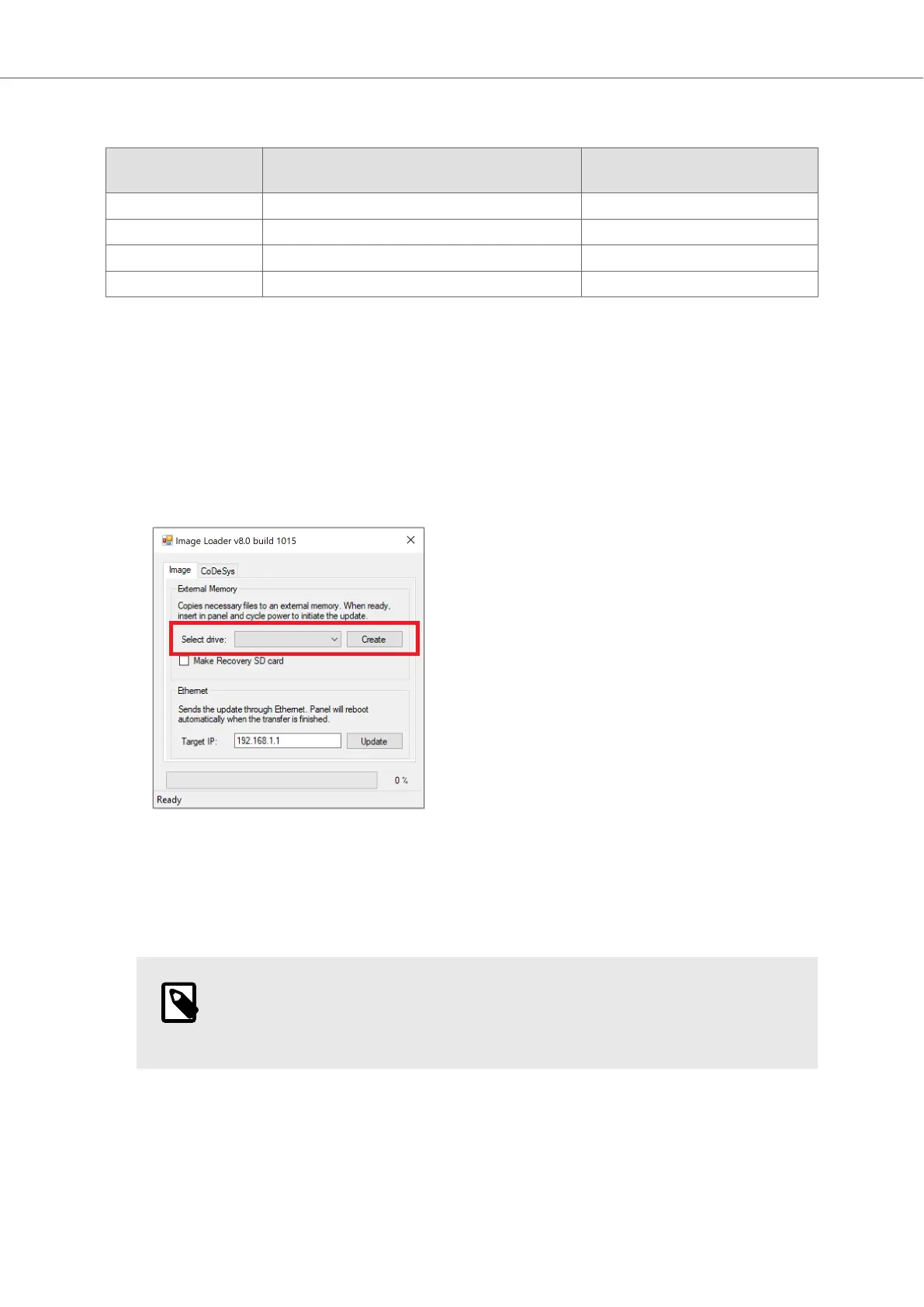
2. Unzip the downloaded file and start the Image Loader application.
3. Connect a USB flash drive or SD card to the computer.
4. In Select drive:, choose the connected USB flash drive or SD card.
5. Click Create.
6. When finished, eject the USB flash drive or SD card.
7. Connect the USB flash drive or SD card to the BoX2 device and power up the device.
8. Wait until red LED indication starts flashing fast and eject the USB flash drive or SD card.
NOTE
Make sure to eject the USB/SD card. Otherwise, the device will try to update
again during next boot up.
9. The device automatically reboots.
10. Wait until the LED shows a blue status light, or purple on/off every 0.5 seconds (if no iX or
CODESYS project is installed).
The update is now completed.
Image and CODESYS Runtime Update
Beijer Electronics, MAEN363 15 2023-06



 To Next Page