4.2. Update the Image Over Ethernet
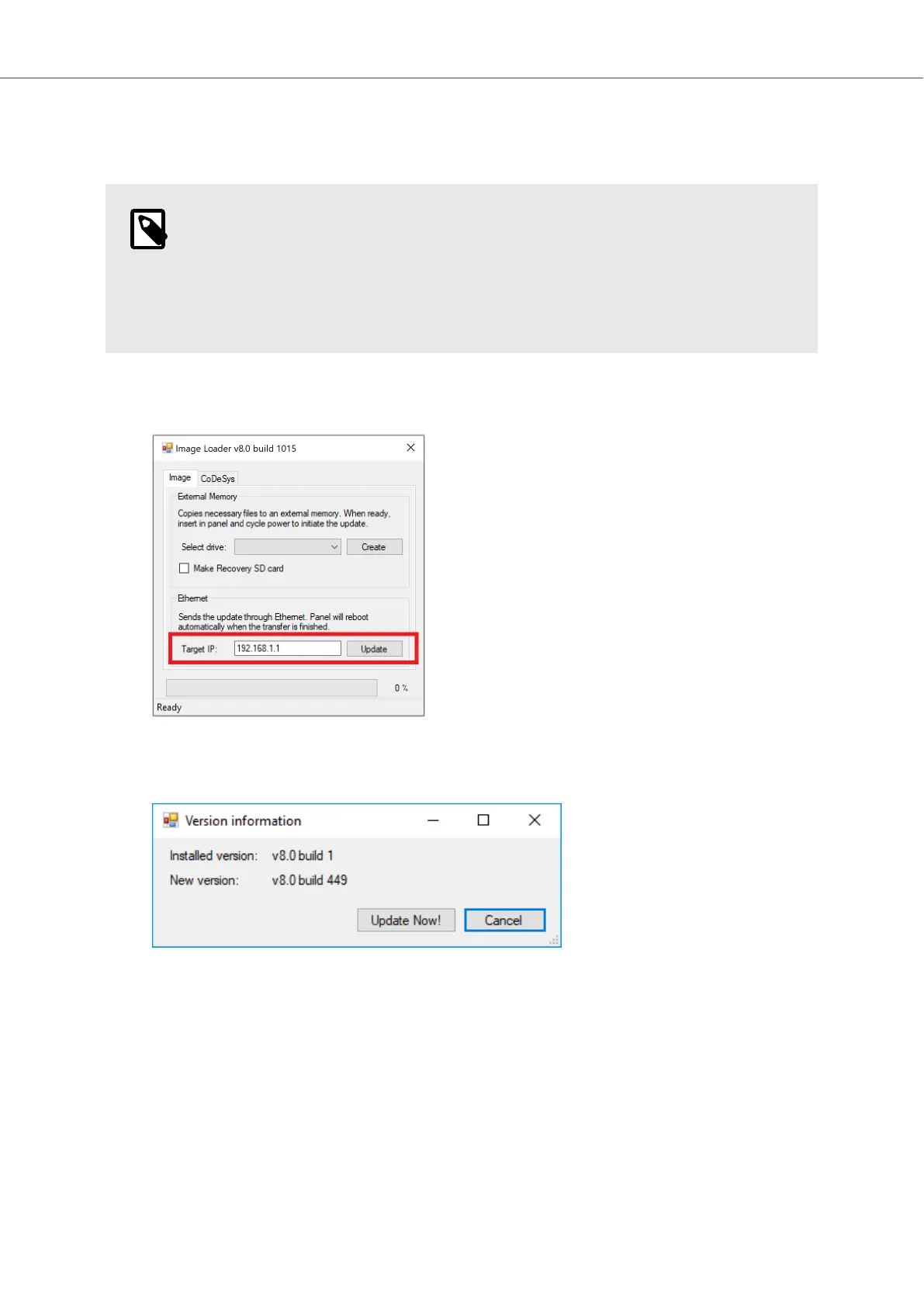
The Image Loader utility can be used to update the image over Ethernet.
NOTE
Before trying to update the image over Ethernet, make sure that your PC is on the
same IP-subnet as the BoX2 device. If your device has an IP address of 192.168.1.1,
and a subnet mask of 255.255.255.0, then your PC must have an IP address in the
range of 192.168.1.2 – 192.168.1.254 and a subnet mask of 255.255.255.0, in order
to communicate with the device.
Do the following:
1. Enter the device Target IP address in the dialog and click on Update to start the update.
2. The dialog shows the current installed image and the new image that the device will be updated
to. Click on Update Now! to confirm the start of the update.
3. A progress bar shows the update transfer status. When the transfer is done, the device will
reboot.
4. Wait until the LED shows a blue status light, or purple on/off every 0.5 seconds (if no iX or
CODESYS project is installed).
The update is now completed.
Image and CODESYS Runtime Update
2023-06 16 Beijer Electronics, MAEN363



 To Next Page