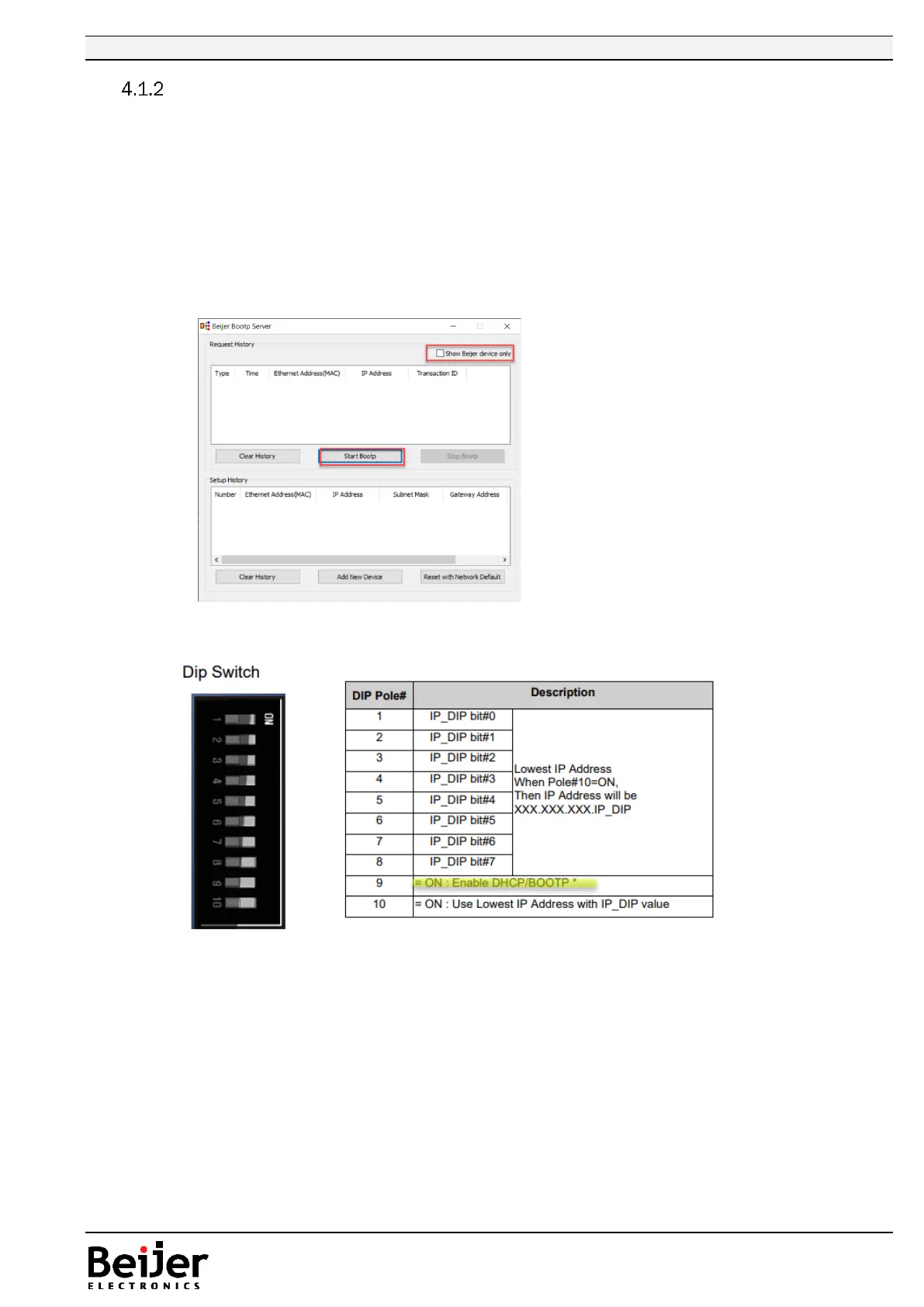
Use BOOTP server when IP address is unknown, method 2
1. Connect the PC with the GL-9089/GN-9289 over Ethernet.
2. Set a fixed IP address on the PC, same subnet as the GL-9089/GN-9289 is to be changed to. The
IP address for the PC should not be assigned automatically (DHCP). Se section 4.2. part 1.
3. Always use the latest version of the Beijer BOOTP server included in IOGuidePro or extracted
tool.
4. Run IOGuidePro and select menu Tools > Bootp Server, or start the BOOTP tool from folder. /
Alternative run the Bootp server separately (BootpSvr.exe).
5. When the BootP Server is launched and to allow M-series device in present version of
IOGuidePro, make sure that ”Show Beijer device only” is unchecked!
6. Press “Start Bootp”.
7. Power OFF the GL-9089/GN-9289 and set DIP switch 9 to ON (BOOTP).


 To Next Page